
How to clean a list before you send: role inboxes, competitors and wrong titles
A short checklist to remove the contacts that waste sends or hurt your reputation, before you email anyone.
Every row you send to has a cost. A wrong title wastes an email. A competitor sees your pitch. A shared inbox can mean nobody ever reads it. A quick clean-up before you send avoids all three.
It takes about 20 minutes for a list of a few hundred contacts.
Step 1: Exclude the wrong titles in the search
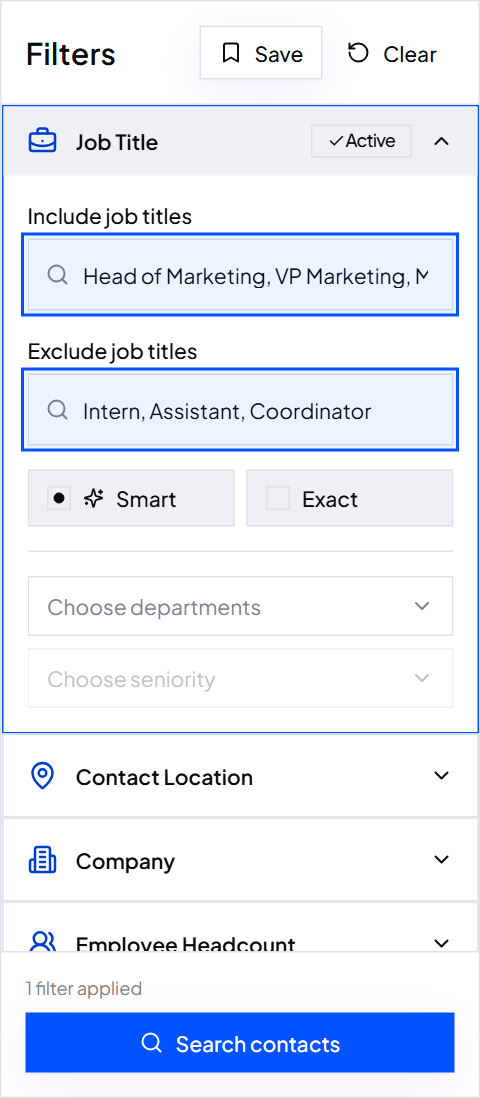
The cheapest fix is before you export. Add the titles you don't want to Exclude job titles, such as Intern, Assistant, Student and Coordinator.
Step 2: Exclude companies that only look right
Some companies match your size and industry but never buy, like agencies or consultancies when you sell to in-house teams. Add words they use about themselves, such as “consulting” or “agency”, to the Keywords exclude box.
ContactYard excludes by keyword and job title. It can't exclude a named company, so handle those in the next step.
Step 3: Remove competitors and current customers
After you export, make a second sheet with the websites of competitors, current customers and anyone you've been asked not to contact. Then mark every row in your list whose Website appears on that sheet and delete them.
=IF(COUNTIF(DoNotContact!A:A, B2)>0, "remove", "keep")
Step 4: Look for shared inboxes
ContactYard lists named people, not shared inboxes. Still, check any list that includes files you imported yourself. Sort the Email column and look for info@, sales@, support@, admin@, hello@ and contact@. Delete them.
Step 5: Read 25 random rows
Totals don't tell you quality. Pick 25 rows at random and ask of each: is this the right person at the right kind of company? Count the yeses.
| Yeses out of 25 | What to do |
|---|---|
| 22 to 25 | Send |
| 18 to 21 | Fix the repeated problem in your search, then export again |
| Under 18 | Rethink the filters before you spend any credits |
Step 6: Cap people per company
Emailing six people at one company in the same week looks like spam, and they will compare notes. Keep the one or two best-matching people per company.
Common mistakes
- Cleaning after sending. A bounced or complained email is already on your record.
- Trusting the total. A list of 3,000 that is 60% right is worse than 800 that is 95% right.
- Forgetting your own customers. Writing “we'd love to work with you” to one of them is awkward.
What to do next
Clean list ready? Check the setup that keeps it clean: why your bounce rate is over 3% and how to fix it.
Keep reading
Why your bounce rate is over 3% and how to fix the list
The five usual causes of bounced cold emails, how to tell which one you have, and a safe routine for new lists.
The columns a send-ready list needs
A column-by-column checklist for the sheet you import into your email tool, with a header row you can copy.
Got a list of companies? How to find the right people at each one
Paste up to 1,000 company websites into ContactYard, add job titles, and get the people to contact at those companies.