
How to build an HR email list
To build an HR email list, search HR job titles by seniority (CHRO, VP HR, HR Director, HR Manager), add the specialist who owns your budget, such as a Benefits Manager or Talent Acquisition Manager, and choose the industries you sell into. Then export verified work emails for those named people, one segment at a time.
Job title does most of the work, because every industry employs HR leaders. What changes is which title holds your budget, and that depends on what you sell and how big the company is.
Match the title to what you sell
| You sell | Budget owner | Employee Headcount |
|---|---|---|
| Employee benefits, group health plans | Benefits Manager, HR Director | 21 to 100, 101 to 250, 251 to 500 |
| Payroll and PEO services | Payroll Manager, HR Manager, Owner | 11 to 20, 21 to 100, 101 to 250 |
| HR software | Head of People, HR Director, HRIS Manager | 101 to 250, 251 to 500, 501 to 1000 |
| Recruiting software | Director of Recruiting, Head of Talent | 251 to 500, 501 to 1000 |
| Staffing and temp labor | Talent Acquisition Manager, HR Manager | 101 to 250, 251 to 500 |
| Corporate training | Learning and Development Manager, Training Manager | 501 to 1000, 1001 to 5000 |
Payroll and benefits deals often need finance to agree, so add the Controller from the CFO email list. At very small firms the owner decides; the CEO email list covers those spellings.
How HR changes as companies grow
| Employee Headcount | Who handles HR | Search for |
|---|---|---|
| 1 to 10, 11 to 20 | The owner, often with an outside payroll firm | Owner, Founder |
| 21 to 100 | An Office Manager or the first HR hire | HR Manager, Office Manager, Owner |
| 101 to 250 | A small team under one leader | HR Director, Head of HR, Head of People |
| 251 to 500, 501 to 1000 | A VP with specialists for benefits, hiring and training | VP HR, plus the specialist for your product |
| 1001 to 5000 and up | A CHRO, with site HR Managers who rarely pick vendors | The corporate VP or specialist who owns your area |
How to find decision makers in a company shows how to add the wider buying group.
The HR titles to search
| Level | Titles | Good to know |
|---|---|---|
| Top of HR | CHRO, Chief People Officer, VP HR | Chief People Officer needs its own entry; Smart finds the rest |
| Runs the team | HR Director, Head of HR, Head of People | Smart also finds Human Resources Director and People Director |
| Day to day | HR Manager, HR Generalist, HR Business Partner | Business Partners at large firms rarely hold budget |
| Benefits and pay | Benefits Manager, Total Rewards Manager, Payroll Manager | Benefits Managers at insurers run products, not staff benefits |
| Hiring | Director of Recruiting, Talent Acquisition Manager, Head of Talent | Smart treats Recruiting and Talent Acquisition as the same |
| Training | Learning and Development Manager, Training Manager | Add Head of Learning for software companies |
Choose industries, not every company
| Industry | Why HR is buying | Good fit for |
|---|---|---|
| Healthcare > Hospitals and Health Care | Constant hiring and credential checks | Staffing, screening, training |
| Manufacturing > Manufacturing | Shift work and safety training | Staffing, training, benefits |
| Transportation and Logistics > Truck Transportation | Steady demand for new drivers | Recruiting software, drug screening |
| Hospitality and Travel > Hotels and Motels | Seasonal hiring and hourly pay | Payroll, staffing |
| Technology > Software Development | Fast hiring and benefits used to win talent | HR software, recruiting software, benefits |
Where HR lists go wrong
- Agency recruiters: with no Industry set, your list fills with people who sell HR. Skip Business Services > Staffing and Recruiting, Executive Search Services, Temporary Help Services and Human Resources Services, unless agencies are your market.
- Shared inboxes: addresses like hr@example.com and careers@example.com fill up with job applications. A named HR Director gets your message read.
- People Manager: on Smart, HR Manager also finds this title, which team leads in other departments use. If your sample shows them, exclude it and search People Operations Manager separately, because the exclusion removes that too.
How to build it in ContactYard
ContactYard searches 100M+ verified B2B prospects. The example follows Fernway Benefits, a fictional Texas broker selling group health plans to employers with hourly staff.
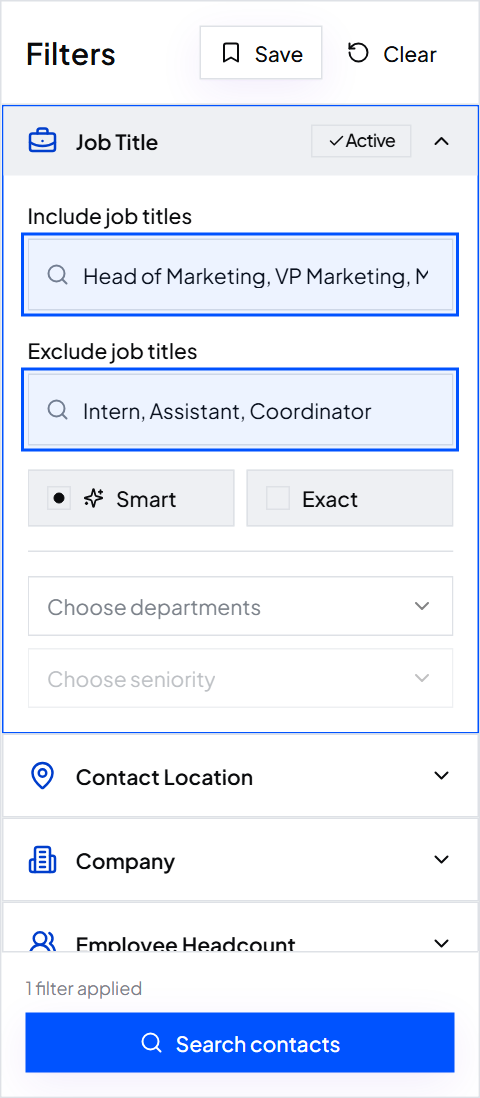
Step 1: Paste the HR titles
In Include job titles, paste the leader list plus the specialist titles for your product from the table above. Leave matching on Smart and paste the exclusions.
CHRO, Chief People Officer, VP HR, HR Director, Head of HR, Head of People, HR Manager
Assistant, Coordinator, Intern, Recruiter, Sourcer, Consultant
Step 2: Set headcount, industry and location
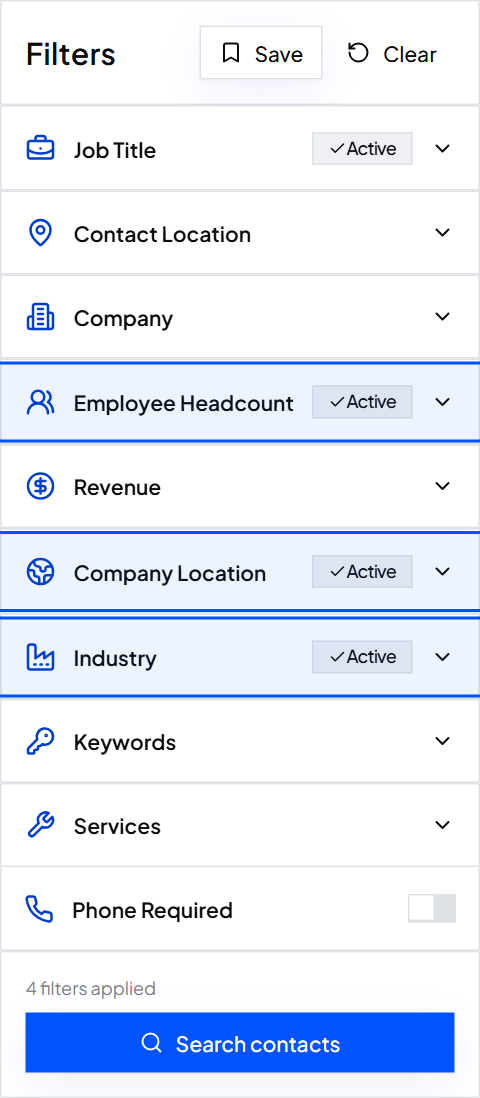
Fernway picks Employee Headcount 101 to 250 and 251 to 500, Industry Manufacturing > Machinery Manufacturing, Transportation and Logistics > Truck Transportation and Healthcare > Home Health Care Services, and Company Location Texas.
Step 3: Read the sample, then export
The total updates instantly as you filter. Open 10 to 20 rows and exclude any wrong title. Turn on Email required, click Save, and export the CSV into any sending tool.
One credit covers the verified work email, the mobile when available and the verification, with no separate verifier needed. How to build a prospect list explains every other filter.
What an HR email list costs
| Provider | Published price per 1,000 contacts |
|---|---|
| ContactYard (Scale, $99 a month for 30,000) | $3.30 |
| Apollo | $18 |
| Lusha | $75 |
| ContactOut | $131 |
| UpLead | $371 |
Growth is $49 a month for 10,000 contacts. A bought HR email list is one fixed file, while ContactYard refreshes data every 30 days. Where to buy email lists compares the ready-made options.
Worked example: Fernway Benefits
Fernway Benefits, fictional Texas benefits broker (illustrative numbers)
- Filters
- Machinery Manufacturing, Truck Transportation, Home Health Care Services, Texas, 101 to 250 and 251 to 500 employees
- Job titles
- VP HR, HR Director, Head of HR, HR Manager, Benefits Manager
- Exclusions
- Assistant, Coordinator, Intern, Recruiter
- Contacts
- 2,400 HR leaders, 1 to 2 per company
- Data cost
- Growth: $49 a month for 10,000 contacts
- Same contacts elsewhere
- 9,600 to 28,800 credits at 4 to 12 credits per contact
FAQ
- What is the fastest way to get an HR emails list?
- Paste HR titles into ContactYard, set headcount and industry, and export verified work emails. You see the total before you spend a credit.
- How do I find HR email addresses at specific companies?
- Paste up to 1,000 websites into Company Domain and add your HR titles. You get the named HR people at those companies, with verified work emails.
- Are generic HR emails like hr@ worth using?
- Rarely for sales. Those inboxes are built for applicants and employee questions, so write to a named HR Director or specialist instead.
- Is an HR mailing list the same as an HR email list?
- A mailing list can mean postal addresses. An HR email list gives you named people with work emails, plus mobiles when available in ContactYard.
- How much does an HR email list cost?
- On ContactYard, $49 a month for 10,000 contacts or $99 for 30,000. Other tools charge $18 to $371 per 1,000.
Start free, paste the HR titles for your product, and save the search so new HR leaders appear next month.
Keep reading
How to build a CFO email list
Every finance title that signs, the company sizes where a CFO exists, hospital CFOs and the exact filters.
How to build a CEO email list
Which CEOs actually answer vendor email, every title spelling to search, and the filters that keep the list clean.
How to find decision makers in a company
Who decides at each company size and department, and how to find them at 1,000 companies at once.