
How to find decision makers in a company
Who makes the buying decision at a company of each size and in each department, how to spot them, and how to find them at up to 1,000 companies in one ContactYard search.
A decision maker is the person in a company who can say yes to a purchase and approve the budget for it. To find decision makers in a company, match the company's size and the department that would use what you sell to the job title that usually owns that budget, then search for that title and check a few signals before you reach out.
The fastest way to do this at scale is ContactYard. Paste up to 1,000 company websites, add the decision-maker titles from the tables below, and the people appear in a results table straight away, each with a verified work email and the mobile number when available.
What is a decision maker in a business?
In a business, the decision maker is whoever has the authority to approve a purchase, the budget to pay for it, and the responsibility if it goes wrong. People also call this person the economic buyer or the budget owner.
Key decision makers are the one to three people whose yes the deal can't happen without. In a five-person company that is one person. In a 5,000-person company it is usually a senior leader in the department that will use your product, plus someone in finance or procurement who signs off the spend.
The decision maker is not always the most senior person you can find. The CEO of a 20-person agency buys the software. The CEO of a 2,000-person manufacturer never sees the invoice for it.
Who is the decision maker in a company, by company size
Company size is the best single predictor of who decides. As a company grows, budgets move down from the founder to department heads, and more people get a say.
| Employees | Who usually decides | Titles to search |
|---|---|---|
| 1 to 10 | The founder or owner, alone and fast | Founder, Co-Founder, Owner, CEO, Managing Director, President |
| 11 to 50 | The founder still signs. A first functional lead often picks the tool | CEO, Founder, COO, Head of [department], [Department] Manager |
| 51 to 200 | The head of the department that uses it. The CEO or CFO joins for bigger spend | Head of [department], [Department] Director, VP [department], CFO |
| 201 to 1,000 | A VP or director owns the budget. A small group of three to five people weighs in | VP [department], [Department] Director, Head of [department], Senior Manager |
| 1,000+ | A buying committee. A VP or C-level leader approves, directors run the evaluation, procurement and IT review | Chief [department] Officer, SVP, VP, Director, Head of [department] for a region or business unit |
Use this as your starting point, then adjust by price. A $50 a month tool is often bought by a manager even at a large company. A $50,000 contract goes to the top even at a small one.
Tip: In ContactYard, run one search per size band with the Employee Headcount filter and a different title list for each. You'll write a better email for each group too.
Decision makers by department and purchase type
The second question is which department owns the problem you solve. Target the leader of that department as the decision maker and the people below them as influencers.
| What you sell | Titles that decide | Titles that influence |
|---|---|---|
| Marketing software, agencies, ads | CMO, VP Marketing, Head of Marketing, Marketing Director | Marketing Operations Manager, Demand Generation Manager, Content Manager |
| Sales tools, data, training | CRO, VP Sales, Head of Sales, Sales Director | Sales Operations Manager, Revenue Operations Manager, Sales Enablement Manager |
| Accounting, payroll, spend tools | CFO, VP Finance, Finance Director, Controller | Accounting Manager, Payroll Manager, FP&A Manager |
| HR, recruiting, benefits | CHRO, VP People, Head of HR, HR Director | Talent Acquisition Manager, HR Manager, People Operations Manager |
| IT, security, developer tools | CTO, CIO, CISO, VP Engineering, Head of IT | IT Manager, Engineering Manager, DevOps Lead, Security Engineer |
| Logistics, operations, supply chain | COO, VP Operations, Head of Operations, Operations Director | Operations Manager, Logistics Manager, Supply Chain Manager |
| Customer support and success | VP Customer Success, Head of Customer Support, Director of Customer Experience | Support Manager, Customer Success Manager |
| Office, facilities, workplace | Head of Workplace, Facilities Director, COO | Office Manager, Facilities Manager |
| Legal and compliance | General Counsel, Head of Legal, Chief Compliance Officer | Legal Counsel, Compliance Manager |
The buying committee: economic buyer, champion, influencer and user
Above about 200 employees, one person rarely decides alone. Gartner's widely quoted figure is that a typical buying group for a complex B2B solution involves 6 to 10 decision makers. You don't need to reach all of them, but you need to know which role each one plays.
| Role | What they do | Typical title | What they need from you |
|---|---|---|---|
| Economic buyer | Owns the budget and gives the final yes | VP, C-level, founder | Cost, risk and how fast it pays back |
| Champion | Wants the change and sells it inside the company | Manager or director on the team with the problem | Proof and a short summary they can forward |
| Influencer | Shapes or can block the choice | IT, security, finance, procurement | Clear answers to their checklist |
| User | Uses the product every day | Specialists, analysts, reps | Proof it's easy and saves them time |
At companies under about 200 people, email the economic buyer directly. At bigger companies, start with the champion, one level below the budget owner, and contact the economic buyer separately with a shorter, results-first message.
How to identify decision makers: eight signals
A title gets you close. These signals tell you whether a person really decides.
- Title. The department name is in it, like Head of Marketing or Operations Director. That person usually owns the function's budget.
- Seniority. Chief, VP, Director and Head of usually decide. Manager and Specialist usually influence. In a company of 15, the Marketing Manager may be the top of marketing.
- Budget ownership. Profiles and bios that mention a budget, a P&L or vendors they chose are strong signs.
- Team size. Someone who leads the team that would use your product, like a support lead with 30 agents, has both the pain and the pull.
- LinkedIn. Open the company page and look at the People tab. Search it for a department word and see who sits at the top of that function, and who posts about the problem you solve.
- Press and the company website. The team page, press releases and news quotes name the person who led a project or owns a function.
- Job posts. A posting that says the role reports to the VP of Operations shows you part of the org chart. A department that is hiring also has budget.
- Asking. Ask the person who answers the phone, or ask your first contact who else would weigh in. People answer this question more often than you'd expect.
Who else would want a say in a change like this? If you liked it, what would the next step on your side look like? Who owns the budget for [area] this year? Has your team bought something similar before? Who signed off on it?
How to find decision makers at a list of companies
Often you already know which companies to target. They come from a trade show, a job board, a funding announcement or your own research. What's missing is the right person at each one. ContactYard starts from those companies and takes about ten minutes.
Step 1: Turn your companies into a plain list of websites
You need one website per company. Use the short form, like northwind.com, with no https://, www. or page paths. One per line works best.
Only have company names? Look up the websites first. Names are easy to mix up, and websites aren't.
Step 2: Paste them into Company Domain
In the filter panel, open Company Domain and paste your list. You can add up to 1,000 websites in one search. Commas and new lines both work.
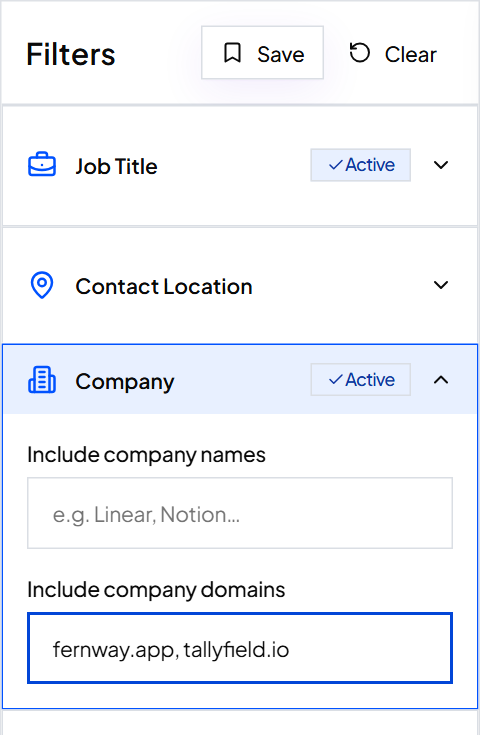
Tip: Have more than 1,000 companies? Split them into batches of 1,000 and save each batch as its own search.
Step 3: Add decision-maker titles and exclusions
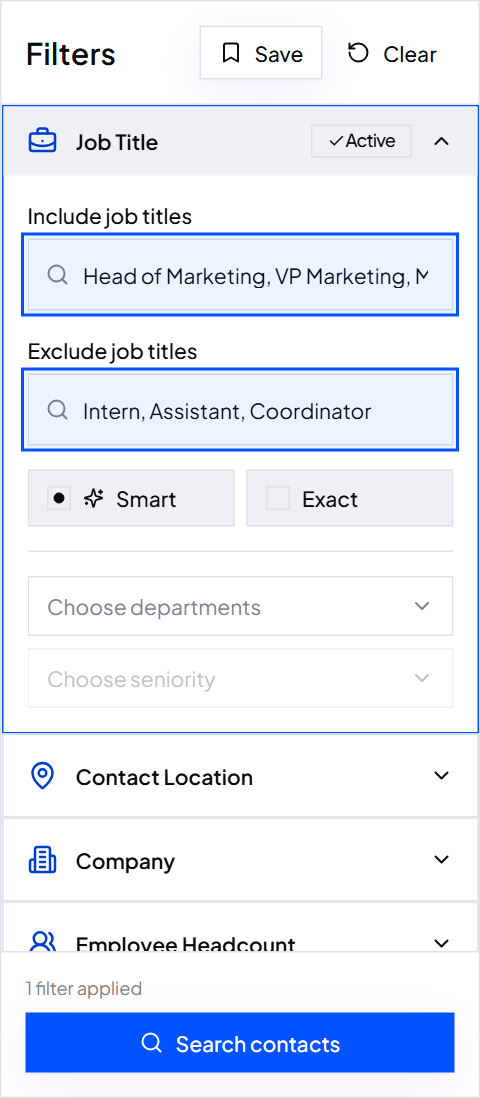
Without a title filter you'd get everyone. Add three to six titles for the person who decides, taken from the tables above, like Head of Operations, VP Operations, Operations Director and COO. Smart matching finds the common short forms for you, so VP Marketing also finds Vice President of Marketing.
Then add titles to Exclude job titles, such as Assistant, Intern, Coordinator and Executive Assistant, so the people who support the decision maker don't slip in. See how job title matching works.
Step 4: Search and read the results
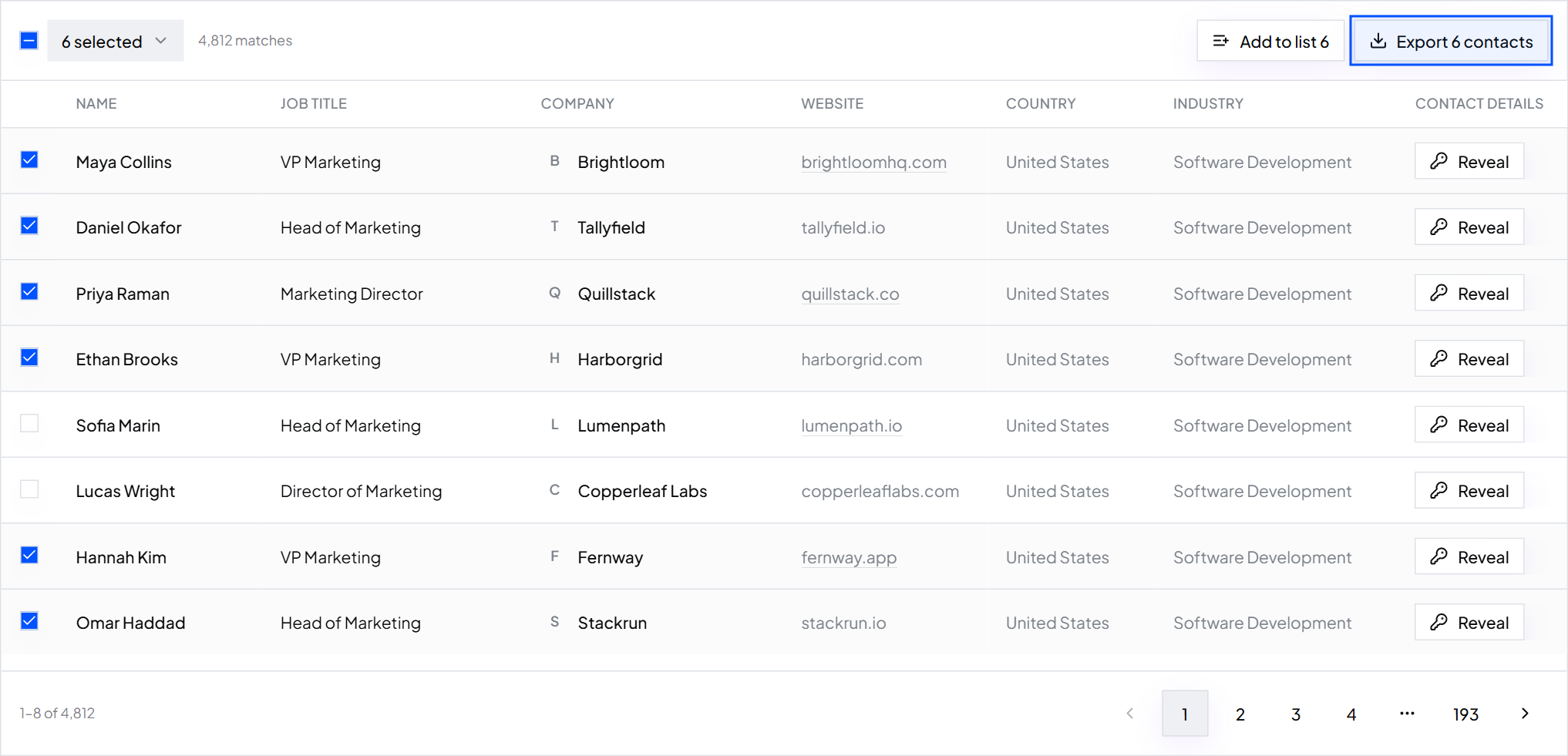
Click Search contacts. Results appear immediately. Some companies return several people and some return none. That's normal: a 12-person company has no VP of Operations.
Step 5: Find the companies that came back empty
Export the results, then compare the export's Website column with your original list. Put your list in column A of a sheet called Companies and paste the export's websites into column A of a sheet called Results. This formula marks the gaps.
=IF(COUNTIF(Results!A:A, A2)>0, "found", "empty")
Step 6: Widen the titles for small companies
Paste only the empty websites into a new search. Most of them are small companies, so use the titles from the 1 to 10 and 11 to 50 rows: Founder, Co-Founder, Owner, CEO and Managing Director. Save it as a second search so the two groups stay apart and get different emails.
Step 7: Pick one or two people per company and export
Tick the best one or two people at each company, usually the economic buyer and a likely champion, and click Export. You get a CSV with name, job title, company, work email, phone, LinkedIn URL, website, location and industry. One credit covers the whole contact: the verified work email, the mobile when available, and the verification.
Worked example: Harborgrid (fictional)
- What they sell
- Dock scheduling software for warehouses
- Start
- 400 company websites from a logistics trade show list
- Search 1 titles
- COO, VP Operations, Head of Operations, Operations Director, Warehouse Director
- Excluded
- Assistant, Intern, Coordinator, Executive Assistant
- Result
- Decision makers found at 310 of the 400 companies
- Search 2
- The 90 empty websites with Founder, Owner, CEO, Managing Director
- Picked
- Up to two people per company, 680 contacts in total
- Cost
- 680 credits, well inside the $49 Growth plan's 10,000. The rest carries over
Copyable decision-maker titles by department
Paste a line straight into the Job Title filter. Each list leans senior on purpose. Use the small-company list when Employee Headcount is under 50.
CMO, Chief Marketing Officer, VP Marketing, Head of Marketing, Marketing Director, Director of Demand Generation, Head of Growth
CRO, Chief Revenue Officer, VP Sales, Head of Sales, Sales Director, Director of Sales, Head of Revenue Operations
CFO, Chief Financial Officer, VP Finance, Finance Director, Head of Finance, Controller, Financial Controller
CHRO, Chief People Officer, VP People, VP Human Resources, Head of HR, HR Director, Head of Talent
CTO, CIO, CISO, VP Engineering, Head of Engineering, Head of IT, IT Director, Director of Engineering
COO, Chief Operating Officer, VP Operations, Head of Operations, Operations Director, Director of Operations, Head of Supply Chain
Founder, Co-Founder, Owner, CEO, Managing Director, President, General Manager
Assistant, Executive Assistant, Intern, Coordinator, Student, Trainee
Common mistakes
- Going straight to the CEO of a large company. Above about 200 people, the CEO forwards your email or ignores it. Go to the department leader.
- One title list for every company size. The right person at a 15-person company is not the one at a 500-person company.
- Skipping the champion. At bigger companies the person with the problem pushes the deal. Without one, the economic buyer has no reason to act.
- Emailing the whole committee on the same day. They compare notes. Contact one or two people per company and space them out.
- Trusting the title alone. Head of Growth is marketing at one company and sales at another. Read the profile before you write.
- Working from an old file. People change jobs all the time. ContactYard refreshes its data every 30 days, so search again instead of reusing last year's list.
- Who is the decision maker in a company?
- The person who can approve the purchase and owns the budget for it. In companies under 50 employees that is usually the founder, owner or CEO. In larger companies it is the head, director or VP of the department that will use what you sell.
- What are key decision makers?
- The one to three people whose approval a deal needs. Typically the budget owner in the buying department, plus a senior finance or procurement person for larger purchases.
- How do you identify decision makers in a business?
- Start with the title that matches the company's size and the department you sell to. Then check seniority, whether they own a budget or a team, their LinkedIn profile, press mentions and job posts. When in doubt, ask your first contact who else would weigh in.
- Is the CEO always the decision maker?
- No. The CEO decides at small companies and for very large purchases. At a company of a few hundred people, most purchases are approved by a VP or director, and contacting the CEO first slows you down.
- How many people are involved in a B2B buying decision?
- It depends on company size and price. Gartner's widely quoted figure for a complex B2B solution is 6 to 10 decision makers. A small company buying a simple tool often has just one.
- How do I get decision makers' email addresses?
- Search for them in ContactYard by company domain and job title and export the ones you want. Each contact comes with a verified work email and the mobile number when available, for one credit. If you already have a LinkedIn profile URL, use Enrich Contacts to get that person's work email and mobile.
- How do I find decision makers on LinkedIn?
- Open the company page, go to People, and search for a department word like operations or finance to see who leads it. Then use LinkedIn profile URLs to get their work email.
What to do next
Not sure which companies belong on the list? Define them first with an ideal customer profile. List ready? Clean it before you send: remove competitors, customers and the wrong titles.
Keep reading
Ideal customer profile: definition, examples and template
What an ICP is, why it matters, seven examples, a fill-in template and an A, B, C scoring sheet, plus how to turn it into a list of real contacts.
How to build a prospect list: steps, techniques and an example
Six steps from a one-line buyer description to an exported, verified prospect list, plus a filled-in example, 10 prospecting techniques and how to keep the list fresh.
How to clean a list before you send: role inboxes, competitors and wrong titles
A short checklist to remove the contacts that waste sends or hurt your reputation, before you email anyone.