
Where to buy email lists, and why building your own is better
Where people buy email lists and leads, what a bought list really costs you, and how to build a fresher, verified B2B list for less.
You can buy email lists from three kinds of sellers: list brokers, data vendors that cut files or sell database access, and online marketplaces that sell ready-made lists by industry and location. Most charge per record or per thousand records, often with a minimum order.
Here is the honest answer, though: buying a static list is the worst way to get one. A list you build yourself is fresher, verified, cheaper per contact and made only for you. The fastest way to build it is ContactYard, and this guide shows you how, with the numbers side by side.
Where can you buy email lists?
| Seller | What you get | How they usually price |
|---|---|---|
| List brokers | Lists compiled from directories, publishers, events and other sources, to buy or rent | Per thousand records, often with a minimum order. With a rental you may never see the addresses, because the list owner sends for you |
| Data vendors and compilers | A file cut to your filters, or access to their database | Per record, by credits, or by annual subscription |
| Marketplaces and file shops | Ready-made files such as dentists in Ohio or CEOs of software companies | A flat price per file or per record |
| B2B data platforms | A searchable database you filter yourself and export from | Monthly or annual plans with a set number of contacts or credits |
The first three sell you a static file: a snapshot that was collected at some point in the past. The last one lets you build the list yourself, today, to your exact filters. That difference decides almost everything that follows.
Why buying a static list is the worst way to get one
It's shared
A ready-made file is sold to anyone who pays for it. The people on it get the same pitch from every buyer, and they learn to ignore all of them.
It's stale the day you buy it
People change jobs, companies rename and inboxes close. A file doesn't update itself, and most sellers won't tell you when each record was collected. Read how fast contact data goes stale to see what that does to a list over a year.
It's unverified
An accuracy promise on a sales page is not a check you can see. You pay first and find out how many addresses work when your emails bounce.
Your email platform forbids it
Mailchimp's Acceptable Use Policy prohibits uploading or sending campaigns to purchased, rented, third-party, co-registration, publicly available or partner lists, and says it may suspend or terminate accounts that break the policy. HubSpot's Acceptable Use Policy is just as plain: "You may not email purchased lists." Its help pages add that lists claiming opt-in consent still can't be used in its marketing email tool.
Bounces and spam traps hurt your sender reputation
Mailbox providers watch how many of your emails bounce. Bought lists also tend to carry spam traps: addresses that were never used by a real person and exist only to catch senders who buy or harvest lists. Hitting them can put your domain on blocklists such as Spamhaus, and then even your good emails land in spam. Once bounces pass about 3%, stop and fix the list. Here's why your bounce rate is high.
Consumer lists carry a consent problem
In the UK and EU, marketing emails to individuals generally need their consent. The UK ICO's guidance says consent passed along with a bought list only counts if it named your organisation specifically, or a precisely defined category it falls in, and the soft opt-in exemption never applies to bought lists. The sender carries the responsibility, not the seller. For B2C, a bought list is close to unusable. Read is cold email legal for how the rules differ for business contacts.
The better way: build the exact list you need
Building beats buying on every point above, and ContactYard is the fastest way to build. You search 100M+ verified B2B prospects, including ones other lead databases don't have, and export only the people who match your filters.
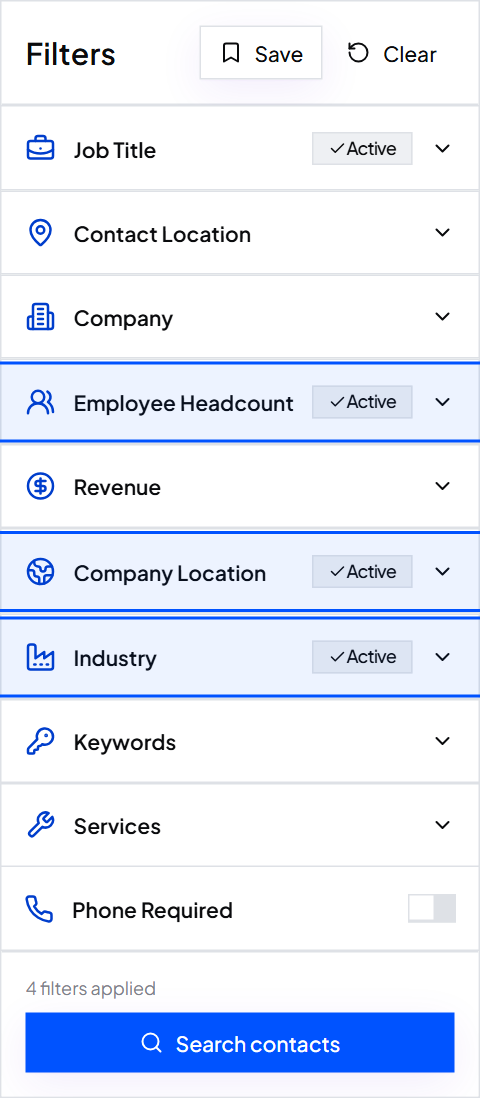
- Made to your filters. Job Title, Employee Headcount, Revenue, Company Location, Industry, Keywords, Services and Company Domain. Nobody else gets your exact list.
- Verified before you get it. Every work email is checked before delivery, not taken on trust from the original source.
- Mobiles in the same credit. One credit is one complete contact: the work email, the mobile number when available, and the verification.
- Fresh. Data is refreshed every 30 days, so you build from this month's data, not a file from last year.
- Instant. Results appear in a table straight away. Tick the people you want and export a CSV.
- Add the job titles you sell to, plus exclusions like Assistant and Intern.
- Add company filters: Employee Headcount, Company Location and Industry.
- Tick Email required, and Phone required if you also want to call.
- Click Search contacts and check the total.
- Tick the contacts you want and click Export to get your CSV.
Tip: Send cold outreach one to one from a cold email tool on a separate sending domain. Newsletter platforms like Mailchimp are built for people who subscribed to you.
The full walkthrough is in how to build a prospect list.
Cost: a purchased list vs ContactYard
| Typical purchased list | ContactYard | |
|---|---|---|
| Price | Per record or per thousand, often with a minimum order. Extra filters usually cost more | $49 a month for 10,000 contacts, or $99 a month for 30,000 (about $3.30 per 1,000) |
| Mobile numbers | Often a separate, pricier file or add-on | Included in the same credit when available |
| Verification | A claim from the seller. You verify it yourself, at extra cost | Every work email checked before delivery |
| Freshness | Whenever the file was compiled, often not stated | Refreshed every 30 days |
| Who else has it | Anyone else who bought the same file | Built from your own filters |
| Next month | Buy again | Rerun your saved search. Unused credits carry over for the next two billing months |
B2B data platforms are cheaper than files, but they vary widely too. Based on public pricing, at each provider's lowest, most discounted rate, the price per 1,000 contacts looks like this:
| Provider | Price per 1,000 contacts |
|---|---|
| ContactYard | $3.30, mobile included |
| Apollo.io | $18, phone uses separate credits |
| Lusha | $75, phone uses separate credits |
| ContactOut | $131 |
| UpLead | $371 |
The gap gets bigger once you add phones. Other tools typically charge 1 credit for the email, 2 to 10 more for the mobile, and 1 more to verify, so 4 to 12 credits per contact. In ContactYard it is always one.
Worked example: Fernway (fictional)
- Goal
- Heads of operations at US logistics companies with 51 to 500 employees
- Search
- Job Title, Employee Headcount, Company Location, Industry, Email required
- Contacts exported
- 6,000, each with a verified work email and the mobile when available
- Plan
- Growth, $49 a month for 10,000 contacts
- Cost per contact
- Under half a cent at the plan rate
- Left over
- 4,000 credits that carry over for the next two billing months
If you still buy a list: check these first
If you're set on buying, don't pay until the seller answers every point below in writing.
- When was each record collected and last verified? Ask for dates, not "recently".
- How was it collected? Directories, events, co-registration or forms. Harvested addresses are where spam traps hide.
- Is it exclusive? Ask how many times the same file has been sold.
- Can you test a sample? Ask for 100 random records and check them yourself before you buy.
- What happens to bounces? Look for a written replacement or refund for addresses that bounce.
- Do you own it or rent it? Rentals often allow one send, and sometimes the seller sends for you.
- Is there consent that names you? Essential for any consumer or UK and EU list.
- Where will you send from? Not Mailchimp or HubSpot. Their terms forbid purchased lists.
- Start small. Send 100 to 200 emails first and stop if more than 3% bounce.
1. When was each record collected, and when was each email last verified? 2. Where did the data come from? 3. How many other buyers have this exact file? 4. Can I test 100 random records before I pay? 5. Do you replace or refund bounced addresses? 6. Do I own the list, or is it a rental with limited sends? 7. For individuals in the UK or EU: can you show consent that names my company?
Where to buy leads instead
When people ask where to buy leads, they usually mean contact details for the people most likely to buy. Don't buy someone else's idea of your market. Write down who your best customers are, turn that into filters, and pull the matching people from ContactYard. How to get B2B leads covers the full process.
How to get a cold call list
Build it the same way, with one change: tick Phone required. ContactYard then returns only people with a phone number, and the mobile comes in the same credit as the email, so you can call and email the same list.
- Add job titles and company filters as above.
- Tick Phone required.
- Search, tick the contacts you want and export. The phone number is in its own column, ready for your dialer.
Check the calling rules where you dial, such as the National Do Not Call Registry in the US or the TPS and CTPS in the UK. More on this in how to get phone numbers for cold calling.
- Where can I buy email lists?
- From list brokers, data vendors and online list marketplaces, which sell static files, or from B2B data platforms, where you build the list yourself. Building it in ContactYard gets you a verified, current list for about $3.30 per 1,000 contacts.
- Is it legal to buy an email list?
- Buying one is generally legal. Using it is where the rules apply. In the US, CAN-SPAM requires accurate sender details, a physical address and a working opt-out. In the UK and EU, emailing individuals from a bought list needs consent that named you, which bought lists rarely have.
- Can I upload a purchased list to Mailchimp or HubSpot?
- No. Mailchimp's Acceptable Use Policy prohibits sending to purchased, rented or third-party lists, and HubSpot's says you may not email purchased lists. Both can suspend your account.
- How much does an email list cost?
- Sellers price per record or per thousand, often with a minimum order, and charge more for extra filters and phone numbers. ContactYard costs $49 a month for 10,000 contacts or $99 a month for 30,000, with the mobile included when available.
- Where can I buy an email database?
- B2B data platforms sell access to a database instead of a file. ContactYard gives you 100M+ verified B2B prospects to filter, refreshed every 30 days, and you only export the people you want.
- How do I get a cold call list?
- Search ContactYard with your job titles and company filters, tick Phone required, and export. Each contact includes the work email and the mobile number in one credit.
What to do next
Skip the file. Start free and build the list you actually need in ContactYard, or see the plans.
Keep reading
How to build a prospect list: steps, techniques and an example
Six steps from a one-line buyer description to an exported, verified prospect list, plus a filled-in example, 10 prospecting techniques and how to keep the list fresh.
How to get B2B leads: 9 ways, ranked by speed and cost
What B2B lead generation is, nine ways to get B2B leads with the fastest and cheapest marked, a step-by-step outbound process, the tools you need, and what month one costs.
Is cold email legal? Yes, if you follow these rules
Cold email to business contacts is legal in the US and most countries. Here is what CAN-SPAM, GDPR, PECR and CASL require, with a checklist and a footer you can copy.