
How to get B2B leads: 9 ways, ranked by speed and cost
What B2B lead generation is, nine ways to get B2B leads with the fastest and cheapest marked, a step-by-step outbound process, the tools you need, and what month one costs.
To get B2B leads, decide exactly who buys from you, then find those people and their work contact details, either by attracting them (inbound) or by going to them (outbound). The fastest way is outbound from a B2B contact database: filter for your buyer, export verified emails and mobiles, and start sending the same day.
This guide gives you nine ways to get B2B leads, ranked by speed and cost, a step-by-step outbound process in ContactYard, a plain guide to lead generation tools, and what your first month actually costs.
What is B2B lead generation?
B2B lead generation is the work of finding businesses that could buy from you, finding the people inside them who decide, and getting a way to contact them. The meaning is the same as any lead generation. What changes is the buyer: you sell to a company, but a person signs.
So B2B lead gen has two layers. First the right companies, by size, industry and location (that's firmographic data). Then the right people at them, by job title and seniority. A B2B lead is a person who passes both, with a verified way to reach them. What sales leads are covers lead types and stages in more detail.
One more thing sets B2B apart: your market is countable. You can't list every person who might buy a sandwich. You can list every head of finance at US software companies with 50 to 200 employees. That's why outbound works so well in B2B.
9 ways to get B2B leads, compared
Here is the full playbook first. Each method is explained below.
| Method | Speed to first leads | Cost | Best for |
|---|---|---|---|
| 1. Outbound from a contact database | Same day | Low: ContactYard is $49 a month for 10,000 contacts | Any market you can describe with filters |
| 2. Enrich lists you already have | Same day | Low: 1 credit per contact | Old CRM records, event lists, LinkedIn URLs |
| 3. LinkedIn | Days | Mostly your time | Research and warm first touches |
| 4. Referrals | Weeks | Free, or a referral reward | High-trust, high-value deals |
| 5. Content and SEO | Months | Writing time | Steady inbound that compounds |
| 6. Partnerships | Weeks to months | Usually a revenue share or a swap | Products that sit next to another product |
| 7. Events | Tied to the date | Tickets, travel, booth fees | Big deals and niche industries |
| 8. Paid ads | Days | Every click, every month | Offers you've already proven |
| 9. Intent and trigger events | Days | Your time plus contact data | Timely, relevant outreach |
Fastest: outbound from a contact database, and enriching lists you already have. Both give you contactable leads within the hour. Cheapest per lead: referrals, when you have them, then outbound, where ContactYard's Scale plan works out at about $3.30 per 1,000 contacts. Slowest but compounding: content and SEO.
1. Outbound from a contact database
You describe your buyer with filters, get the matching people with their contact details, and email or call them. It's the only method where you choose the volume and the audience on day one.
ContactYard is the strongest choice here. It has 100M+ verified B2B prospects, including ones other lead databases don't have. Results show immediately, with no request queue, and one credit gets the complete contact: verified work email, mobile when available, and verification. The step-by-step process is further down.
2. Enrich the lists you already have
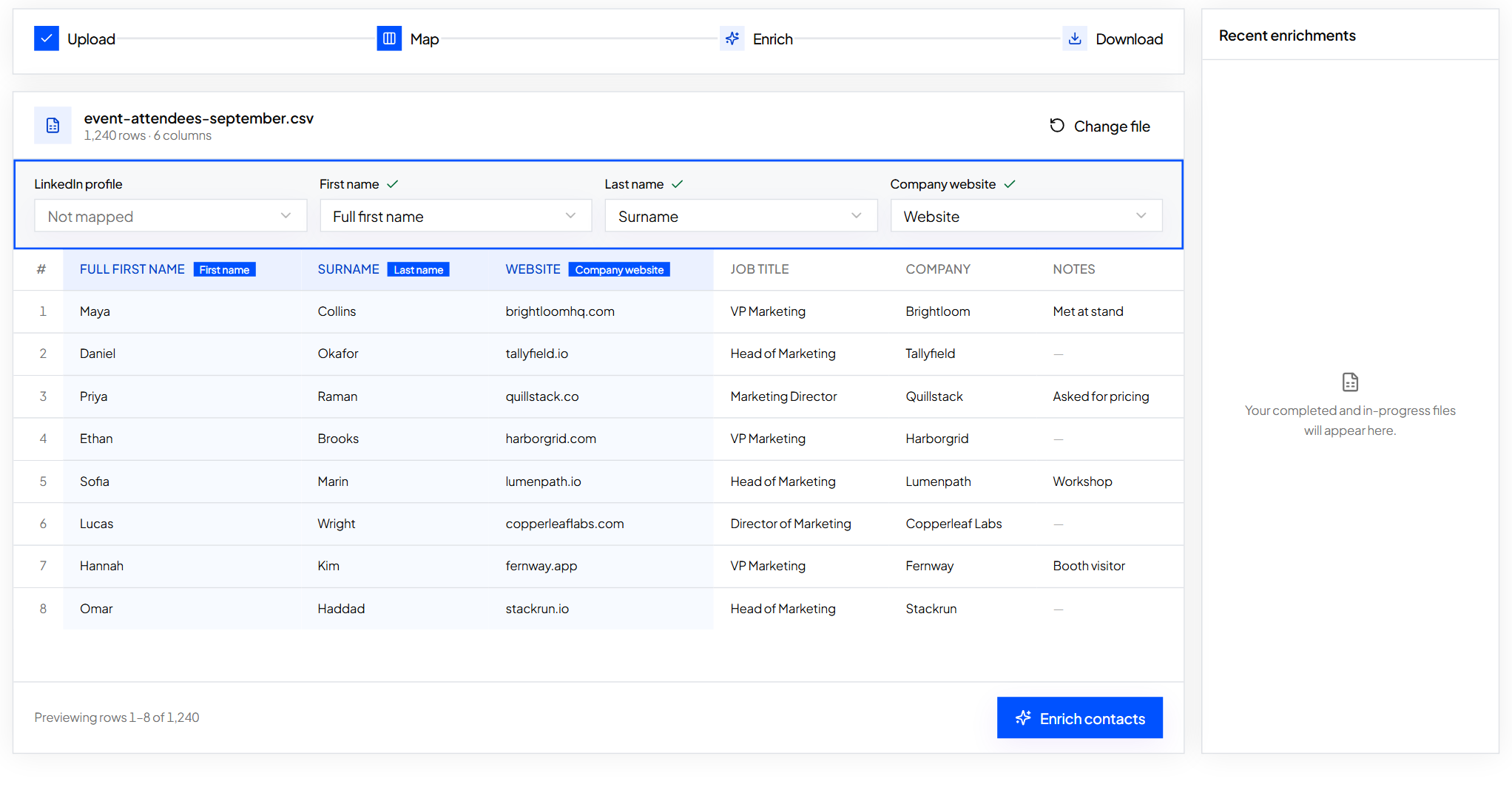
Most companies are sitting on leads they can't contact: CRM records with no email, event attendee sheets, a column of LinkedIn profile URLs. Enrichment fills in the gaps.
In ContactYard, open Enrich Contacts, upload the spreadsheet and map the columns. Each row needs either a LinkedIn profile URL, or a first name, last name and company domain. You get the file back with work emails and mobiles filled in. Here's the full walkthrough.
3. LinkedIn
LinkedIn is the best place to research a buyer and make a warm first touch. Look at what they post, send a short personal connection request, and comment when you have something useful to add. Use LinkedIn's own tools, such as Sales Navigator, within its terms.
To email someone you found there, paste their profile URL into ContactYard's Enrich Contacts and get their work email and available mobile. How to find someone's email on LinkedIn shows the steps.
4. Referrals
Ask happy customers who else has the problem you solved for them. Make the ask specific. “Do you know an operations lead at another clinic group who books patients by phone?” gets names. “Know anyone who might be interested?” gets “I'll think about it.”
Referrals are cheap and trusted, but you can't produce more of them on demand. Treat them as a bonus on top of a method you control.
5. Content and SEO
Write the pages your buyers search for: how-tos, comparisons, templates. Answer the question properly, then offer a next step such as a trial, a template or a demo. Leads from content arrive warm, because they came looking. It takes months to build, then keeps bringing leads without more spend.
6. Partnerships
Find companies that sell to the same buyer but don't compete with you: an accounting firm for a payroll product, an agency for a marketing tool. Swap introductions, run a joint webinar, or list each other on an integrations page.
7. Events
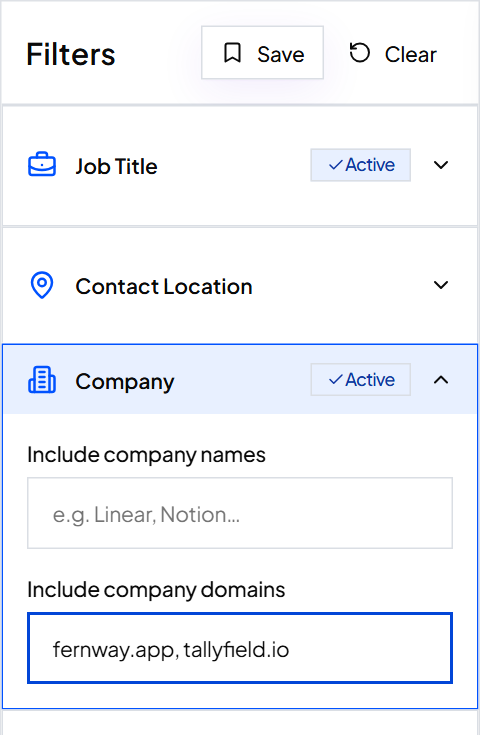
Trade shows and meetups put many buyers in one room. The trick is to start before the event. Collect the exhibitor websites, paste up to 1,000 of them into ContactYard's Company Domain filter, add job titles, and book meetings before you arrive. Afterwards, run the badge-scan list through Enrich Contacts to fill in emails and mobiles.
8. Paid ads
LinkedIn, Google and Meta ads with a lead form can bring leads within days. You pay for every click whether it turns into a lead or not, and the flow stops when the spend stops. Run ads once you know which offer works. A cheap way to find out first is to test the market with 500 emails.
9. Intent and trigger events
A new leader, a funding round, a new office or a hiring push often means a company is about to buy. Spot these events on news sites, job boards and company announcements, collect the company websites, and paste them into ContactYard's Company Domain filter with the job titles you want. Reach out while the event is fresh, and mention it honestly.
How to get B2B sales leads with ContactYard, step by step
This is how to generate leads in B2B sales the fast way. The example follows Quillstack, a fictional company that sells onboarding software to HR teams.
Step 1: Write your ideal customer profile in one paragraph
Quillstack's version: “HR leaders at software companies with 51 to 500 employees in the United States and Canada, who hire often enough that onboarding eats their week.” Keep yours this short. How to write an ideal customer profile walks through it.
Step 2: Turn it into filters
Add the job titles: Head of People, HR Director, VP People. Smart matching picks up common short forms, and Exact matching is there when you need it. Add Intern, Assistant and Coordinator to Exclude job titles.
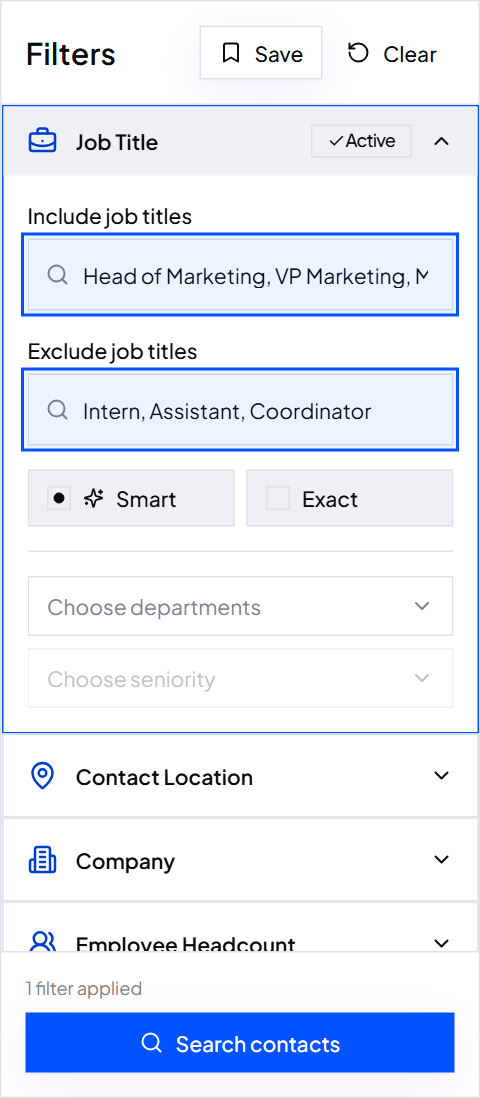
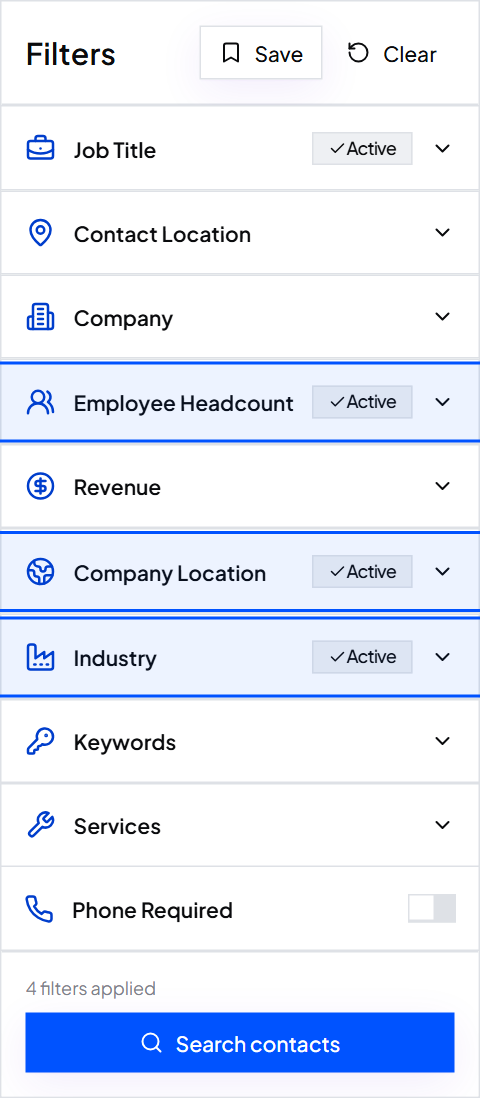
Then set Industry to software, Employee Headcount to the ranges that cover 51 to 500, and Company Location to United States and Canada. Turn on Email required. Planning to call? Turn on Phone required too.
Step 3: Search and check a sample
Results show right away. Open 10 to 25 rows at random and ask: is this the right person at the right kind of company? If too many aren't, change one filter and search again. When it looks right, click Save so you can rerun it later from Saved.
Step 4: Export your leads
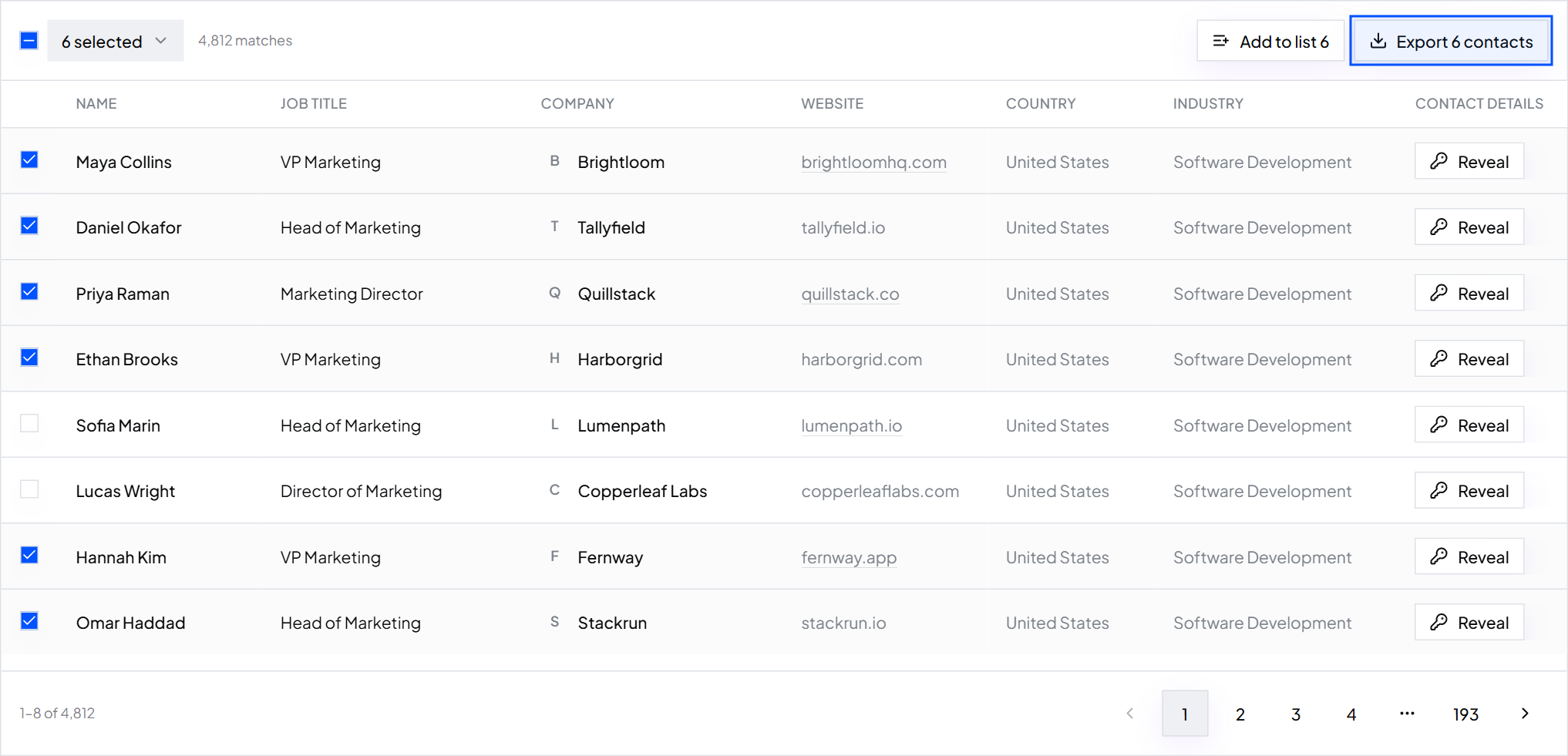
Tick the contacts you want and click Export. The CSV has first name, last name, job title, company, work email, phone, LinkedIn URL, company website, location and industry.
Step 5: Verify, then clean
Every work email in ContactYard is checked before delivery, not taken on trust from the original source, and the data is refreshed every 30 days. You don't need a separate verifier. Before you send, clean the list: remove competitors, current customers and anyone on your do-not-contact list.
Step 6: Send, and follow up
Load the sheet into your sending tool. Write a short, specific email, then follow up two or three times. Start with a small first batch and watch the bounce rate. Read what a cold email is for the writing, and is cold email legal for the rules in your market. Calling too? Here's how to get phone numbers for cold calling.
What are lead generation tools?
Lead generation tools are software that help you find, contact and track possible buyers. Lead generation software is the same thing under another name. The term covers several categories, and each one does a different job.
| Category | What it does | Where ContactYard fits |
|---|---|---|
| Contact databases | Search people by job title and company, then export their contact details | This is ContactYard's core: 100M+ verified B2B prospects |
| Enrichment | Fill in missing emails and phones on a list you already have | Enrich Contacts, built in |
| Email finders | Find one person's work email | Paste a LinkedIn profile URL into Enrich Contacts |
| Email verifiers | Check an address before you send | Included in every credit |
| Sequencers | Send emails and follow-ups on a schedule and track replies | Load your ContactYard export into your sequencer |
| CRMs | Track every lead, deal and conversation | Import your ContactYard export into your CRM |
The data part (database, enrichment, email finding and verification) is where most teams overpay, because they buy three or four tools and pay per credit in each. ContactYard does all four in one, at one credit per complete contact.
What are the best lead generation tools?
The best stack is small: one tool for data, one for sending, one CRM. For the data, ContactYard is the best value, and the numbers below show why.
Why ContactYard is the best value for lead data
Price per 1,000 contacts, based on each provider's lowest, most discounted public pricing, which is usually the annual plan:
| Provider | Price per 1,000 contacts | 10,000 contacts at that rate |
|---|---|---|
| ContactYard | $3.30, mobile included | $33 |
| Apollo.io | $18, phone uses separate credits | $180 |
| Lusha | $75, phone uses separate credits | $750 |
| ContactOut | $131 | $1,310 |
| UpLead | $371 | $3,710 |
1 credit, not 4 to 12
The headline price isn't the whole story. Other tools typically charge 1 credit for the email, 2 to 10 more for the mobile, and 1 more to verify. That's 4 to 12 credits for one complete contact, so a 10,000-credit plan elsewhere can mean only 833 to 2,500 complete contacts.
In ContactYard, one credit is one complete contact: a verified work email, the mobile number when available, and the email verification. 10,000 credits means 10,000 complete contacts.
- Growth: $49 a month for 10,000 contacts.
- Scale: $99 a month for 30,000 contacts, about $3.30 per 1,000, with priority support.
- Unused credits carry over for the next two billing months.
- You can start free with trial credits. See pricing for details.
What month one costs
Here is a realistic first month of B2B outbound for a founder or a small team. The sending setup uses rough market prices, so check them before you buy. The data line is ContactYard's real price.
| Item | Month one | Notes |
|---|---|---|
| Sending domains (3) | $30 to $45 | Roughly $10 to $15 each per year, kept separate from your main domain |
| Inboxes (6) | $30 to $48 | Roughly $5 to $8 each per month, two per domain |
| Sending tool | $30 to $60 | Roughly, for one that handles warm-up and follow-ups |
| Lead data: ContactYard Growth | $49 | 10,000 complete contacts, mobile included |
| Total | About $139 to $202 | Plus your time |
New inboxes need to warm up, so month one is mostly small batches. Here's how the data side looks for Quillstack.
Quillstack, month one
- Plan
- ContactYard Growth, $49
- Segments
- 3 saved searches: HR leaders at 51 to 100, 101 to 250 and 251 to 500 employees
- Contacts exported
- 1,500
- Credits used
- 1,500
- Credits carried forward
- 8,500, usable for the next two billing months
- Same 1,500 contacts at 4 to 12 credits each
- 6,000 to 18,000 credits
For the full budget, including your time and warm-up weeks, read what cold outreach costs in month one.
Common mistakes
- Starting with tools, not a buyer. Write the ideal customer profile first. Every filter comes from it.
- Paying three tools for one contact. A database, a phone add-on and a verifier add up. One credit in ContactYard covers all three.
- Sending to the whole export at once. Start with a small batch, read bounces and replies, then scale.
- Relying on one channel you don't control. Referrals and inbound are great. Outbound is the one you can turn up when the pipeline is thin.
- What is B2B lead generation?
- B2B lead generation is finding businesses that could buy from you, the people inside them who decide, and a way to contact those people. It runs inbound (buyers come to you through search, content and ads) and outbound (you find them, for example in a contact database like ContactYard).
- What is the fastest way to get B2B leads?
- Outbound from a B2B contact database. In ContactYard you filter by job title, company size, industry and location, see results right away, and export verified work emails and mobile numbers the same day.
- How do I generate B2B leads with little budget?
- Ask customers for referrals, use LinkedIn to research and connect, and write content that answers buyer questions. For a list you can contact this week, start free with ContactYard trial credits, then Growth is $49 a month for 10,000 contacts.
- What is lead generation software?
- Lead generation software helps you find, contact and track possible buyers. The main categories are contact databases, enrichment tools, email finders, email verifiers, sequencers and CRMs. ContactYard covers the database, enrichment, email finding and verification in one tool.
- What are the best lead generation tools?
- Keep it to three: one tool for data, one for sending and one CRM. For data, ContactYard is the best value: about $3.30 per 1,000 contacts on the Scale plan, with the mobile included in the same credit, based on public pricing comparisons.
- Is it legal to email B2B leads?
- In many countries, yes, if you follow the rules: say who you are, keep the message honest, give a clear way to opt out and honour it. The rules differ by country, so read is cold email legal before you send.
What to do next
Write your ideal customer profile, turn it into filters, and export your first leads today. Start free with ContactYard.
Keep reading
What are sales leads? Meaning, types and examples
A sales lead is a possible buyer you can contact. Learn what lead gen means, how leads differ from prospects, every lead type, and how to turn your definition into a list.
How to build a prospect list: steps, techniques and an example
Six steps from a one-line buyer description to an exported, verified prospect list, plus a filled-in example, 10 prospecting techniques and how to keep the list fresh.
What is a cold email? How to send one that gets replies
A cold email is a first message to someone you have never spoken to. Learn how it differs from spam, how to set up sending, and copy a template that works.