
What are sales leads? Meaning, types and examples
A sales lead is a possible buyer you can contact. Learn what lead gen means, how leads differ from prospects, every lead type, and how to turn your definition into a list.
A sales lead is a person or company that could become your customer, and that you have a way to contact. In B2B sales, a lead is usually a named person at a business that fits what you sell, with a work email or phone number you can reach.
That is the core of what leads in sales are. This article covers what lead gen means, how a lead differs from a prospect, an opportunity and a customer, the types of leads you'll hear about, and how to turn your own lead definition into a list you can contact today.
What is a lead in sales
Ask ten sales teams what a lead is and you'll hear small differences. The shared meaning is this: a lead is a possible buyer who hasn't been qualified yet. You know who they are and how to reach them. You don't yet know if they need you, can pay, or want to talk.
Two things turn a name into a lead. The person could plausibly buy, and you can reach them. A finance director at a 200-person company is a lead for expense software. The same finance director with no email or phone on file is just a name on a web page.
You may also see “lead sales” used for the business of selling leads: companies that collect contact details and sell them on. That's a different thing. Here, a lead is a possible buyer for you. If you're weighing a bought list, read where to buy email lists first.
What lead gen means
Lead gen is short for lead generation: the work of finding possible buyers and getting their contact details so sales can reach them. There are two ways to do it.
- Inbound lead generation. Buyers come to you. They find your website, read your content, click an ad or fill in a demo form.
- Outbound lead generation. You go to them. You choose the companies and people you want, get their contact details, and reach out by email, phone or LinkedIn.
Inbound leads arrive already interested, but you can't decide how many arrive this week. Outbound is the one you can switch on today and scale with a budget. Most B2B teams run both.
The fastest way to start outbound is ContactYard. You describe your buyer with filters, see the matching people right away, and export them with verified work emails and mobile numbers.
Lead vs prospect vs opportunity vs customer
These four words describe stages of the same relationship. Teams draw the lines a little differently, but this is the split most CRMs use. The example follows Quillstack, a fictional company that sells expense software.
| Stage | What it means | What you know | Example |
|---|---|---|---|
| Lead | A possible buyer you can contact | Name, role, company, contact details | Dana Ruiz, Finance Director at Northwind, on a list Quillstack exported |
| Prospect | A lead you've checked is a real fit and worth working | Fit is confirmed: right size, likely need | Northwind has 180 staff and still handles expenses in spreadsheets |
| Opportunity | A prospect in an active buying conversation | Need, budget, timing and a next step | Dana books a demo and asks for pricing for 40 users |
| Customer | Someone who has bought | Contract and revenue | Northwind signs an annual plan |
The line that matters most is lead to prospect. A lead is anyone who could buy. A prospect is someone you've decided deserves your time. Teams that blur the two end up with a big pipeline that never closes.
Types of leads
Lead types group leads by temperature, by who qualified them, or by how they arrived. One person can be several types at once, such as a warm, inbound MQL.
By temperature: cold, warm and hot leads
- Cold lead. Fits your buyer profile but has never heard of you. Example: an operations director you found in a contact database.
- Warm lead. Knows you or has engaged a little. Example: someone who replied “not right now” to your first email, or downloaded a guide.
- Hot lead. Wants to talk soon. Example: a head of IT who replies “can you send pricing?”
By qualification: IQL, MQL, SQL, PQL and service-qualified
- Information-qualified lead (IQL). Gave contact details in exchange for information, very early on. Example: a sales manager who swapped an email address for a call script template.
- Marketing-qualified lead (MQL). Marketing judges them more likely to buy, based on fit and engagement. Example: a finance lead who attended a webinar and then viewed the pricing page.
- Sales-qualified lead (SQL). Sales has checked them and accepted them as ready for direct follow-up. Example: after a first call, a rep confirms the need, the budget and who signs.
- Product-qualified lead (PQL). Has used your product on a trial or free plan and reached real value. Example: a trial user who invited five teammates in the first week.
- Service-qualified lead. An existing customer who tells your support team they want to buy more. Example: a customer asks support how to add a second office to the account.
Tip: SQL can mean sales-qualified or service-qualified, depending on the team. Agree which one you mean before it shows up in a report.
By source: inbound and outbound leads
- Inbound lead. Came to you. Example: a demo request from someone who found your pricing page through search.
- Outbound lead. You found them. Example: a VP Sales at a 60-person software company on a list you built in ContactYard.
What makes a good lead
A good lead has three things. Miss one and the lead is weak, however good it looks in your CRM.
- Fit. The company and the person match your ideal customer profile: right industry, right size, right role.
- Contact data. A verified work email, and ideally a mobile number. Without it, a perfect fit is useless.
- Timing. Some reason to talk now: a new role, a growing team, a problem that just got worse.
You can check fit and contact data before you send a single message. Timing you usually learn in the conversation.
BANT, briefly
BANT is a classic checklist for qualifying a lead once you're talking to them. It stands for Budget, Authority, Need and Timeline.
- Budget. Can they pay for this?
- Authority. Can this person decide, or who else must agree?
- Need. Do they have the problem you solve, and does it matter to them?
- Timeline. When do they want it fixed?
You don't need all four to start a conversation. You need them before you call something an opportunity.
Where leads come from
| Source | How it works | Speed to first leads |
|---|---|---|
| Outbound lists from a contact database | You filter for your buyer and export their contact details | Same day |
| Inbound content and search | Buyers find your pages and sign up or ask for a demo | Slow to build, steady once it works |
| Paid ads and forms | You pay for clicks and capture details on a form | Days, for as long as you pay |
| Referrals | Customers and partners introduce people they know | Depends on who asks and when |
| Events and webinars | You meet buyers or collect sign-ups | Tied to the event date |
If you need leads this week, outbound from a contact database is the source you can start in an afternoon. How to get B2B leads ranks every method by speed and cost.
The lead data fields you need
A lead is only as useful as the fields attached to it. These are the ones sales teams actually use.
| Field | Why you need it | In a ContactYard export |
|---|---|---|
| First and last name | The greeting, and spotting duplicates | Yes |
| Job title | Checking it's the right person | Yes |
| Company | Used in the message and for grouping | Yes |
| Work email | The address you send to | Yes, checked before delivery |
| Phone | Calls and texts | Yes, the mobile when available |
| LinkedIn URL | Research before you reach out | Yes |
| Company website | Personalization and one-per-company limits | Yes |
| Location | Time zones and local angles | Yes |
| Industry | Splitting the list into segments | Yes |
| Source | Which search or list the lead came from | You add it |
| Status | New, contacted, replied, qualified, not a fit | You add it |
Tip: In ContactYard, one credit gets the complete contact: a verified work email, the mobile number when available, and the email verification. Other tools typically charge 1 credit for the email, 2 to 10 more for the mobile and 1 more to verify, so 4 to 12 credits per contact.
Worked example: from lead definition to list
Harborgrid is a fictional company that sells maintenance scheduling software to trucking fleets. Before building anything, its founder, Priya Nair, writes down what a lead means for Harborgrid.
Harborgrid's lead definition
- Companies
- Trucking, freight and logistics companies
- Size
- 51 to 500 employees
- Place
- United States
- People
- Fleet Manager, Director of Fleet Operations, VP Operations
- Not
- Assistants, interns, coordinators
- Must have
- A work email
- Why now
- Fleets big enough that spreadsheets stop working
Every line maps to a ContactYard filter. That's the test of a real lead definition: if you can't search for it, it's a wish, not a definition.
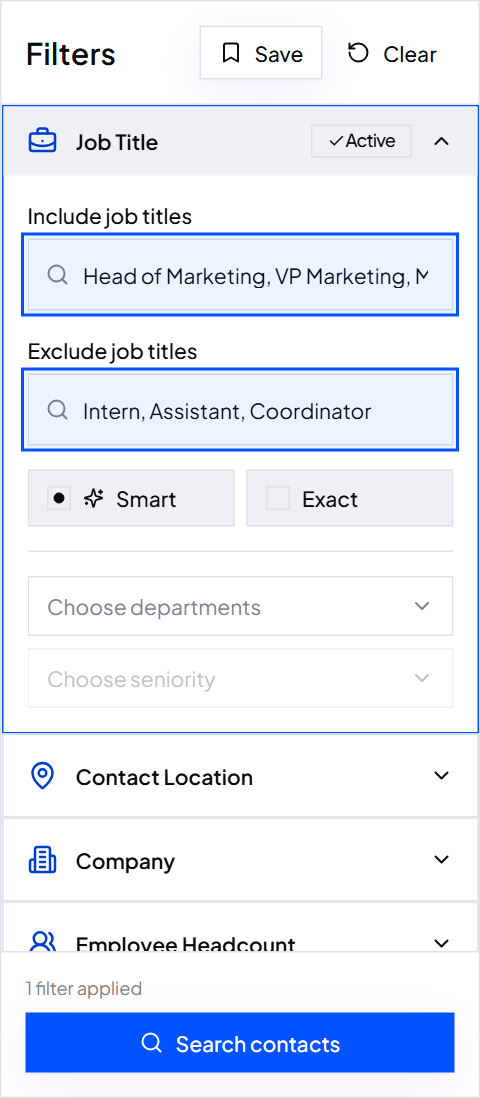
Step 1: Add the job titles
Priya adds her three titles to Job Title. Smart matching finds the common short forms too, so VP Operations also finds Vice President of Operations. She adds Assistant, Intern and Coordinator to Exclude job titles.
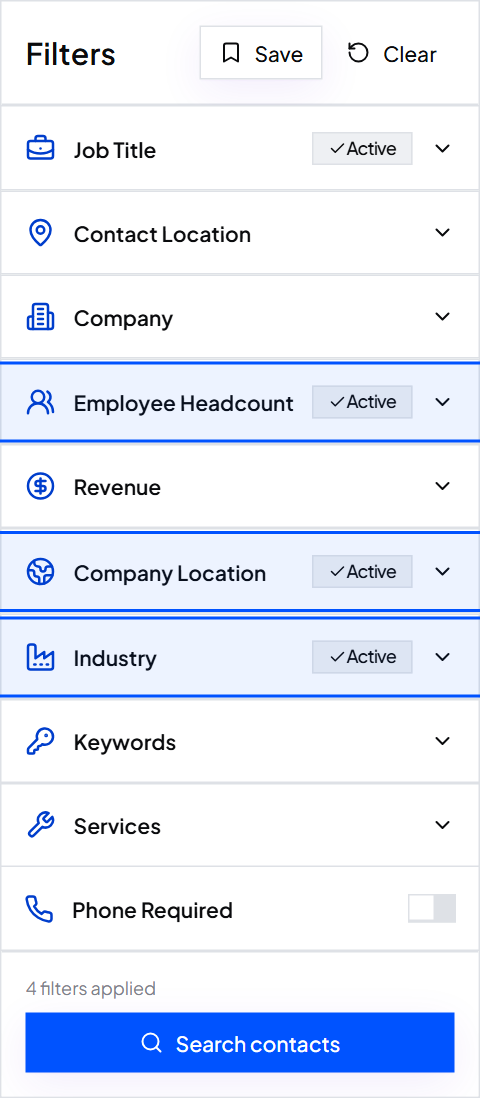
Step 2: Add the company filters
She picks the Employee Headcount ranges that cover 51 to 500, sets Company Location to United States, chooses the transportation and logistics Industry, and turns on Email required. If her team planned to call, she'd turn on Phone required as well.
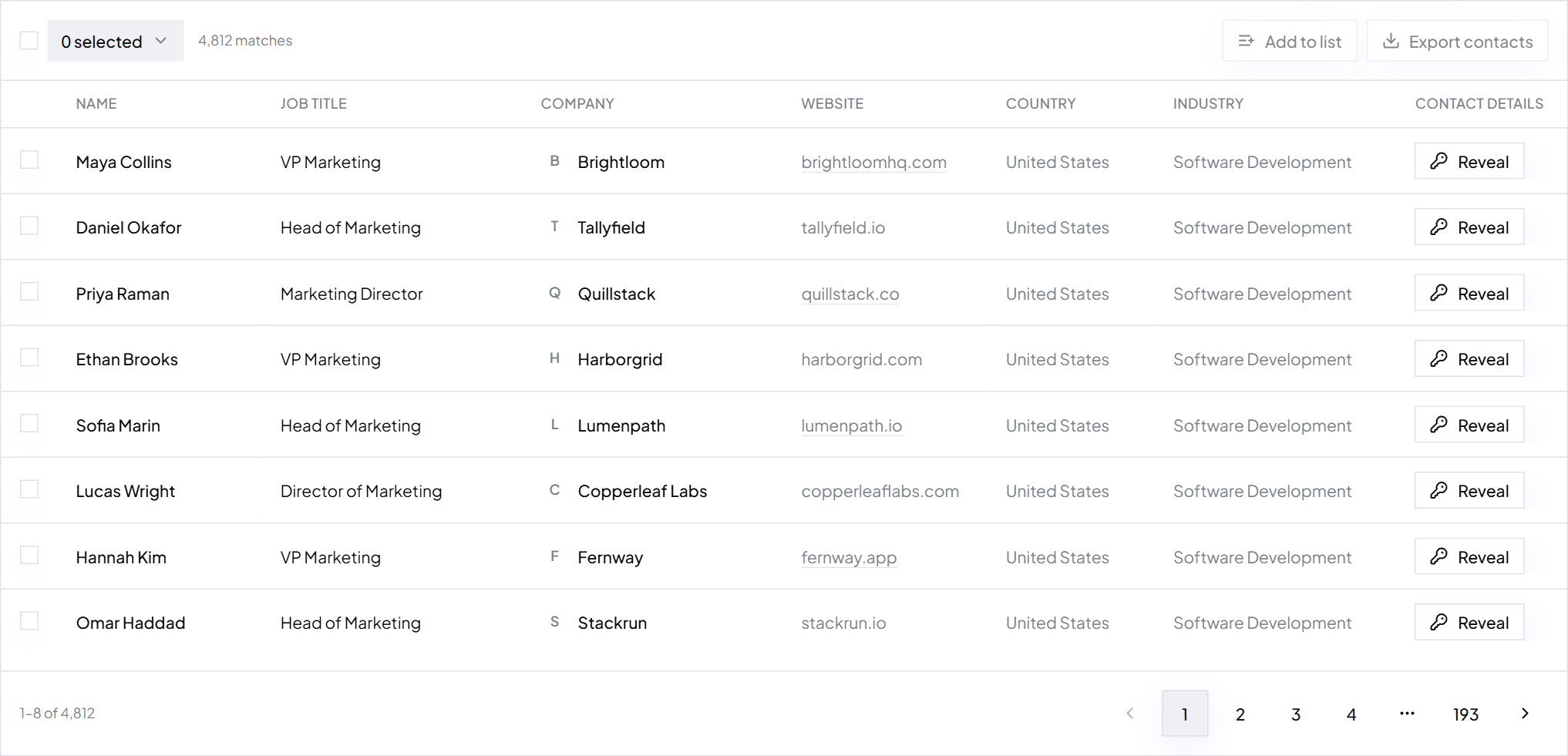
Step 3: Search and check a sample
Results show right away in a table. Priya reads the total, then opens ten rows at random. Are these fleet people at trucking companies? If not, she tightens a filter and searches again.
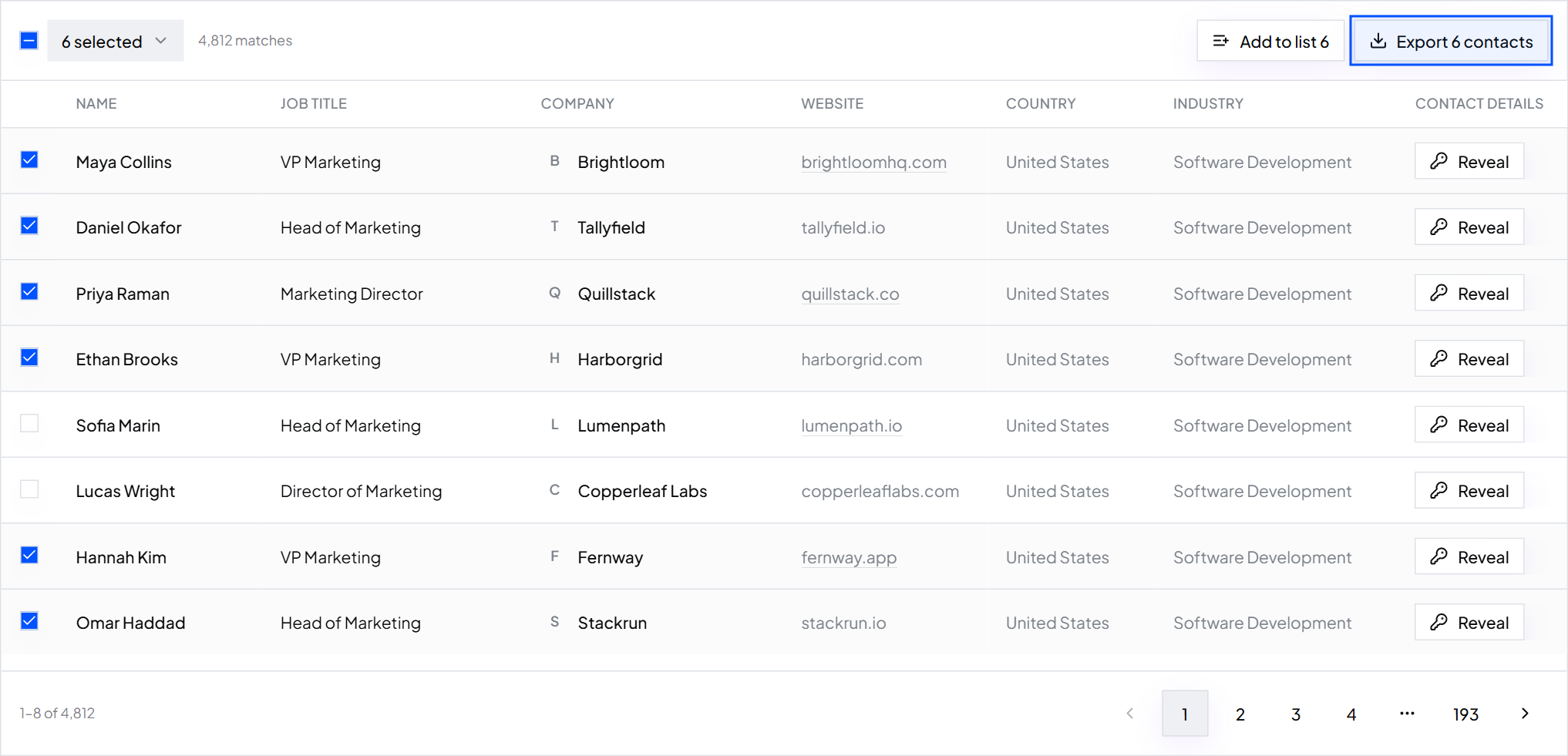
Step 4: Export and save the search
She ticks the contacts she wants, clicks Export, and gets a CSV with names, titles, companies, work emails, phones, LinkedIn URLs, websites, locations and industries. Then she clicks Save so she can rerun the same search next month.
Priya now has leads in the strict sense: possible buyers, with contact details. The next job is turning them into prospects by sending a short, relevant message. What a cold email is and how to write one covers that part.
Write your own lead definition
Fill this in before you build a list. Every blank should be something you can filter on or check.
We sell: ____ Companies: industry ____, size ____ employees, location ____ People: job titles ____ Exclude: titles ____, keywords ____ Must have: work email / mobile number Why now: ____ A lead becomes a prospect when: ____
Common mistakes
- Calling every contact a lead. If they can't plausibly buy, they're noise in your CRM.
- A definition you can't search for. “Forward-thinking companies” isn't a filter. “Software companies with 50 to 200 employees” is.
- Leads without contact data. A list of names with no verified email is research, not leads.
- No status column. Without it you can't tell who you contacted, who replied and who said no.
- What is a lead in sales?
- A lead is a person or company that could become your customer and that you have a way to contact. It hasn't been qualified yet: you know who they are, but not yet whether they need you, can pay or want to talk.
- What does lead gen mean?
- Lead gen is short for lead generation, the work of finding possible buyers and getting their contact details. Inbound lead gen attracts buyers to you through search, content and ads. Outbound lead gen means finding the right people yourself, for example in ContactYard, and reaching out.
- What is the difference between a lead and a prospect?
- A lead is anyone who could buy and whom you can contact. A prospect is a lead you've checked is a real fit and worth working. Every prospect was a lead first, but most leads never become prospects.
- What are the main types of sales leads?
- By temperature: cold, warm and hot. By qualification: information-qualified (IQL), marketing-qualified (MQL), sales-qualified (SQL), product-qualified (PQL) and service-qualified leads. By source: inbound and outbound.
- What is a qualified lead?
- A qualified lead is one your team has checked against its criteria, such as fit, need, budget and authority, and decided to pursue. BANT (Budget, Authority, Need, Timeline) is a common checklist for this.
- How do I get sales leads quickly?
- Use a B2B contact database. In ContactYard you filter by job title, company size, industry and location, see matching people right away, and export them with verified work emails and mobile numbers in one credit per contact.
What to do next
Turn your lead definition into a real list in a few minutes. Start free with ContactYard, or read how to get B2B leads for every method ranked by speed and cost.
Keep reading
How to get B2B leads: 9 ways, ranked by speed and cost
What B2B lead generation is, nine ways to get B2B leads with the fastest and cheapest marked, a step-by-step outbound process, the tools you need, and what month one costs.
Ideal customer profile: definition, examples and template
What an ICP is, why it matters, seven examples, a fill-in template and an A, B, C scoring sheet, plus how to turn it into a list of real contacts.
How to build a prospect list: steps, techniques and an example
Six steps from a one-line buyer description to an exported, verified prospect list, plus a filled-in example, 10 prospecting techniques and how to keep the list fresh.