
What is firmographic data? Meaning, attributes and examples
Firmographic data describes a company the way demographic data describes a person. See the attributes, three full company profiles and how to turn them into a list.
Firmographic data is information that describes a company: its industry, size, revenue, location and structure. It does for businesses what demographic data does for people, and B2B sales and marketing teams use it to decide which companies to target.
If you sell to companies, firmographics are the first filter on every list you build. This guide covers the firmographic meaning, the eight attributes that matter, three full example profiles, how firmographic data compares with demographic, technographic and intent data, and how to turn it into a list of real contacts in minutes.
Firmographic meaning and where the word comes from
The word is a blend of firm and demographics. Demographics sort people by facts like age, income and where they live. Firmographics sort companies by the same kind of fixed, checkable facts: what they do, how big they are and where they are based.
The idea comes from business-to-business market segmentation. In 1984, Benson Shapiro and Thomas Bonoma described a nested approach in Harvard Business Review. Its outermost layer is company demographics: industry, company size and customer location. That layer is the first and easiest cut, and it is what most teams now call firmographics. You will also see company demographics, business demographics and emporographics used for the same thing.
So what is firmographics, in one line? It answers the question: what kind of company is this? It doesn't tell you what software the company runs, what it is researching this week or who works there. Those are other data types, covered further down.
The main firmographic attributes
Most firmographic information fits into eight attributes. Each one is a fact you can look up and check.
| Attribute | What it describes | Example value |
|---|---|---|
| Industry | The main kind of business | Software Development |
| Sub-industry | The niche inside that industry | Payroll and HR software |
| Employee headcount | How many people work there, as a band | 101 to 250 employees |
| Revenue | Yearly sales, as a band | $20M to $50M |
| Location | Headquarters city and country, plus other offices | Austin, United States |
| Company type and structure | Ownership and how the business is organised | Private, venture-backed, one subsidiary |
| Company age | Years since it was founded | Founded 2016 |
| Growth signals | Recent changes that show momentum | Hiring 12 engineers, new Toronto office |
Industry and sub-industry
Industry is almost always the first cut. Official systems use codes: NAICS (the North American Industry Classification System) uses codes of up to six digits, and the older SIC system uses four. Sales databases mostly use plain labels instead, such as Software Development or Hospitals and Health Care. The sub-industry matters because one label like software covers both a two-person app studio and a payroll platform with 200 staff.
Employee headcount and revenue
Size tells you about budget, team structure and how many people sign off on a purchase. Headcount is the easier of the two to find. Private companies rarely publish revenue, so revenue figures for them are estimates. Work in bands, such as 21 to 100 employees or $5M to $20M, not exact numbers.
Location
Location covers the headquarters and, where it matters, the other offices. It decides territory, language, time zone, currency and which laws apply to your outreach. A company headquartered in London with a large team in Berlin can belong in two territories at once.
Company type, structure and age
Type covers public or private, venture-backed, family-owned, nonprofit and government. Structure covers parent companies, subsidiaries, franchises and multi-site businesses. Age is simple: a three-year-old startup and a 40-year-old manufacturer buy in very different ways, even at the same headcount.
Growth signals
Hiring sprees, funding rounds, new offices and acquisitions sit on the line between firmographic and intent data. They describe the company, but they also hint at timing. Use the fixed attributes to decide who could buy, and growth signals to decide who to contact first.
Firmographic data examples: three company profiles
Here is what a complete firmographic profile looks like. All three companies are fictional.
Northwind Payroll (B2B software)
- Industry
- Software Development
- Sub-industry
- Payroll and HR software
- Employee headcount
- 101 to 250
- Revenue
- $20M to $50M
- Headquarters
- Austin, Texas, United States
- Company type
- Private, venture-backed
- Founded
- 2016
- Growth signals
- Hiring 12 engineers, opened a Toronto office this year
Fernway Logistics (freight and warehousing)
- Industry
- Transportation, Logistics, Supply Chain and Storage
- Sub-industry
- Freight forwarding and warehousing
- Employee headcount
- 501 to 1,000
- Revenue
- $100M to $500M
- Headquarters
- Rotterdam, Netherlands
- Other locations
- Antwerp and Hamburg
- Company type
- Private, family-owned
- Founded
- 1987
- Growth signals
- Bought a smaller cold-storage firm last year
Harborgrid Dental Group (healthcare)
- Industry
- Hospitals and Health Care
- Sub-industry
- Dental clinics
- Employee headcount
- 21 to 100
- Revenue
- $5M to $20M
- Headquarters
- Manchester, United Kingdom
- Company type
- Private, multi-site, six clinics
- Founded
- 2009
- Growth signals
- Opening two clinics, hiring a practice operations manager
Read them side by side and the sales approach writes itself. Northwind is young and growing, so it buys tools to keep up with hiring. Fernway is large, older and family-run, so decisions go through a few senior people and take longer. Harborgrid is small but spread over six sites, so anything that saves admin time per clinic is easy to explain. You know most of that before you write a word.
Firmographic vs demographic vs technographic vs intent data
These four data types answer different questions. Firmographics pick the company. The others tell you about the person, the tools or the timing.
| Data type | Describes | Answers | Examples | How often it changes |
|---|---|---|---|---|
| Firmographic | The company | What kind of company is this? | Industry, headcount, revenue, location | Slowly, over months or years |
| Demographic | A person | Who is this person? | Job title, seniority and department in B2B; age and income for consumers | When they change jobs or get promoted |
| Technographic | The company's technology | What tools do they use? | CRM, website platform, cloud provider | When they switch tools |
| Intent | Buying behaviour | Are they looking to buy now? | Research on a topic, visits to review or pricing pages | Week to week |
Use them in that order. Firmographic data narrows the market to companies that could buy. Demographic data, mainly job title and seniority, finds the right person inside each company. Technographic and intent data help you rank and time the list. Skip the first step and the rest is wasted on companies that were never a fit.
How sales and marketing teams use firmographic data
- Segmentation. Split one big market into groups that share a problem. Marketing leaders at 11 to 20 person agencies and at 501 to 1,000 person agencies need different emails. See how to split a list into segments.
- Ideal customer profile. An ICP is mostly firmographics: the industry, size and location of the companies that get the most value from you. Write yours with the ICP guide.
- Territory planning. Assign reps by country, region or city, then balance territories by the number of matching companies, not by area on a map.
- Lead scoring. Give points for firmographic fit. A lead from your best industry and size band scores higher than one from a company type you rarely close.
- TAM (total addressable market). Count the companies that match your filters and multiply by what one customer pays a year. That is your first estimate of the market.
- Personalisation. Industry, size and location give you an honest first line that is true for everyone in a segment.
Worked example: a first TAM from firmographics (fictional numbers)
- Firmographic filters
- Software Development, 21 to 250 employees, United States and Canada
- Matching companies
- 4,000
- Average contract
- $6,000 a year
- First-pass TAM
- 4,000 × $6,000 = $24M a year
- Next check
- How many buyers you can actually reach at those companies
The last row is the one most teams skip. A market only counts if you can reach the people in it. Check whether your market is big enough for cold outreach.
Where to get firmographic data
There are four common sources. Three are free or already paid for. Only one gives you firmographics and the people at each company in the same step.
| Source | What you get | Cost | The catch |
|---|---|---|---|
| Company websites and annual reports | Industry, products, locations, sometimes headcount | Free | Slow, one company at a time |
| Government registries, such as Companies House in the UK or SEC EDGAR in the US | Legal name, registered address, incorporation date, filings, and revenue for public companies | Free | Little on size for private companies, and no contacts |
| Your CRM and website forms | Firmographics for leads and customers you already have | Already paid for | Only covers companies you know, and fields go stale |
| A B2B contact database | Firmographics for millions of companies, filterable, attached to verified contacts | Subscription | Quality depends on how often it is checked and refreshed |
For outbound, a B2B contact database is the right answer, and the fastest one is ContactYard. You filter by firmographics, see the matching people straight away and export them with their company details attached. ContactYard covers 100M+ verified B2B prospects, refreshes its data every 30 days and checks every work email before delivery.
Whatever source you use, check three things: how often the data is refreshed, how well it covers your countries and industries, and whether it uses size bands that match how you think about your market.
How ContactYard filters map to firmographics
Every firmographic attribute you need for outbound is a filter in ContactYard. Set the company first, then add job titles for the people.
| Firmographic attribute | ContactYard filter | How to use it |
|---|---|---|
| Industry and sub-industry | Industry | Pick industries such as Software Development, then narrow to sub-industries |
| Employee headcount | Employee Headcount | Choose bands from 1 to 10 up to 10,000+ employees |
| Revenue | Revenue | Choose bands from under $1M up to $1B+ |
| Location | Company Location | Filter by country or city |
| Niche or specialty | Keywords and Services | Find a niche no industry label covers, such as cold storage or payroll outsourcing |
| Named target companies | Company Domain | Paste up to 1,000 company websites in one search |
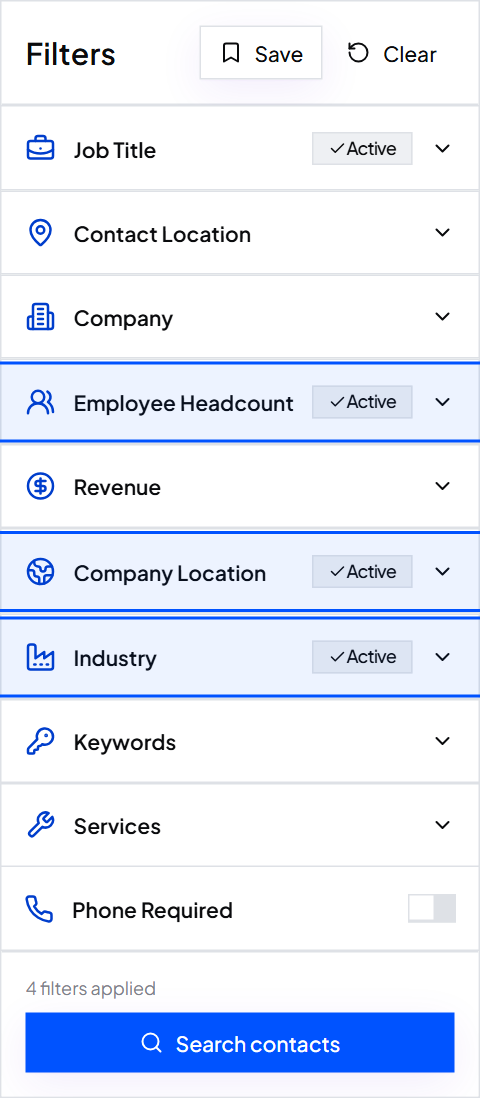
Results show immediately in a table. Tick the contacts you want, click Export and you get a CSV. Every exported contact carries its company, website, industry and location next to the name, job title, verified work email, phone and LinkedIn URL. Your firmographics travel with the list into your CRM or sending tool, ready for segmenting and scoring.
Worked example: selling to companies like Northwind
- Industry
- Software Development
- Employee Headcount
- 101 to 250 and 251 to 500
- Revenue
- $20M to $50M
- Company Location
- United States and Canada
- Keywords
- payroll, HR
- Job Title
- VP People, Head of People, HR Director
- Email required
- On
Smart matching on Job Title finds common short forms, so VP People also finds Vice President of People. Save the search and rerun it from Saved next month to pick up new matches.
The cost is simple. One credit is one complete contact: a verified work email, the mobile number when available, and email verification. Growth is $49 a month for 10,000 contacts. Scale is $99 a month for 30,000, about $3.30 per 1,000. Based on public pricing, Apollo.io costs about $18 per 1,000 and Lusha about $75, with phone numbers on separate credits.
Tip: Firmographic filters choose the companies. Job titles choose the people. You need both. How to build a prospect list walks through the full search.
Common mistakes with firmographic data
- Stacking every filter at once. Each filter shrinks the market. Start with industry and size, then add more only if the list is too broad.
- Treating revenue as exact. Revenue for private companies is an estimate. Use bands and don't split hairs between neighbouring ones.
- Forcing a niche into one industry label. If your buyers span several industries, use Keywords and Services to find what they do.
- Letting it go stale. Companies grow, move and get bought. A list built from old firmographics targets companies that no longer fit. See how fast contact data goes stale.
Put firmographics to work
Write down the industry, size band and location of your best customers. That is your firmographic profile. Turn it into a search, add job titles and you have a list. Start free with ContactYard and see how many matching contacts are waiting.
- What is firmographic data?
- Firmographic data is information that describes a company, such as its industry, employee headcount, revenue, location, company type and age. B2B teams use it to choose which companies to target, the way consumer marketers use demographics to choose people.
- What does firmographic mean?
- Firmographic is a blend of firm and demographic. It means relating to the traits of a company rather than a person. Firmographics, the noun, is the set of those traits.
- What are examples of firmographic data?
- Industry (Software Development), sub-industry (payroll software), headcount (101 to 250 employees), revenue ($20M to $50M), location (Austin, United States), company type (private, venture-backed), founding year (2016) and growth signals (a new office or a hiring spree).
- What is the difference between firmographic and demographic data?
- Firmographic data describes companies. Demographic data describes people. In B2B, demographic data usually means job title, seniority and department, while firmographic data means the industry, size and location of the employer.
- What is the difference between firmographic and technographic data?
- Firmographic data describes what a company is: its industry, size and location. Technographic data describes the technology it uses, such as its CRM or website platform. Firmographics decide whether a company could buy; technographics help you rank and tailor the pitch.
- Where can I get firmographic data?
- Company websites, government registries and your own CRM give you firmographics one company at a time. For outbound, use a B2B contact database. ContactYard lets you filter 100M+ verified prospects by industry, headcount, revenue and location, and every exported contact includes the company, website, industry and location.
Keep reading
Ideal customer profile: definition, examples and template
What an ICP is, why it matters, seven examples, a fill-in template and an A, B, C scoring sheet, plus how to turn it into a list of real contacts.
How to build a prospect list: steps, techniques and an example
Six steps from a one-line buyer description to an exported, verified prospect list, plus a filled-in example, 10 prospecting techniques and how to keep the list fresh.
How to split one big list into segments that each get their own email
One email to a whole list sounds like it was written for nobody. Group people by shared situation and write once per group.