
How to find a company email address: the inbox and the right people
Where to find a company's general email, how to work out its email format, how to reach the right person there, and how to get emails for hundreds of companies at once.
To find a company email address, check the company's contact page and website footer for its general inbox, such as info@ or hello@, then its Google Business Profile and social pages. To reach the right person at the company instead of a shared inbox, search ContactYard by Company Domain and Job Title and export their verified work email.
This guide is about emails at a company: the general inbox and the people who work there. It covers six ways to find them, how to work out a company's email format, how to find emails for hundreds of companies in one go, and why a named person almost always beats info@. If you already have one person's name and want their address, how to find someone's email is the shorter route.
Two kinds of company email address
"Company email" can mean a shared inbox or a person's work address. Decide which you need before you search, because they're found in different places.
| General inbox | A person's work email | |
|---|---|---|
| Looks like | info@, hello@, contact@, sales@ | jane.doe@, jdoe@, jane@ |
| Who reads it | Whoever is on duty, often an assistant or a shared tool | One named person |
| Where to find it | Contact page, footer, Google Business Profile | ContactYard, or the email format plus a check |
| Best for | Orders, support, press, asking to be routed | Sales, partnerships, hiring, anything for one role |
1. The fastest way: search the company in ContactYard
If you want the people, not the inbox, go straight to them. ContactYard holds over 100 million verified B2B prospects, including people other lead databases don't have, and every work email is verified before it reaches you.
- Start a search and open the Company filter. Type the company's website into Company Domain, or use Company name.
- Add the roles you want in Job Title. Smart matching catches common short forms, so VP Operations also finds Vice President of Operations.
- Results appear as you filter, with the total count. Tick the people you want and export a CSV with work email, mobile when available, job title and LinkedIn URL.
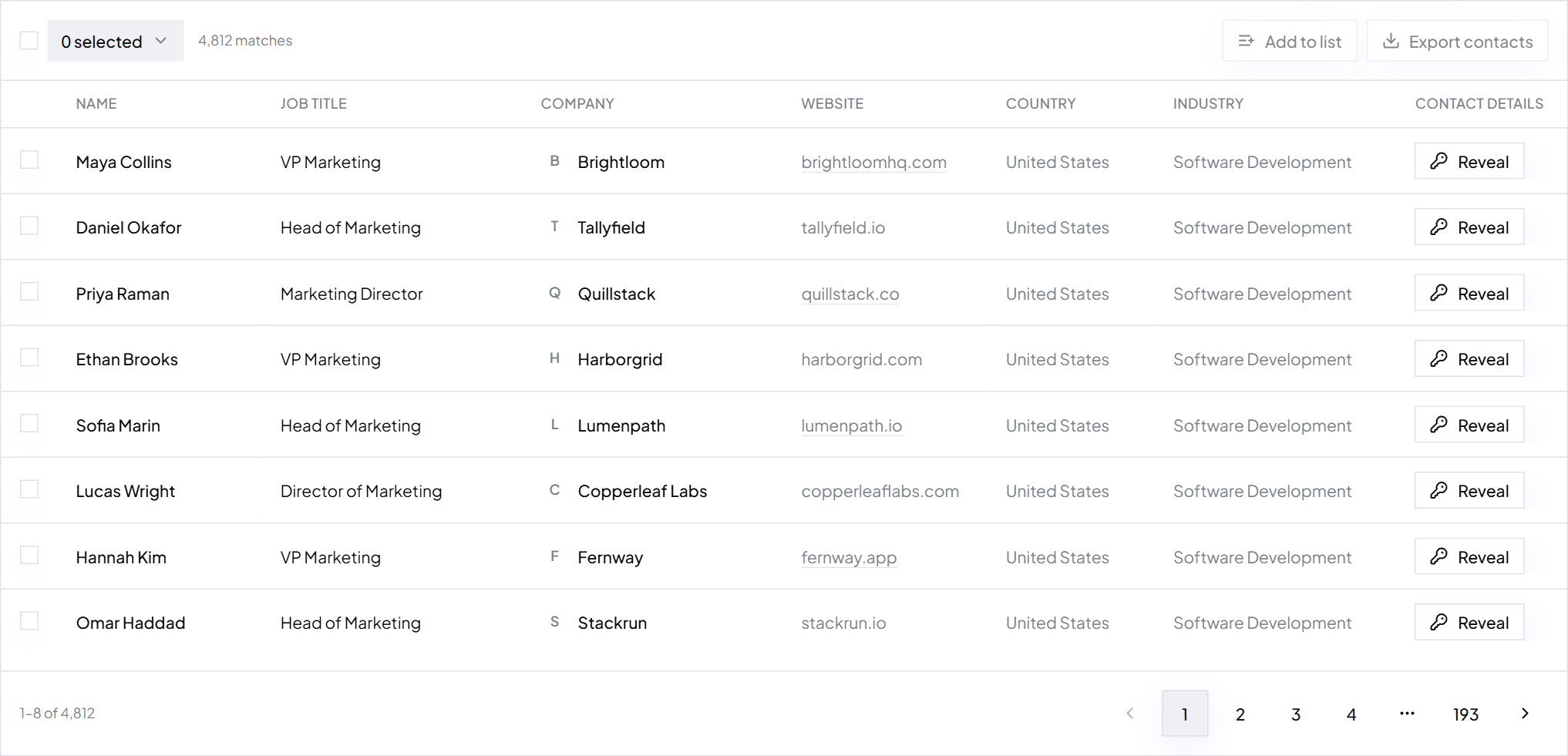
One credit gets each contact's verified work email, the mobile when available and the verification. No guessing, no separate checker. Not sure which role to pick? How to find decision makers in a company maps the titles that usually own each kind of purchase.
Where to find a company's general email address
When you do want the shared inbox, these free places find it for most companies. Work down the list.
2. The contact page and website footer
Most companies list a general address on their Contact, About or Support page, or in the footer of every page. Some hide it behind a contact form. If so, look at the privacy policy and terms pages: they usually name an address for data or legal requests, which also confirms the email domain.
Companies in Germany and Austria must publish an Impressum page with contact details, including an email address. For European companies, it's the most reliable place to look.
3. Google Business Profile and maps listings
Search the company name and look at the business panel on the right of Google results, or the listing in Google Maps. Local and service businesses often add an email, a phone number and a website. Apple Maps and Bing Places sometimes carry the same details.
4. Social profiles and directories
- LinkedIn company page. The About tab shows the website, and sometimes a phone number.
- Facebook and Instagram. Small businesses often list an email in the About section or a Contact button.
- Industry directories and trade associations. Member lists often include a general address.
- Chamber of commerce and local business directories. Useful for small local firms.
- Marketplaces and review sites. Supplier and agency listings often show a sales contact.
5. Google search operators
When the site doesn't show an address, search for pages that do. Swap in the company's domain.
site:northwind.com "@northwind.com" "@northwind.com" (email OR contact) "northwind.com" email filetype:pdf site:northwind.com (press OR media OR investors)
Press releases, PDF brochures and investor pages often show named staff addresses, not just the general one. Those are even more useful, because they reveal the company's email format.
6. WHOIS records
WHOIS once showed the owner of every domain, with an email address. Most registrars now hide personal details by default, so a lookup usually shows a privacy service instead. It's still worth a try for very small businesses that registered their own domain years ago.
Common general addresses
If you can't find one listed, these are the inboxes companies use most. They exist at many companies, but not all, so verify one before you send to it (how to check if an email address is valid shows how).
| Address | Usually used for |
|---|---|
| info@, hello@, contact@ | General questions |
| sales@ | New business and quotes |
| support@, help@ | Existing customers |
| press@, media@ | Journalists and press requests |
| partners@, partnerships@ | Partnership and reseller requests |
| careers@, jobs@ | Job applications |
| billing@, accounts@ | Invoices and payments |
How to find a company's email format
Most companies give every employee an address in the same pattern. Find the pattern once and you know roughly what anyone's address there looks like.
Step 1: Find one real staff address
Use the search operators above. A press release usually ends with a named media contact. A PDF brochure or event programme often lists a sales rep. One real address is enough to start.
Step 2: Read the pattern, then confirm it
Say you find priya.nair@fernway.com. That's first name, dot, last name. A second address in the same pattern makes it likely. Small companies often use first name only, and larger ones usually add the surname to avoid clashes.
| Format | For Jane Doe at Fernway |
|---|---|
| first.last@ | jane.doe@fernway.com |
| first@ | jane@fernway.com |
| flast@ | jdoe@fernway.com |
| firstlast@ | janedoe@fernway.com |
Step 3: Verify before you send
A format is a strong clue, not proof. People leave, names clash and some companies run catch-all servers that accept every guess. Check every built address before you send. The full worked example, with every common format and the cases that break the pattern, is in how to find someone's email.
Tip: Format guessing is fine for two or three people. For a list, guessed addresses push your bounce rate up fast. Use verified emails instead.
How to find the right person's email at a company
Knowing the format still leaves you with a question: who? The person who can say yes to your offer is rarely the person who reads info@.
- Name the role, not the department. "Head of Operations" is a search. "Operations" is a guess.
- Search the company in ContactYard with Company Domain and that Job Title. Add one or two related titles in case the company uses different words.
- Pick one or two people. The owner of the problem first, their manager second.
- Export and send to their verified work email.
Finding the right people at Fernway
- You sell
- Fleet maintenance software
- Company Domain
- fernway.com
- Job Title
- Fleet Manager, Head of Operations, VP Operations
- Results
- Three people, each with a verified work email
- Send to
- The Fleet Manager first, the Head of Operations second
How to find emails for many companies at once
Every free method above is one company at a time. If you have a list of target companies, from your CRM, an event attendee list or a spreadsheet of accounts, ContactYard does the whole list in one search.
Step 4: Collect the company websites
Put one domain per line, like northwind.com, without https:// or www. Domains match more reliably than company names, because names are spelled many ways.
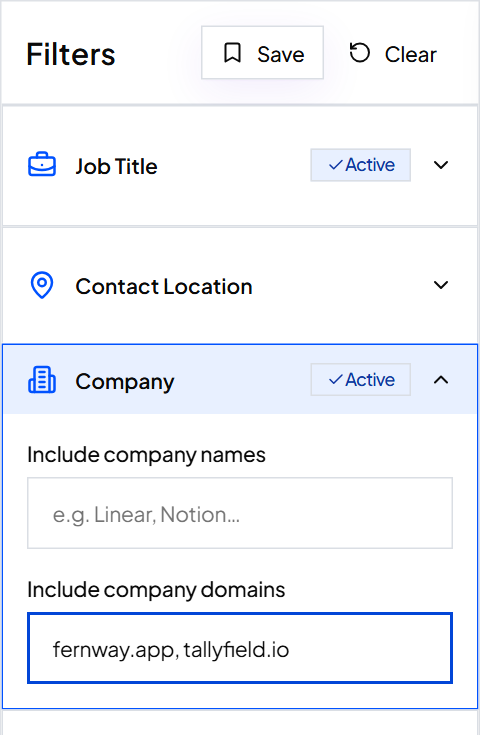
Step 5: Paste up to 1,000 domains into Company Domain
Open the Company filter and paste the whole column into Company Domain. ContactYard accepts up to 1,000 company domains in one search. Got more? Split them into batches of 1,000 and save each batch as its own search.
Step 6: Add the job titles you want
Add the roles to Job Title, and exclude the ones you don't want, such as Assistant or Intern. Turn on Email required so every row has a work email. The count updates as you filter, so you can see how many people you'll get across all your companies before you spend a credit.
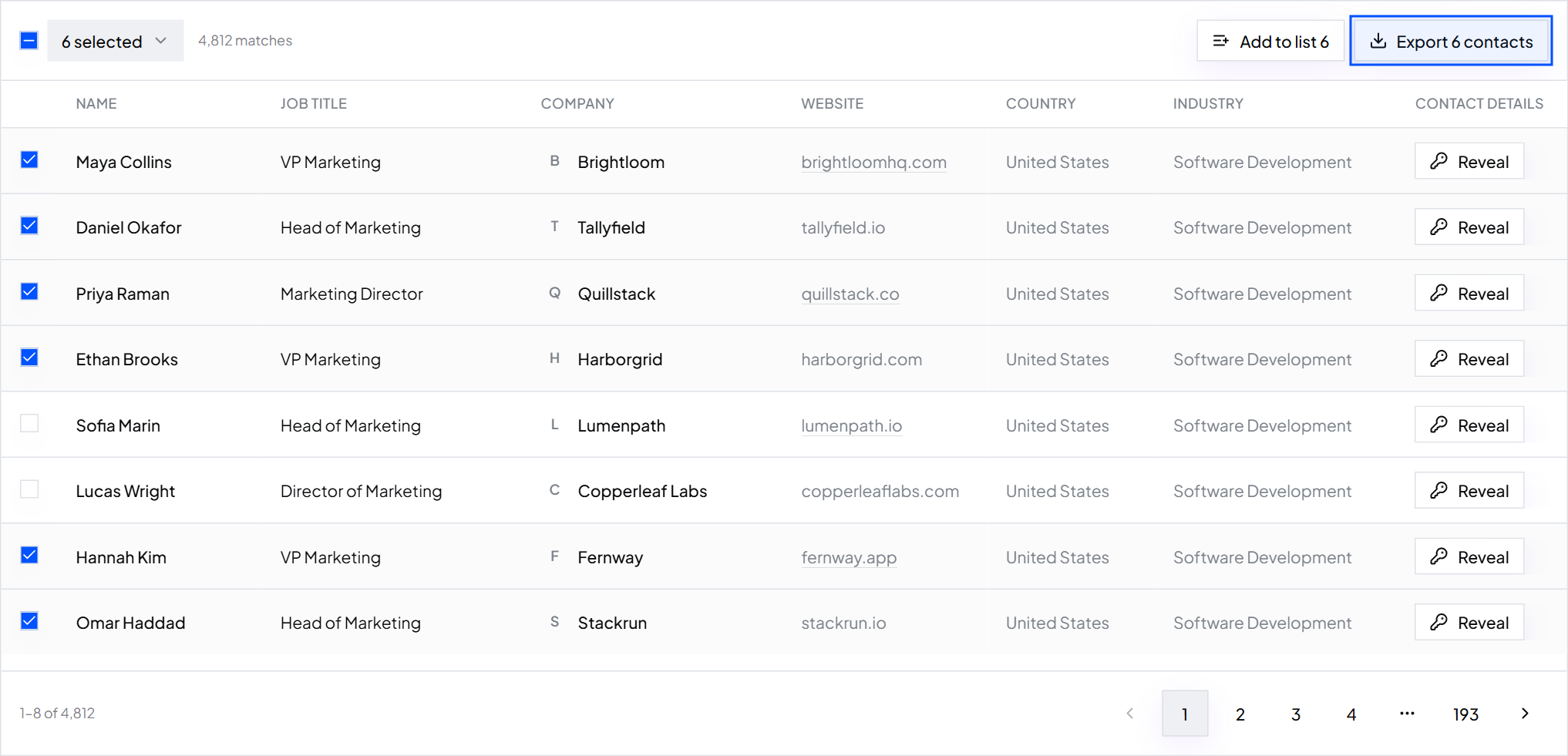
Step 7: Select and export
Tick the people you want and click Export. The CSV has name, job title, company, website, verified work email, mobile when available, LinkedIn URL, location, industry and headcount. Import it into Instantly, Smartlead, lemlist or your CRM.
Starting without a company list? Filter by industry, headcount, revenue and location instead. How to build a prospect list walks through it.
Why a person beats info@
General inboxes have a job, but outreach isn't it. A message to info@ lands in a queue with invoices, job applications, spam and customer questions. Whoever reads it decides in seconds whether to forward it, and most sales pitches don't get forwarded.
- A person can say yes. A shared inbox can only pass you along, if it bothers.
- A person can be followed up. Your second and third emails reach the same reader, who now knows your name.
- A person can be personalized. You can mention their role, their team or their company's news. info@ has no role.
- Shared inboxes hurt deliverability. Many senders remove role addresses from cold lists: nobody owns them, they rarely reply, and anyone who reads the box can mark you as spam. Clean a list before you send covers this.
Use info@ when you genuinely want to be routed, such as a partnership request with no obvious owner. For everything else, find the person.
Every method compared
| Method | Speed | Cost | Accuracy | What you get |
|---|---|---|---|---|
| ContactYard search | Seconds, up to 1,000 companies at once | One credit per contact, mobile included | High, every email verified before delivery | Named people with verified work emails |
| Contact page and footer | 1 to 5 minutes | Free | High when listed | General inbox |
| Google Business Profile | 1 minute | Free | Medium, listings go out of date | General inbox, phone |
| Social profiles and directories | 2 to 10 minutes | Free | Medium | General inbox, sometimes a person |
| Google search operators | 5 to 15 minutes | Free | Medium, pages go out of date | Staff addresses and the email format |
| Email format plus a check | 5 to 15 minutes per person | Free for a few checks | Medium, catch-all domains stay unconfirmed | A likely address for one person |
| WHOIS | 1 minute | Free | Low, usually hidden | Sometimes the site owner |
What company emails cost
Doing it by hand costs time: at ten minutes per company, 200 target accounts is more than 30 hours, and you'd still end up with guesses. A contact data tool does it in minutes, and the price per contact varies a lot.
| Provider | Public price per 1,000 contacts |
|---|---|
| ContactYard (Scale) | $3.30, mobile and verification included |
| Apollo.io | $18 |
| Lusha | $75 |
| ContactOut | $131 |
| UpLead | $371 |
ContactYard plans are $49 a month for 10,000 contacts on Growth and $99 a month for 30,000 on Scale, and unused credits roll over for two months. Start free and search your first target companies today.
Use company emails the right way
Write to people about their work, say who you are, and make it easy to opt out. The rules differ by country, and is cold email legal covers the main ones. ContactYard data is for business contact only; read the acceptable use policy.
FAQ
- How do I find the email address of a company?
- For the general inbox, check the contact page, the website footer, the privacy policy and the company's Google Business Profile. For a person at the company, search ContactYard with the company's domain in Company Domain and the role in Job Title, then export their verified work email.
- How can I find email addresses for businesses in bulk?
- Collect the company websites in one column and paste up to 1,000 of them into ContactYard's Company Domain filter. Add the job titles you want, turn on Email required, then select the results and export a CSV with verified work emails and mobiles when available.
- How do I find a business email address for free?
- Look at the contact page, footer and legal pages, the Google Business Profile, the LinkedIn company page and Facebook About section. Google searches like site:domain.com "@domain.com" often surface staff addresses too. ContactYard also gives you free trial credits when you sign up.
- How do I search a company email address by domain?
- Search Google for site:domain.com "@domain.com" and "@domain.com" filetype:pdf to find addresses published on the web. To get the people at that domain, enter it into ContactYard's Company Domain filter and add the job titles you need.
- Can I find every employee's email at a company?
- You can find the people whose roles matter to you. Search the company's domain in ContactYard and add one or more job titles, or leave Job Title empty to see everyone listed at that company. Each contact comes with a verified work email.
- Should I email info@ or a person?
- A person, almost always. A named decision maker can reply, be followed up and be written to about their own job. Use info@ only when you want the company to route you, such as a press or partnership request with no clear owner.
Keep reading
How to find someone's email address: 9 methods that work
The fastest way to find someone's work email, eight free methods, a worked example of cracking a company's email format, and how to check an address before you send.
How to find decision makers in a company
Who makes the buying decision at a company of each size and in each department, how to spot them, and how to find them at up to 1,000 companies in one ContactYard search.
How to build a prospect list: steps, techniques and an example
Six steps from a one-line buyer description to an exported, verified prospect list, plus a filled-in example, 10 prospecting techniques and how to keep the list fresh.