
How to find someone's email address: 9 methods that work
The fastest way to find someone's work email, eight free methods, a worked example of cracking a company's email format, and how to check an address before you send.
The fastest way to find someone's email address is to look up their work email in ContactYard with their LinkedIn profile URL, or their name and company domain. You get a verified work email, plus their mobile when available, for one credit. To find someone's email for free, check the company website, their LinkedIn contact info and Google, or work out the company's email format and verify your guess before you send.
This guide is about work emails, the address you need to reach someone about business. It covers all nine methods, a worked example with a fictional company, how to find emails for a whole list, and why guessed addresses hurt your sending. If you want a friend's personal address, there's a short section on that near the end.
Before you start: get three facts right
Most failed searches fail before they begin. Write down these three things first.
- Full name. Use the name they work under. A profile that says Bob may sit on a mailbox that says robert.
- Current company. People change jobs. Check their LinkedIn profile or the company's team page before you search, or you'll find an address that no longer works.
- Company email domain. This is the part after the @. It is usually the website domain, but not always. A brand site can be northwind-store.com while email runs on northwind.com. A press release or a staff address on the site will show you the real one.
1. The fastest method: look them up in ContactYard
ContactYard holds over 100 million verified B2B prospects, including people other lead databases don't have. You don't guess and you don't need a separate verifier. Every work email is checked before it reaches you, and the data is refreshed every 30 days.
There are two ways in, depending on what you already have.
You know the person
- Open Enrich Contacts.
- Give it their LinkedIn profile URL, or their first name, last name and company domain.
- Get back their verified work email and their mobile number when available.
You know the company and the role, not the name
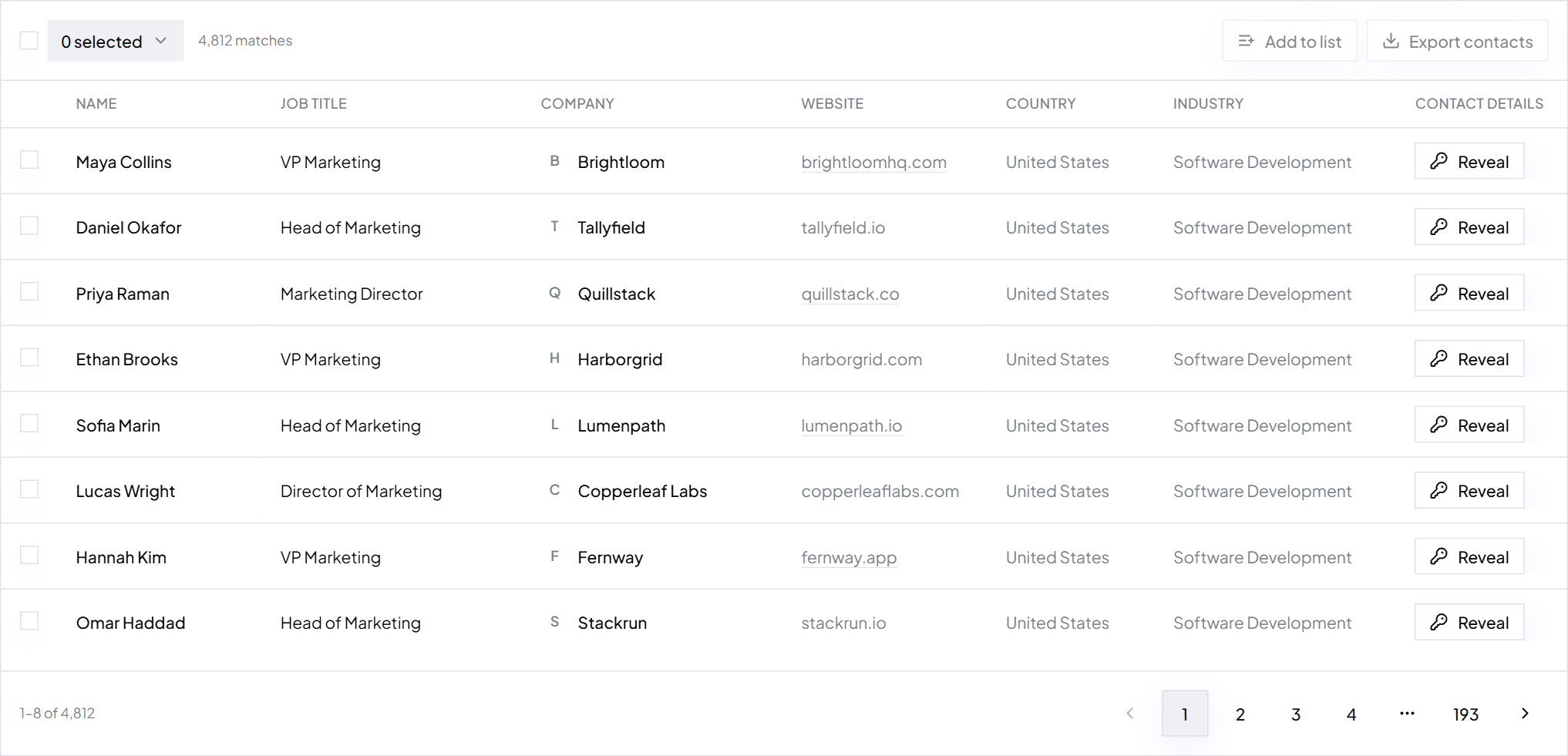
- Start a search and add the company with the Company name or Company Domain filter.
- Add the role with Job Title. Smart matching catches common short forms, so VP Marketing also finds Vice President of Marketing.
- Results show at once in a table. Tick the people you want and click Export to get a CSV with work email, phone, job title and LinkedIn URL.
Tip: One credit gets you the complete contact: verified work email, mobile when available, and the email check. Other tools typically charge 1 credit for the email, 2 to 10 more for the mobile and 1 more to verify, which is 4 to 12 credits per person. Start free with trial credits.
Free ways to find someone's email address
The free methods work. They are just slow, and each one only works for some people. Run them in this order, from most likely to least.
2. Check the company website
Small companies often list staff emails outright. Larger ones rarely list everyone, but they almost always leak the email format somewhere. Look in these places:
- Team, about and leadership pages. Some list emails under each photo.
- Press or newsroom pages. Press releases usually end with a named media contact and a direct address.
- Blog author bios. Writers often add their email or a contact link.
- Careers pages. Recruiters and hiring managers sometimes list their own address.
- PDFs. Brochures, price lists, event programmes and annual reports are full of staff addresses.
- Contact and legal pages. The privacy policy often names a data protection contact with a real address.
Even one staff address is a win. It shows the format, and the format is what you need for method 5.
3. Look at their LinkedIn contact info
Open their profile and click Contact info under their name. Members choose who sees their email: only themselves, first-degree connections, or wider. So you'll usually see it only if you're connected and they chose to share it. It is often a personal address, not the work one. The full walk-through is in how to find someone's email on LinkedIn.
4. Use Google search operators
Plain searches for a name return social profiles. Operators narrow Google to pages that are likely to show an address. Copy these and swap in your own person and domain.
"Dana Whitfield" "harborgrid.com" "Dana Whitfield" Harborgrid (email OR contact) site:harborgrid.com "@harborgrid.com" "harborgrid.com" email filetype:pdf site:harborgrid.com (press OR media OR contact)
| Search | What it finds |
|---|---|
| Name in quotes plus the domain in quotes | Any page that mentions both, such as speaker lists and press releases |
| Name plus company plus (email OR contact) | Bios and contact pages that name them |
| site: with the domain in quotes | Pages on the company's own site that show staff addresses, which reveals the format |
| Domain plus email plus filetype:pdf | Brochures, reports and event programmes with addresses inside |
| site: plus press, media or contact | Newsroom and contact pages with named contacts |
Tip: Google ignores most punctuation, so the @ in a search is a hint, not a filter. Scan the results for real addresses rather than trusting the snippet.
5. Guess the email format, then verify it
Most companies give every employee an address in the same format. Find the format and you can build anyone's address. This is the most useful free method, and the worked example below shows exactly how to do it.
6. Check social bios
People in sales, marketing, design and engineering often put a contact address in their bio on X, Instagram, GitHub or Medium. GitHub profiles show a public email when the owner sets one, and public commits can carry one too.
7. Look for a personal site or published work
Consultants, founders, writers and researchers often run their own site with a contact page. Conference speaker pages, podcast guest notes and newsletters work the same way. Academic papers usually name a corresponding author with an email.
8. Ask through the general inbox
Write a short note to the company's general address: who you want to reach and why, in two lines. Whoever reads it can forward a relevant message to the right person, and a forwarded email arrives with a warm introduction.
9. Ask a mutual contact, or check WHOIS
A shared connection can give you the address and an introduction in one step. WHOIS records once showed the owner of every website, but most registrars now hide personal details by default, so it rarely works for anyone other than small site owners.
Worked example: cracking a company email format
You want to email Dana Whitfield, Head of Operations at Harborgrid, a fictional logistics company. Her LinkedIn profile shows she still works there. You have no address.
Step 1: Find any real address at the company
You run site:harborgrid.com (press OR media OR contact). A press release from last spring ends with the media contact Liam Porter, liam.porter@harborgrid.com. That confirms the email domain matches the website, and it shows one real address.
Step 2: Read the format from it
liam.porter is first name, a dot, last name. One address is a clue, not proof. A second one, from a speaker list PDF, shows priya.nair@harborgrid.com. Two matching addresses make the pattern likely.
Step 3: List the common formats for your person
These are the formats you'll meet most often. Write Dana's version of each, with the one your evidence supports first. If you found no staff address at all, work down this list in order.
| Format | Dana Whitfield at Harborgrid |
|---|---|
| first.last@ | dana.whitfield@harborgrid.com |
| first@ | dana@harborgrid.com |
| flast@ | dwhitfield@harborgrid.com |
| firstlast@ | danawhitfield@harborgrid.com |
| f.last@ | d.whitfield@harborgrid.com |
| first_last@ | dana_whitfield@harborgrid.com |
| last.first@ | whitfield.dana@harborgrid.com |
Tip: Small companies often give everyone first@, because there is only one Dana. Once a company has two people with the same first name, it usually moves to a format with the surname in it.
Step 4: Check for the cases that break the pattern
- Shared names. If two people are called Dana Whitfield, the second often gets dana.whitfield2@ or a middle initial.
- Hyphenated and double surnames. Companies drop the hyphen, keep it, or use only one name.
- Accents. Accented letters are usually swapped for plain ones, so José becomes jose.
- Nicknames. The mailbox follows the HR record, so Bob is usually robert.
- Group companies. A subsidiary may use the parent's domain.
Step 5: Verify before you send
Run dana.whitfield@harborgrid.com through an email verifier. You'll get one of four answers, and only one of them means send.
What a verifier tells you
- Valid
- The mail server confirmed the mailbox exists. Send.
- Invalid
- The server rejected it. Try the next format on your list.
- Catch-all
- The server accepts every address, so nobody can confirm this one. Treat it as a guess.
- Unknown
- The server didn't answer the check. Treat it as a guess.
That took two searches, a PDF and a verifier, and it still might end on catch-all. Enter Dana's name and harborgrid.com in ContactYard and you get her verified work email, and her mobile when available, in one step.
Why guessed emails bounce, and what that does to deliverability
A guessed address is a bet. When it's wrong, the receiving server rejects it with a hard bounce. Send one and nothing happens. Send dozens and you have a problem.
- Mailbox providers watch your bounce rate. A high rate tells Gmail and Outlook you don't know who you're mailing, so more of your good emails go to spam.
- Catch-all domains hide bad guesses. The server accepts the email, so your verifier and your sending tool both look fine, and the message lands in an unread box or bounces later.
- Sending tools pause accounts. Many people who send cold email treat 3% as the point to stop and check the list. Some email services start reviewing accounts at about 5%.
- Damage outlasts the campaign. A sender reputation takes time to rebuild, and a damaged domain drags down every email you send from it.
Guessing works for one or two important people. It doesn't work for a list. The causes and the fix are in why your bounce rate is over 3%.
How to find a company email address vs a specific person
"How to find a company email address" means two different things. Pick the one you need.
| You want | Where to find it | Use it for |
|---|---|---|
| The company's general email | Contact page, website footer, Google Business Profile, invoices | Support, orders, press, asking to be routed to the right person |
| A department address | Contact page, press page, careers page | Press requests, partnership enquiries, job applications |
| A specific person's work email | ContactYard, or the free methods above | Sales outreach, partnerships, hiring, anything personal to one role |
| Several people at one company | ContactYard search with Company Domain and Job Title | Reaching the buying group at a target account |
General inboxes like info@ and sales@ are read by whoever is on duty that day. Use them to get routed. For a pitch, go direct to the person who owns the problem. To find who that is, read how to find decision makers in a company.
How to find business email addresses in bulk
Every free method above is one person at a time. For a list, you have two fast routes in ContactYard.
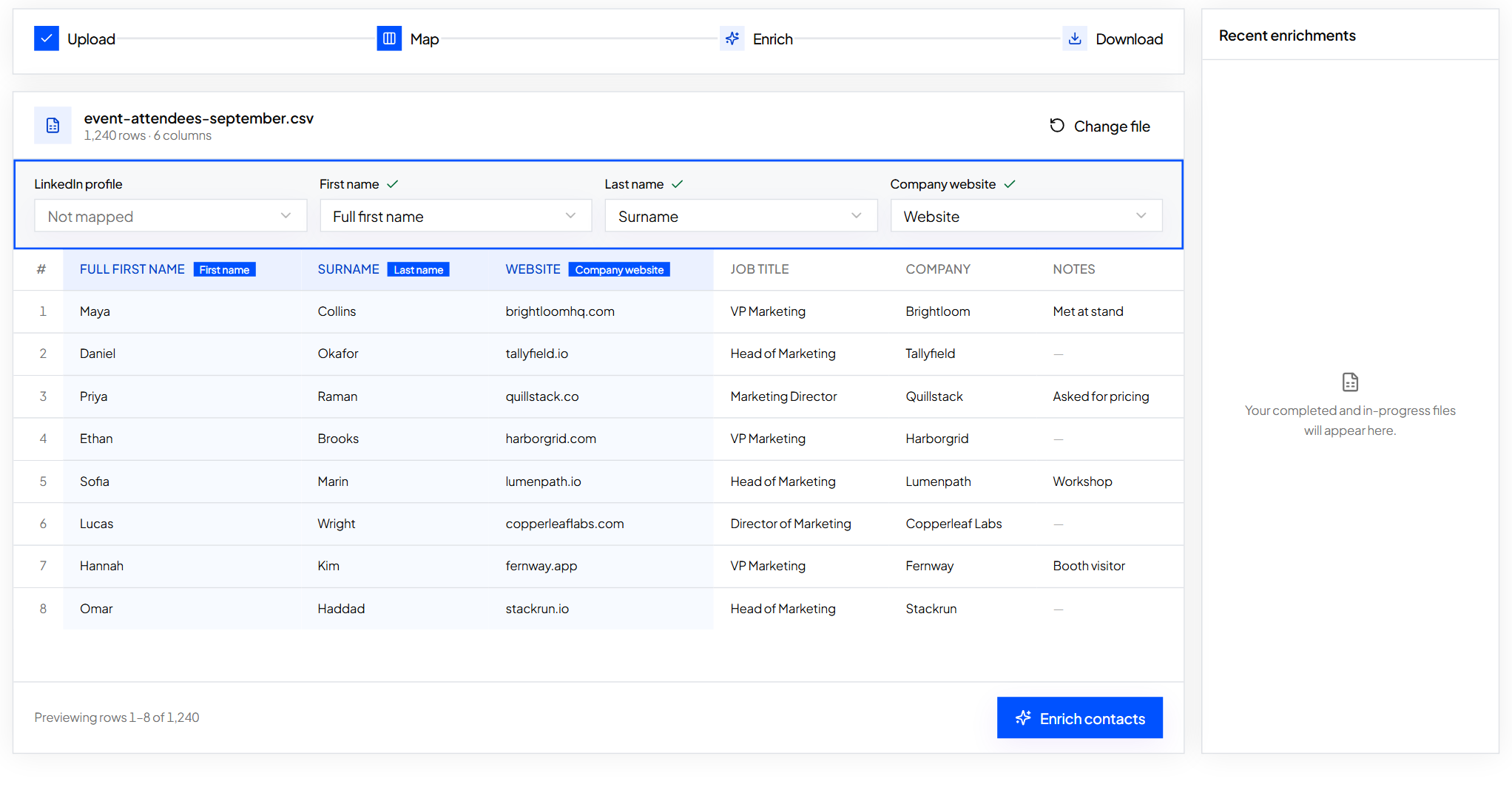
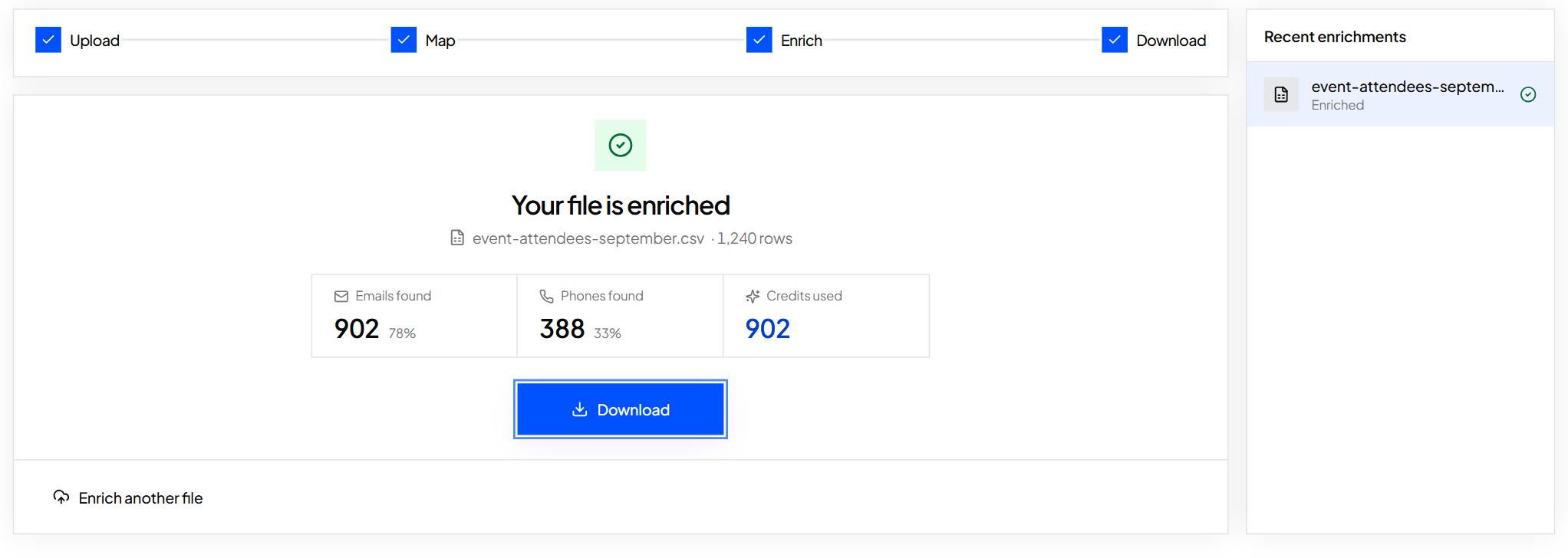
- You already have names. Upload your spreadsheet to Enrich Contacts and map the columns. Each row needs a LinkedIn profile URL, or first name, last name and company domain. You get the file back with verified work emails and mobiles filled in. Step by step: fill missing emails and phones in a spreadsheet.
- You have a list of companies. Paste up to 1,000 company websites into the Company Domain filter, add the job titles you want, and export the results.
- You're starting from scratch. Filter by job title, industry, employee headcount, revenue and location to build the list. See how to build a prospect list.
Every method compared
| Method | Speed per person | Cost | Accuracy | Works in bulk |
|---|---|---|---|---|
| ContactYard | Seconds | One credit, mobile included | High, every email checked before delivery | Yes, search or spreadsheet upload |
| Company website | 2 to 10 minutes | Free | High when listed | No |
| LinkedIn contact info | 1 minute | Free | High, often a personal address | No |
| Google search operators | 5 to 15 minutes | Free | Medium, pages go out of date | No |
| Format guessing plus verifier | 5 to 15 minutes | Free for a few checks | Medium, catch-all domains stay unconfirmed | Risky |
| Social bios | 2 to 5 minutes | Free | Medium, often personal | No |
| Personal site or published work | 5 to 10 minutes | Free | High when found, rare | No |
| General inbox | Days | Free | Depends on who reads it | No |
| Mutual contact or WHOIS | Days | Free | High from a contact, WHOIS rarely works | No |
What it costs to find 500 emails
Free is only free if your time is. Say the free route takes you five minutes per person once you're practised. For 500 people, that's about 42 hours of searching, with catch-all guesses still left over.
Here's what the same 500 contacts cost by tool, based on public pricing at each provider's lowest, most discounted rate.
| Provider | Price per 1,000 contacts | 500 contacts |
|---|---|---|
| ContactYard | $3.30, mobile included | $1.65 |
| Apollo.io | $18, phone uses separate credits | $9 |
| Lusha | $75, phone uses separate credits | $37.50 |
| ContactOut | $131 | $65.50 |
| UpLead | $371 | $185.50 |
ContactYard plans start at $49 a month for 10,000 contacts on Growth, and $99 a month for 30,000 on Scale. Unused credits carry over for the next two billing months. See pricing.
How to find someone's personal email
If you need a friend's or old classmate's personal address, ask a mutual contact, message them on the social app where you already know them, or check their personal website. Personal addresses are private for a reason. For anything about work, use the work address. It reaches them where they handle business, and it's the address people expect business email at.
Use the address the right way
Finding an address is the easy part. Send something relevant to the person's job, say who you are, and make it easy to opt out. The rules differ by country; is cold email legal covers them. ContactYard data is for business contact only; read the acceptable use policy and the business contact notice.
- Is there a way to find someone's email address?
- Yes. For a work email, the fastest way is ContactYard: enter their LinkedIn profile URL, or their name and company domain, and get a verified work email plus their mobile when available. Free methods include the company website, LinkedIn contact info, Google search operators and guessing the company's email format, then verifying it.
- How can I find someone's email address for free?
- Check the company's team, press and contact pages, look at their LinkedIn contact info, and search Google with their name and company domain in quotes. If you find one address at the company, use its format to build theirs, then run it through a verifier before you send. ContactYard also gives you free trial credits when you sign up.
- How do I find someone's work email?
- You need their full name, current company and the company's email domain. Enter those, or their LinkedIn profile URL, in ContactYard to get a verified work email. To do it by hand, find any staff address on the company website, copy its format and verify the result.
- How do I find a company's email address?
- For the general address, check the contact page, the website footer and the company's Google Business Profile. For a specific person at the company, search ContactYard by Company Domain and Job Title, or enrich their name and domain.
- How do I obtain email addresses for a whole list?
- Upload the list to ContactYard Enrich Contacts. Each row needs a LinkedIn profile URL, or first name, last name and company domain, and the file comes back with verified work emails and mobiles filled in. If you only have company names, paste up to 1,000 company websites into the Company Domain filter and add the job titles you want.
- Why did the email I guessed bounce?
- The format was wrong for that person, the person left, or the name breaks the pattern, such as a shared name, a nickname or a hyphen. Catch-all domains accept guesses at first and fail later. Always verify a guess, and don't guess for a list.
Keep reading
How to find someone's email on LinkedIn
LinkedIn only shows an email to the people a member chooses. Here is where to look, the manual methods that work, and the fastest way to get a verified work email from a profile URL.
How to fill in missing emails and phone numbers in a spreadsheet
Upload a contact file, map your columns, check the preview and get emails and phones added next to your original rows.
Why your bounce rate is over 3% and how to fix the list
The five usual causes of bounced cold emails, how to tell which one you have, and a safe routine for new lists.