
How to find an email address by name
To find an email address by name, pair the name with the person's company domain, because a name alone matches too many people. Then copy the company's email format and verify your guess, or enter the name and domain in ContactYard and get a verified work email for one credit.
Start from what you have
| You have | Do this |
|---|---|
| A name only | Find their current company first (step 1) |
| Name and company | Find the domain (step 2), or search the company in ContactYard |
| Name and company domain | Enrich Contacts, or guess the format and verify |
| A LinkedIn profile | See how to find someone's email on LinkedIn |
| A spreadsheet of names | Upload it to Enrich Contacts |
| A company but no name | See how to find a company email address |
The manual method, step by step
Say you want Maya Okafor, Head of Operations at Fernway, a fictional logistics company. Expect 5 to 15 minutes per person.
Step 1: Confirm their current company
An old employer gives you a dead address. Check their LinkedIn profile, or add what you know to the search.
"Maya Okafor" Fernway "Maya Okafor" "head of operations" site:linkedin.com/in "Maya Okafor" Fernway
Step 2: Find the company domain
Take it from the company website's address, then check it's the one staff use.
- Subsidiaries often send from the parent's domain.
- Rebrands can leave staff on the old domain.
- Country sites may not match the email domain.
For this walkthrough, Fernway's domain is example.com.
Step 3: Find the email format
Most companies use one format for everyone, so one real staff address is enough to start. Two make the pattern likely.
site:example.com "@example.com" "@example.com" (press OR media OR contact) "example.com" email filetype:pdf
Step 4: Build the address
Put the format your evidence supports first. With no evidence, work down the list.
| Format | Maya Okafor at Fernway |
|---|---|
| first.last@ | maya.okafor@example.com |
| first@ | maya@example.com |
| flast@ | mokafor@example.com |
| firstlast@ | mayaokafor@example.com |
Nicknames, shared names and hyphens break the pattern. The full format list and edge cases are in how to find someone's email address.
Step 5: Verify before you send
Run the guess through a verifier. Valid means send. Invalid means try the next format. Catch-all or unknown is still a guess. Details: how to check if an email address is valid.
Do this for one or two people, never a list. Wrong guesses hard bounce, and a high bounce rate sends your good emails to spam too.
The fast way: ContactYard
ContactYard is the best email finder by name for sales work. It holds over 100 million verified B2B prospects, including ones other lead databases don't have, and refreshes its data every 30 days.
You know the name and domain
- Put first name, last name and company website in a sheet. One row is fine.
- Upload it to Enrich Contacts as CSV or Excel and map the columns.
- Download it back with the verified work email and mobile when available.
You know the name, company and rough role
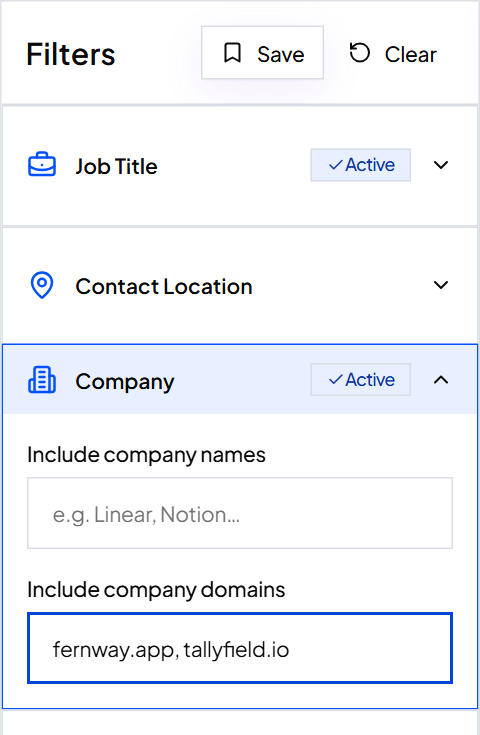
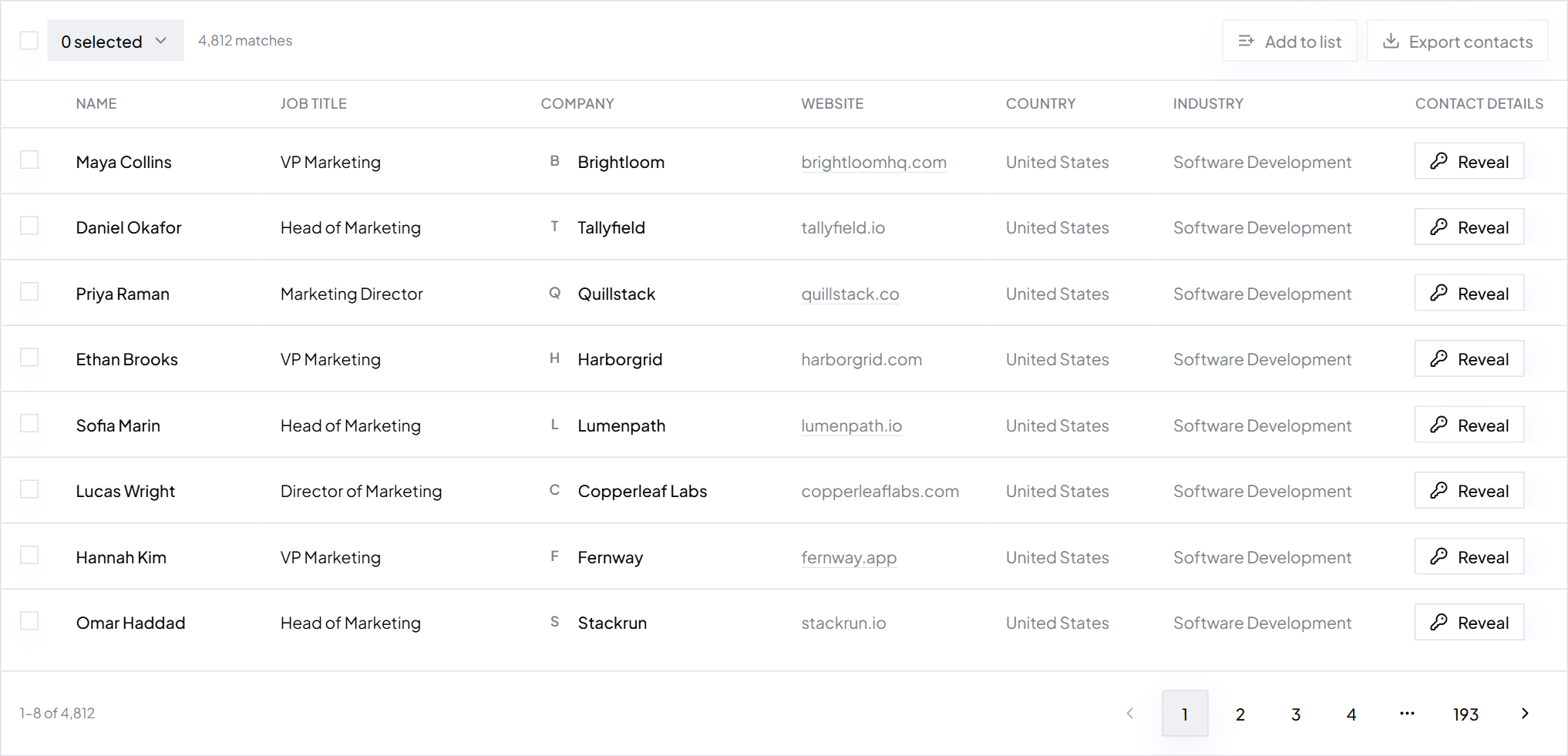
- Open Search and enter the website in Company Domain, or use Company name.
- Add their role in Job Title. Smart matching finds VP Operations as Vice President of Operations too.
- Spot the name in the results, tick them and Export.
Tip: One credit gets the verified email, the mobile when available and the check. Other tools charge 4 to 12 credits for the same contact. Start free.
Find emails for a whole spreadsheet of names
Guessing formats doesn't scale. Upload the sheet instead. These are the only columns you need:
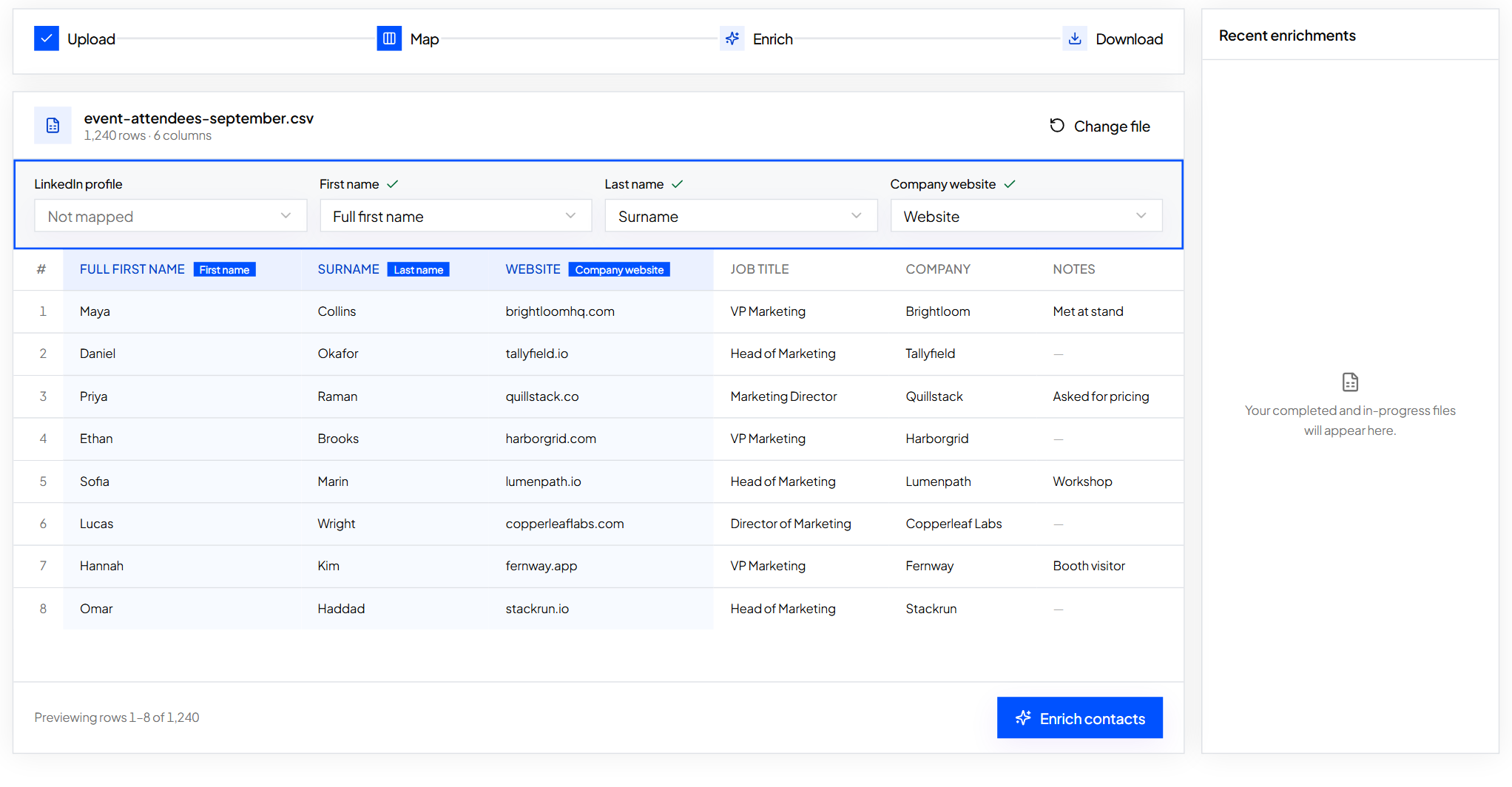
First name,Last name,Company website Maya,Okafor,example.com Tom,Reyes,example.org Priya,Nair,example.net
- Upload a CSV, TSV, TXT or Excel file with any other columns left in.
- Map First name, Last name and Company website.
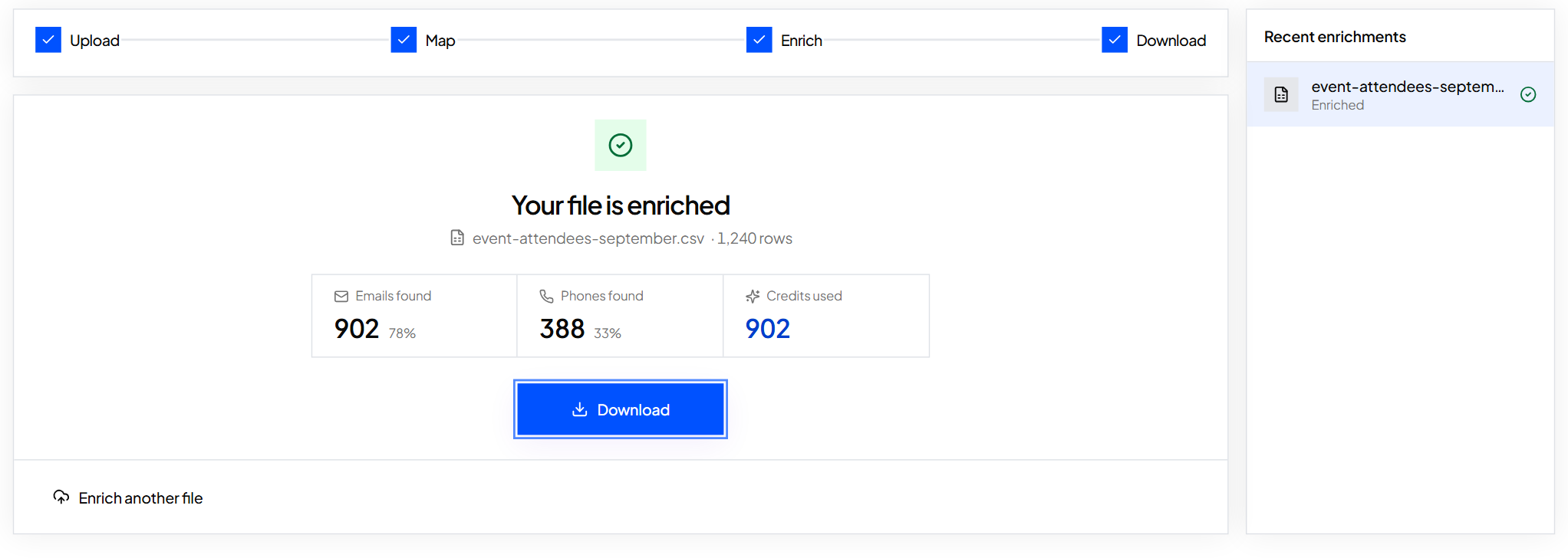
- Enrich and watch emails found, phones found and credits used.
- Download your file with the new columns added.
Messy sheet? See fill missing emails and phones in a spreadsheet. Then import the result into Instantly, Smartlead, lemlist or your CRM.
Free email finder by name: what you actually get
| Method | Speed per person | Cost | Works for a list |
|---|---|---|---|
| ContactYard | Seconds | 1 credit, mobile included | Yes |
| Format guess plus verifier | 5 to 15 minutes | Free for a few | Risky |
| Google with name and domain | 5 to 15 minutes | Free | No |
| LinkedIn contact info | 1 minute | Free, often personal | No |
Free lookup tools typically cap you at a handful of searches, then push a paid plan. At volume, price decides it: ContactYard is $3.30 per 1,000 contacts on Scale, against $18 at Apollo, $75 at Lusha, $131 at ContactOut and $371 at UpLead. See pricing.
FAQ
- How do I find an email address by name?
- Find the person's company domain, copy the company's email format and verify your guess. Or enter the name and domain in ContactYard Enrich Contacts for a verified work email.
- Can I find an email address with just a name?
- Rarely, because many people share a name. Use LinkedIn or Google to place them at a company first, then search with the name and domain.
- Is there a free email finder by name?
- Yes: Google, the company website and a free verifier cost nothing but take minutes per person. Start free on ContactYard to get it done in seconds.
- How do I obtain email addresses for a list of names?
- Upload the list to ContactYard Enrich Contacts with first name, last name and company website. It comes back with verified work emails and mobiles when available.
- What is a contact finder by name?
- A tool that takes a person's name and company and returns their work email and phone. ContactYard gives both for one credit.
Keep reading
How to find someone's email address
The fastest way to find a work email, eight free methods and how to crack an email format.
How to find a company email address
Find a company's general inbox, its email format and the right person's verified email.
How to check if an email address is valid
What verifier results mean, five ways to check one address, and how to check a whole list.