
How to write a cold email: step by step, with a before and after
Write a cold email that gets replies: the right list first, then the subject line, first line, problem, ask and sign-off, with a rewrite of a bad email and a checklist.
To write a cold email, open with a short, specific subject line, then write one line about the reader, name one problem they likely have, show one result you deliver, and end with one easy question. Keep the whole email under 120 words, in plain text, signed by a real person with an opt-out line. The part that matters most happens before you type: choosing a narrow, verified list, so every line you write is true for everyone who gets it.
This guide takes each part in order, with examples, a before and after rewrite of a weak email, a formula and a checklist. For what a cold email is, the domain setup and deliverability, read what is a cold email. If you just want something to paste, go to our cold email templates.
The parts of a cold email
Every good cold email has the same six parts. Each has one job, and none of them is long.
| Part | Its job | Length |
|---|---|---|
| Subject line | Gets the email opened without tricking anyone | 2 to 6 words |
| First line | Proves you picked this person on purpose | 1 sentence |
| Problem | Names something they already worry about | 1 to 2 sentences |
| Result and proof | Shows what changes, and that it has happened before | 1 to 2 sentences |
| Ask | One question that is easy to answer | 1 sentence |
| Sign-off | Real name, company, postal address and an opt-out | 3 to 4 short lines |
How to write a cold email, step by step
Step 1: Get the right verified list
A cold email is only as good as the list it goes to. The words that earn replies from heads of operations at 80-person heating companies sound random to a marketing manager at a bank. So choose the people first, then write for them.
ContactYard is the fastest way to do it. Search 100M+ verified B2B prospects, including people other lead databases don't have, and filter by job title, headcount, revenue, industry, location and keywords. The Job Title filter has Smart, Exact and Exclude modes, so “Operations Director” also finds the variants you'd miss and leaves out the assistants. Results and the total count update as you filter, so you know how big your segment is before you write a word.
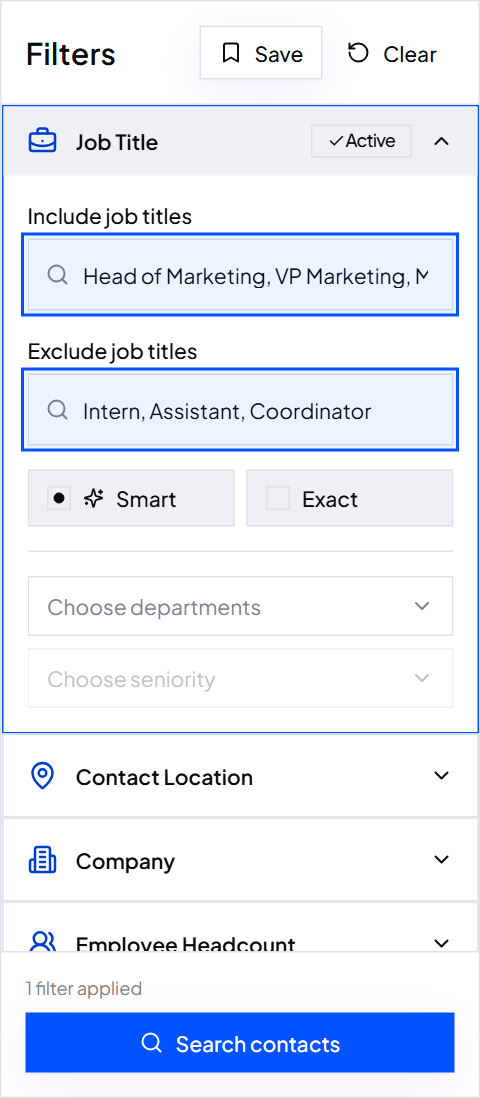
Export the segment as a CSV with first name, job title, company, website, work email, mobile and LinkedIn URL. Every work email is verified before you get it, and one credit covers the complete contact: verified email, mobile when available and the verification. Other tools charge 4 to 12 credits for the same contact. On the Scale plan that comes to about $3.30 per 1,000 contacts. How to build a prospect list walks through the filters.
Tip: Bounces ruin good copy. A list full of dead addresses pushes your best email into spam folders. Why your bounce rate is high explains the link.
Step 2: Write one sentence on why they should care
Before the email, write a one-line brief. If you can't fill it in, the email isn't ready yet, and no amount of wording will fix that.
[Job titles] at [type of company] struggle with [problem]. We fix it by [how], so they get [result]. Proof: [customer] got [specific result] in [time].
Filled in, fictional
- Who
- Heads of operations at field service companies with 50 to 200 staff
- Problem
- Technicians sit idle when a customer cancels on the day
- How
- Brightpath refills cancelled slots from the waiting list automatically
- Result
- The technician gets a new job instead of an empty hour
- Proof
- Harborgrid Heating refilled 70% of same-day cancellations in its first month
Step 3: Write the subject line
The subject line has one job: get the right person to open the email without misleading them. Short and plain wins. Write it like the subject of an email from a colleague, not a newsletter.
- Keep it to 2 to 6 words. Long subjects get cut off on phones.
- Make it about them. Their company, their problem or their news, not your product.
- Use sentence case or lowercase. Title Case and capitals read like marketing.
- Be honest. No fake “Re:” or “Fwd:”. In the US, CAN-SPAM requires a subject line that reflects what the email is about.
- Skip the spam words. “Free”, “guaranteed”, “act now” and exclamation marks.
| Weak | Better | Why |
|---|---|---|
| Brightpath + Fernway: Revolutionising Field Service!! | Same-day cancellations at Fernway | About their problem, no hype |
| Quick 15-minute demo? | idle technicians | Names the pain, not your ask |
| Re: our conversation | question about dispatch | Honest, and still reads like a colleague wrote it |
| Partnership opportunity | Fernway's new Leeds branch | A specific trigger shows you did the work |
More subject lines, matched to each template, are in our cold email templates.
Step 4: Write the first line
The first line shows in the inbox preview next to the subject, so it decides the open as much as the subject does. Use it to prove you chose this person on purpose. Make it about them, and make it true.
| Type | Example | Where it comes from |
|---|---|---|
| Trigger | Saw Fernway just opened a second branch in Leeds. | News, job posts, funding, new leaders |
| Observation | Your booking page offers same-day slots, which most heating firms don't. | Their website, from the Website column in your export |
| Role-based | Running operations for 60 technicians usually means the day's plan breaks by 10am. | Job title and headcount columns, so it works for a whole segment |
| Peer | We work with three other heating firms in Yorkshire. | Industry and location filters |
Avoid openers that waste the preview: “I hope this email finds you well”, “My name is”, “I wanted to reach out”, “I came across your profile”. None of them tells the reader anything about their own business.
Writing a unique first line for hundreds of people by hand is slow. Personalise cold emails with AI shows how to draft them from the Website column and check them before sending.
Step 5: Name one problem and prove you can fix it
Now say what you think is hard for them. One problem, in the words they'd use with a colleague. Not three problems, and not your feature list.
- Weak: “Brightpath is an all-in-one AI platform for field service management.” This is about you.
- Strong: “When a customer cancels on the day, that technician usually sits idle until someone rings round the waiting list.” This is about them.
Then add one line of proof: a result, a customer, a number. Specific beats impressive. “Harborgrid Heating refilled 70% of same-day cancellations in its first month” is more believable than “we've helped hundreds of companies grow”. No customers yet? Use a sharp observation about their business, or offer to do a small piece of the work first.
Step 6: Make one offer and one easy ask
The offer is what they get for replying. The ask is the question that earns the reply. Keep both small. A stranger won't give you 30 minutes, but they will answer a yes or no question.
| Ask | Effort for the reader | Use it when |
|---|---|---|
| “Worth a look?” | One word | Most first emails |
| “Is this on your list this quarter?” | One word | You want to qualify interest |
| “Want me to send the one-page breakdown?” | One word, and they get something | You have a useful asset |
| “Are you the right person, or is it someone else?” | A name | You're not sure who owns the problem |
| “Can we talk Tuesday at 3pm?” | A calendar check | After they show interest, not in the first email |
Giving something first works best when nobody has heard of you. Send something useful before asking for a call has ideas, and three offers to test in week one shows how to compare them.
Step 7: Sign off like a real person
End with your first name, then your full name, title, company and a postal address, and a plain opt-out line. That is what makes it a legitimate business email, and it is required in the US and many other countries. Is cold email legal has a full footer to copy.
Dana Dana Whitfield, Head of Partnerships, Brightpath 12 Example Street, Leeds LS1 4AB Not relevant? Reply "no" and I won't email again.
Skip the logo, the banner and the row of social icons. A plain text signature looks like a person wrote the email, because one did.
Step 8: Cut it to under 120 words
Cold emails get read on phones, between meetings. Aim for 50 to 120 words. Then cut:
- Every sentence that starts with “I” or “We” and doesn't mention the reader.
- Adjectives about your product: innovative, leading, all-in-one, cutting-edge.
- A second problem, a second offer or a second link.
- Any line you would skip if you were the reader.
Tip: Read the email on your phone before you send it. If you have to scroll, it's too long.
Step 9: Personalise at the right level
Not every email needs an hour of research. Match the effort to the size of the deal.
| Level | What changes per email | Time per email | Best for |
|---|---|---|---|
| Segment | First name, company, plus a line true for the whole segment | Seconds | Large lists of similar companies |
| One line | A unique first line from their website or news | 1 to 2 minutes, less with AI | Most B2B campaigns |
| Full | Opening, problem and offer written for one account | 10 minutes or more | Big deals, short lists |
Segment-level personalisation only works when the segment is tight. That is why the list comes first: narrow ContactYard filters, such as one industry, one headcount band and one job title group, make a single line true for everyone in the file. Split a big list into segments shows how.
Before and after: rewriting a bad cold email
Here is a typical first attempt from Brightpath, a fictional scheduling tool, to Sam, head of operations at Fernway Heating, a fictional 80-person heating company.
Subject: Brightpath + Fernway: Revolutionising Field Service Operations!! Dear Sir/Madam, I hope this email finds you well. My name is Dana and I am the Head of Partnerships at Brightpath, the leading all-in-one AI-powered platform for field service businesses. Founded in 2019, Brightpath helps companies of all sizes streamline scheduling, dispatch, invoicing, customer communication, inventory and reporting. Our innovative solution has helped hundreds of businesses grow faster and work smarter. I came across your company and thought you might be interested in learning more about how we could help you achieve your goals. Would you have 30 minutes next week for a demo? You can book a time on my calendar here: [link]. I've also attached our brochure and pricing. Looking forward to hearing from you! Best regards, Dana Whitfield
What's wrong with it:
- The subject line is hype. Capitals, a plus sign and two exclamation marks look like marketing mail.
- “Dear Sir/Madam”. Proof the sender doesn't know who they're writing to.
- The first three sentences are about Brightpath. Sam has learned nothing about his own business.
- Six features, no problem. Sam has to work out why any of it matters to him.
- Claims nobody can check. “Leading”, “innovative”, “hundreds of businesses”.
- A big ask, a link and an attachment. Thirty minutes from a stranger, plus two things that make spam filters suspicious.
- No postal address and no opt-out.
Subject: same-day cancellations at Fernway Hi Sam, Saw Fernway now covers Leeds as well as York. More technicians usually means more empty hours when a customer cancels on the day. Brightpath refills those slots from your waiting list automatically, so the technician gets a new job instead of a gap. Harborgrid Heating refilled 70% of same-day cancellations in its first month. Worth a look, or not a priority right now? Dana Dana Whitfield, Head of Partnerships, Brightpath 12 Example Street, Leeds LS1 4AB Not relevant? Reply "no" and I won't email again.
| Part | Before | After |
|---|---|---|
| Subject | Hype about the sender | Their problem, their company |
| Opening | Dear Sir/Madam, I hope this finds you well | A true fact about Fernway |
| Body | Six features | One problem, one result |
| Proof | “Hundreds of businesses” | One named customer, one number |
| Ask | A 30-minute demo and a calendar link | A yes or no question |
| Extras | A link and an attachment | None |
| Footer | Name only | Title, address and an opt-out |
The cold email formula
Every email in this guide follows the same shape. Paste it into your sending tool as a starting point. Curly brackets are columns from your export, square brackets are lines you write once per segment.
Subject: [their problem or news, 2 to 6 words] Hi {first_name}, [First line: one true thing about them or {company}.] [Problem: what's hard for people in their role at companies like theirs.] [Result: what changes, and how, in one line.] [Proof: one customer, one number.] [Ask: one yes or no question.] [Your first name] [Your full name], [Title], [Company] [Postal address] Not relevant? Reply "no" and I won't email again.
You may have seen named copywriting formulas. They all fit inside this shape:
| Formula | Stands for | When it fits a cold email |
|---|---|---|
| PAS | Problem, Agitate, Solve | The pain is well known and urgent |
| BAB | Before, After, Bridge | You can show a clear before and after |
| AIDA | Attention, Interest, Desire, Action | Rarely: it tends to run long for a first email |
Cold email writing checklist
Run every email through this before it goes out.
[ ] The list is one narrow segment, verified, exported in the last 30 days [ ] Subject line is 2 to 6 words, honest and about them [ ] First line is true for this person and isn't about me [ ] One problem, in the reader's words [ ] One result and one specific piece of proof [ ] One easy question as the ask [ ] Under 120 words, plain text, no attachments, at most one link [ ] Real name, company, postal address and an opt-out [ ] Every {variable} is filled, no blank greetings [ ] Reads on a phone without scrolling [ ] Follow-ups written before the first send
Writing mistakes that kill replies
- Fake familiarity. “Re:” subjects, “as promised” or “following up on our call” when there was no call.
- Broken merge fields. “Hi {first_name},” or “Hi ,” tells the reader it was a blast. Check the export for empty cells first.
- Jargon. If the reader has to translate it, they won't.
- Writing for everyone. A first line that would fit any company fits none of them.
Test, then improve
Your first version is a good guess, not a final answer. Send it to 100 to 200 people from one segment, then change one thing at a time: the subject line, the first line, the offer or the ask. Judge each version on positive replies, not opens, because privacy features in mail apps make open rates unreliable. Test a market with 500 emails lays out a simple plan.
Many replies come from follow-ups, so write them before you launch. How to follow up on an email covers timing and wording. When a segment works, save the ContactYard search and rerun it later to pull new people who match. ContactYard refreshes its data every 30 days, so the new matches are in their current jobs.
FAQ
- How do you write a cold email?
- Start with a narrow, verified list of the right people. Then write a 2 to 6 word subject line about them, one first line that is true for them, one problem they have, one result with proof, and one easy yes or no question. Sign off with your name, company, postal address and an opt-out, and keep it under 120 words.
- How do you write cold emails that get replies?
- Write to a small, tight segment so every line fits the reader, lead with their problem instead of your product, and ask a question they can answer in one word. Send 2 or 3 short follow-ups in the same thread, and test one change at a time.
- How long should a cold email be?
- Between 50 and 120 words, short enough to read on a phone without scrolling. If a sentence doesn't help the reader decide to reply, cut it.
- What should a cold email subject line say?
- Something specific to the reader in 2 to 6 words, such as their problem, their company or recent news about them. Use sentence case or lowercase, no exclamation marks, and never a fake “Re:” or “Fwd:”.
- How do you start a cold email?
- Greet them by first name, then open with one true line about them: a trigger such as a new office, an observation from their website, or a problem common to their role. Skip “I hope this email finds you well” and “My name is”.
- How do you end a cold email?
- End with one easy question, such as “Worth a look?”, then your name, title, company, postal address and a short opt-out line like “Reply no and I won't email again”.
What to do next
Pick one segment, start free on ContactYard, export 200 verified contacts and write one email with the formula above. Want a head start? Copy one of our cold email templates and fill it from the same export.
Keep reading
Cold email templates: 12 examples you can copy and paste
Twelve ready-to-paste cold email templates for sales, agencies, SaaS, partnerships and follow-ups, each with when to use it, plus filled-in examples and subject lines.
What is a cold email? How to send one that gets replies
A cold email is a first message to someone you have never spoken to. Learn how it differs from spam, how to set up sending, and copy a template that works.
How to personalize cold emails with AI using company websites
Let AI read each prospect's website and write a short, specific first line. Includes prompts you can copy.