
AI for sales prospecting: where it helps, with prompts to copy
Use AI to research accounts, score fit, sort segments and handle replies, and keep it away from contact data. A step-by-step workflow and four prompts you can copy.
AI for sales prospecting means using AI models for the reading, sorting and writing around prospecting: researching accounts from their websites, scoring fit against your ideal customer profile, writing first lines, summarising replies and drafting follow-ups. AI does not supply the contact data. The people, their work emails and their mobiles have to come from a verified B2B database like ContactYard, or your emails bounce.
This guide shows where AI saves real time in prospecting, where it causes damage, the types of AI prospecting tools, a step-by-step workflow from ContactYard export to send, and four prompts you can copy. If you're new to prospecting itself, start with what sales prospecting is.
Where AI actually helps in prospecting
AI is good at jobs that need reading a lot of text and producing a short, consistent answer. Prospecting is full of those jobs. Here are the ones worth handing over.
| Task | What AI does | What you check |
|---|---|---|
| Account research | Reads each company's website and writes a short brief: what they sell, to whom, anything new | That facts come from the site, not from the model's memory |
| Sorting into segments | Puts each company into one of the groups you define, such as by use case or customer type | A sample of 20 rows per group |
| Scoring ICP fit | Rates each company 1 to 5 against your written ideal customer profile, with a reason | That low scores really don't fit before you drop them |
| First lines | Writes one specific opening line per prospect from the website | Every line in the first batch. See personalize cold emails with AI |
| Reply triage | Labels replies as interested, not now, wrong person, unsubscribe and so on, and summarises them | Anything labelled interested or unsubscribe, by hand |
| Follow-up drafts | Drafts a reply or follow-up from the thread and your notes | Tone, facts and the ask, before sending |
| Call prep | Turns the research brief into three questions to ask on a call | That the questions fit your offer |
The pattern: AI reads and drafts, a person decides. Every task above has a clear input (a website, a reply, a profile) and a short output you can check in seconds.
Where AI doesn't help: contact data
Ask an AI chatbot for someone's work email and it will usually give you one. It looks right. It is often a guess: the model takes the company domain, picks a common pattern like first.last, and presents the result with the same confidence as a fact. Ask for a mobile number and it either refuses or makes one up.
Guessed emails bounce. Bounces tell Gmail and Outlook that you don't know who you're writing to, and your sending domain pays for it. A few campaigns on guessed data can put your next hundred emails in spam. Why your bounce rate is high explains the damage.
Same prospect, two sources
- Prospect
- Maya Lindqvist, VP Marketing, Fernway
- AI chatbot answer
- maya.lindqvist@example.com, a pattern guess with no check
- Real address
- mlindqvist@example.com, a different format
- Result of the guess
- Hard bounce, and a hit to your sender reputation
- ContactYard export
- The verified work email, the mobile when available and her LinkedIn URL, for one credit
AI also can't tell you who left their job last month, or who holds a title that didn't exist a year ago. That is a data problem, and ContactYard solves it: 100M+ verified B2B prospects, every work email verified before you get it, and data refreshed every 30 days. Get the data layer right first, then let AI work on top of it. To check an address you already have, see how to check if an email address is valid.
Tip: Never paste an email address an AI tool wrote into your sending tool. If it didn't come from a verified source, it doesn't go out.
Types of AI prospecting tools
“AI prospecting tools” covers several different kinds of software. They do different jobs, and they all depend on the same thing: a verified list to work on.
| Type | What it does | What it needs from you |
|---|---|---|
| AI SDR agents | Pick prospects, write and send sequences and answer replies with little human input | A tight ICP, a verified list, clear rules and someone watching the output |
| AI research columns | Spreadsheet-style tables, like Clay-style tables, where each column runs a prompt on every row | A list with a website or LinkedIn URL per row |
| AI writing in sending tools | Drafts first lines, emails and follow-ups inside the sequencer | Good inputs per row and a human review of the first batch |
| General AI assistants | Chat tools that can read web pages, summarise and draft | Copy-paste prompts and small batches |
| AI in CRMs and call tools | Summarise calls, suggest next steps and score deals | Clean records in the CRM |
Every row in that table starts with a list of real people with real contact details. ContactYard is that source. Build the list there, export the CSV, and feed it to whichever AI tool you prefer. One credit gets the verified work email, the mobile when available and the verification, so the AI layer never touches unchecked data.
An AI prospecting workflow, step by step
This workflow works with any spreadsheet that has an AI column, an AI table tool, or a chat assistant for small batches. The example follows Brightpath, a fictional company that sells scheduling software to multi-site dental and physio clinics.
Step 1: Write your ICP as a paragraph AI can read
AI scores and sorts against whatever you give it, so write your ideal customer profile in plain words. Brightpath's version: “Clinic groups in the United States with 3 or more locations and 50 to 500 employees, that book patients by phone or a basic online form, and that list several services such as physiotherapy, dental hygiene or sports rehab.” Keep it under 80 words. How to write an ideal customer profile helps if you are starting from scratch.
Step 2: Build the list in ContactYard
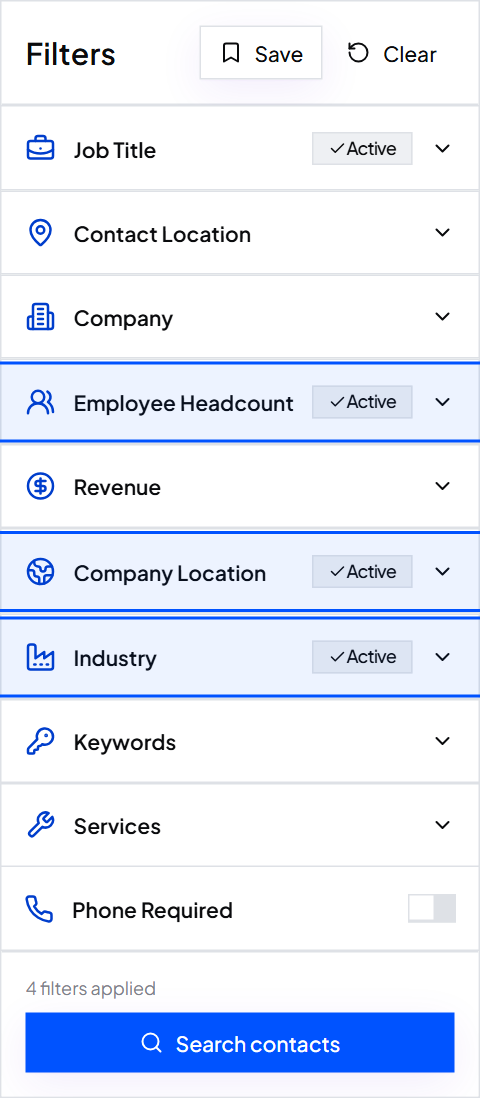
Turn the hard parts of the ICP into filters: Industry, Employee Headcount, Company Location, and job titles like Operations Director, Practice Manager and COO, with Assistant and Intern excluded. Use Keywords or Services for words a good-fit company uses about itself. Results appear instantly with the total count. Leave the soft parts, like how they book patients, for AI to judge from the website.
Step 3: Export the CSV with the Website column
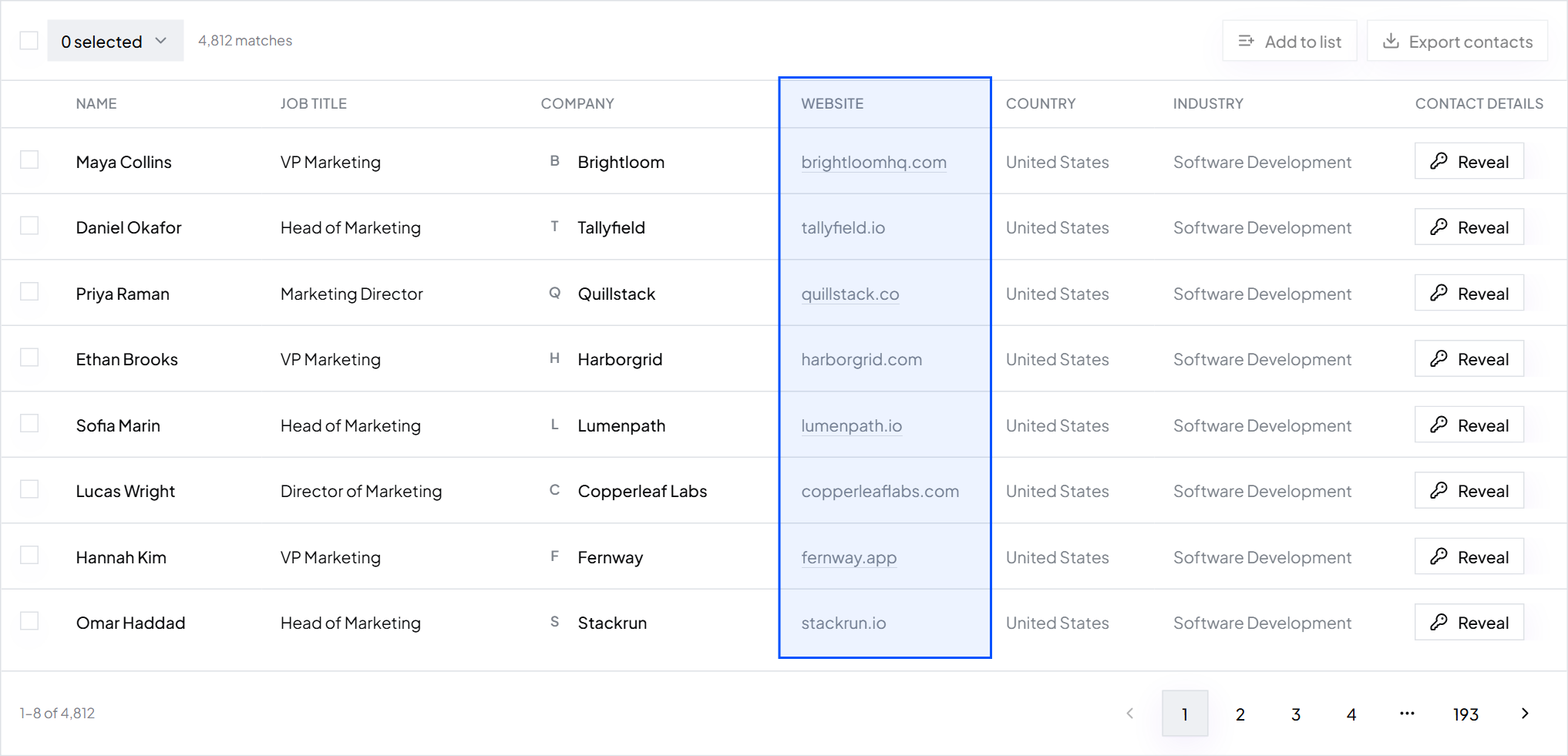
Tick the contacts you want and export. Every ContactYard export includes a Website column, which is what AI reads. You also get names, job titles, companies, verified work emails, mobiles, LinkedIn URLs, locations, industries and headcount, so the same file goes straight into your sending tool later.
Step 4: Add AI columns
Open the file in your spreadsheet or AI table tool and add one column per prompt below: a research brief, then a fit score. Run them on 20 rows first, read the results, fix the prompt, then run the rest. Run company-level prompts once per company, not once per contact, to save time and AI credits.
Step 5: Check the output and cut the list
Read at least 20 briefs and scores against the actual websites. If one mistake repeats, fix the prompt and rerun. Then sort by fit score, drop the 1s and 2s, and split the rest into segments. Split a big list into segments shows how to group them.
Step 6: Write first lines, then send
Add a first-line column with the prompts in how to personalize cold emails with AI, check them, and import the file into your sending tool. Write the rest of each email yourself, one per segment. How to write a cold email covers the structure.
Step 7: Use AI on the replies
When replies come in, run them through the triage prompt to label and summarise them, and use the follow-up prompt to draft answers. A person reads every draft before it goes out.
Brightpath's first batch
- ContactYard search
- Operations and practice leaders at US clinic groups, 101 to 500 employees
- Exported
- 600 contacts at 240 companies
- AI research and fit columns
- Run once per company, so 240 rows, not 600
- Fit score 4 or 5
- Kept and split into dental and physio segments
- Fit score 1 or 2
- Removed before any email was written
- First lines
- Written with AI, checked by hand, NONE rows got a plain opener
- Data cost
- 600 credits, well inside the Growth plan's 10,000
Copy-paste prompts for AI prospecting
Change the parts in square brackets once. Your tool fills the parts in curly brackets from the matching column. Every prompt tells the AI to use only facts from the website and to say NONE when it can't tell, which is what keeps the output honest. For first-line prompts, use the ones in personalize cold emails with AI; these four cover the other jobs.
Visit {website}. Read the home page, the about page and any pricing, services or news page. Write a brief about {company} with exactly these four lines: Sells: what they sell, in under 12 words Customers: who they sell to, in under 12 words Size signals: locations, team size or customer count if the site states them, else NONE Recent: anything new in the last 12 months (launch, new location, hire, funding) with the date if shown, else NONE Rules: - Use only facts from the website. Do not use outside knowledge. - Plain words. No adjectives like innovative or leading. - If the site does not say enough for a line, write NONE for that line.
Our ideal customer: [paste your ICP paragraph here] Visit {website} and read about {company}. Score how well {company} matches our ideal customer from 1 to 5: 5 = matches every point 4 = matches most points, nothing rules it out 3 = unclear, the website does not say enough 2 = matches a few points, at least one important miss 1 = clearly not a fit Reply in this format only: Score: [1-5] Reason: [one sentence under 20 words that names the deciding fact from the website] Use only facts from the website. If you cannot tell, score 3.
Here is a reply to a cold sales email: {reply_text} Label it with exactly one of these: INTERESTED - wants to talk, asks for pricing or details NOT_NOW - interested but gives a later time or a reason to wait WRONG_PERSON - says someone else handles this (copy the name or email if given) NOT_INTERESTED - a clear no UNSUBSCRIBE - asks not to be contacted again OUT_OF_OFFICE - automatic reply OTHER - anything else Reply in this format only: Label: [label] Summary: [one sentence under 20 words] Follow-up date: [a date if they named one, else NONE]
You are writing a short reply for [your name] at [your company]. We help [type of company] [get a clear result]. The email thread so far: {thread} My notes: [one line, e.g. "offer a 15-minute call next week" or "send the case study link"] Write a reply that: - Answers anything they asked, using only facts from the thread and my notes. - Is under 70 words. - Ends with one easy question. - Has no greeting fluff, no "I hope this finds you well", no exclamation marks. If the thread asks something my notes do not answer, write NEEDS HUMAN instead of a reply.
Tip: Never auto-send a reply to anyone labelled UNSUBSCRIBE or NOT_INTERESTED. Add them to your suppression list straight away. Is cold email legal explains why opt-outs matter.
Rules for using AI in prospecting
- Verified data in, AI on top. People, emails and mobiles come from ContactYard. AI only reads websites and writes text.
- One job per prompt. A prompt that researches, scores and writes at once does all three badly.
- Facts from the website only. Tell the model not to use its own memory, which is often out of date.
- Always allow NONE. A blank is better than an invented fact in a prospect's inbox.
- Check the first batch by hand. Read 20 rows before you trust a prompt on 2,000.
- Run company prompts once per company. It is faster, cheaper and keeps every contact at a company consistent.
- Keep a person on replies. AI drafts, a person sends. Interested replies and opt-outs are too important to automate blind.
Common mistakes
- Asking AI for email addresses. They are guesses. Guesses bounce.
- Letting an AI SDR loose on a loose list. An agent sends to whoever you give it. A bad list just fails faster.
- Letting AI write the whole email. It reads as generic. Use AI for research and one line, and write the body yourself.
- Scoring without a written ICP. “Is this a good fit?” with no definition gets a random answer.
- Skipping the check. One strange line makes a whole campaign look automated.
FAQ
- How do you use AI for sales prospecting?
- Build a verified list in ContactYard, export it with the Website column, then use AI columns to research each company, score fit against your ideal customer profile and write first lines. Check a sample by hand, send, and use AI to triage and draft replies.
- What are AI prospecting tools?
- Software that uses AI for parts of prospecting. The main types are AI SDR agents, AI research columns in spreadsheet-style tables, AI writing inside sending tools, general AI assistants, and AI features in CRMs and call tools. All of them need a verified list to work on.
- Can AI find someone's email address?
- Not reliably. AI chatbots usually guess an email from a common pattern and the company domain, and guessed emails bounce. Get work emails from a verified source like ContactYard, which verifies every email before you get it.
- What is the best AI prospecting tool?
- The one your team will check and keep using, paired with verified data. Start with ContactYard for the list, then add AI columns in a spreadsheet or AI table tool, or the AI writing in your sending tool.
- Will AI replace SDRs?
- AI takes over research, sorting and first drafts. People still decide who is worth contacting, handle real conversations and judge replies. Teams that pair verified data with AI let each rep cover more accounts properly.
What to do next
Get the data layer right, then add AI. Start free on ContactYard, export your first list with the Website column, and run the research prompt on 20 rows today.
Keep reading
How to personalize cold emails with AI using company websites
Let AI read each prospect's website and write a short, specific first line. Includes prompts you can copy.
What is sales prospecting? Definition, process and techniques
Sales prospecting is finding potential customers who fit what you sell and starting the first conversation. Learn the process, 10 techniques, the tool stack and a weekly routine.
How to build a prospect list: steps, techniques and an example
Six steps from a one-line buyer description to an exported, verified prospect list, plus a filled-in example, 10 prospecting techniques and how to keep the list fresh.