
How to write a cold LinkedIn message that gets a reply
Connection notes, first messages after connecting, InMail basics, 6 templates to copy, and how to pair LinkedIn with email and phone so you're never stuck waiting for an accept.
A cold LinkedIn message is a short, personal note to someone you've never spoken to, sent as a connection request note, a message after they accept, or an InMail. To write one that gets a reply, give one specific reason you're reaching out, leave the pitch out of the connection note, and end with a question that takes five seconds to answer.
This guide covers connection request notes, the first message after someone accepts, InMail basics, six templates to copy, the mistakes that get you ignored, and why the people who book the most meetings pair LinkedIn with email and phone.
Three ways to send a cold message on LinkedIn
| Message type | Who you can reach | Length | Limits | Best for |
|---|---|---|---|---|
| Connection request note | Almost anyone, as a request | Up to 300 characters | LinkedIn caps weekly invitations, and free accounts get only a few personalized notes | Opening the door with a reason to connect |
| Message after connecting | Your 1st-degree connections | No practical limit, keep it short | None beyond normal use | The real conversation |
| InMail | People you aren't connected to | A subject line plus a short body | Needs a paid plan and uses monthly InMail credits | Senior people who rarely accept requests |
Most cold LinkedIn outreach is a connection note followed by a message once they accept. InMail is for the few people worth paying to reach directly.
How to write a connection request note
The note has one job: get the accept. It is not the place for your pitch. LinkedIn caps notes at 300 characters and free accounts can get a shorter allowance, so aim for under 200 characters: about two short sentences.
- Use their first name. Nothing else in the greeting.
- Give one real reason. A post they wrote, an event you both attended, a shared customer type, their company's recent news.
- Say who you are in a few words. Your role and who you work with, not your company's mission.
- Ask for nothing but the connection. No link, no calendar, no “quick call”.
Weak note vs strong note
- Weak
- Hi Maya, I'd love to add you to my network. We help companies grow revenue with our platform. Do you have 15 minutes this week?
- Why it fails
- No reason it's her, a vague pitch, and a big ask from a stranger
- Strong
- Hi Maya, your post on carrier invoice errors matched what we see at Harborgrid's logistics clients. I work with finance teams on this. Glad to connect.
- Why it works
- A specific reason, a short intro, no ask beyond the accept
Tip: Look at the profile for 20 seconds before you write. Recent posts, a new role or a company milestone each give you a true first line that a template can't.
The first message after they accept
Don't fire a pitch the minute they accept. That's the message everyone has learned to ignore. Wait a day, then send three or four short lines: a thank you, one observation about their work, and a question that's easy to answer.
- Keep it under 400 characters. It should fit on a phone screen without scrolling.
- Ask about them, not you. “How are you handling X?” beats “Can I show you our product?”
- Offer before you ask. A checklist, a benchmark from your own work or a short teardown makes a reply easy. Send something useful before asking for a call.
- No attachments or links in the first message. Ask first if they'd like to see it.
InMail basics
InMail lets you message someone you aren't connected to. It comes with paid LinkedIn plans such as Premium, Sales Navigator and Recruiter, and each plan gives you a set number of InMail credits per month. Some members also have an Open Profile, which lets Premium members message them without using a credit.
- Write a plain subject line. Their company or topic in a few words, like a good cold email subject.
- Keep the body short. The same structure as a cold email: personal line, problem, result, one question. What is a cold email walks through it.
- Spend credits on the right people. Senior buyers who ignore connection requests, not everyone on your list.
- Track replies per message. Rewrite any InMail that gets no answers after a small batch.
6 cold LinkedIn message templates
Replace everything in curly brackets and cut anything that isn't true for the person. Count the characters on connection notes before you send.
1. Connection note: shared event
Hi {first_name}, saw you were at {event} too. Your point about {topic} from the {session or panel} stuck with me. I work with {job_title}s on {area}. Glad to connect.
2. Connection note: company news
Hi {first_name}, congrats on {company}'s {news, e.g. new office in Leeds}. I help {type of company} with {problem} during that kind of growth. Would be good to connect.
3. First message after they accept
Thanks for connecting, {first_name}. Curious: how is {company} handling {process} now that {trigger, e.g. you've added a second warehouse}? Most {job_title}s I talk to say it's {common pain}. No pitch, just interested in how you approach it.
4. Value first message
Hi {first_name}, I put together a short {checklist or teardown} on {topic} for {type of company}. Three things in it would apply to {company} right away. Want me to send it here? No call attached.
5. InMail to a senior buyer
Subject: {problem} at {company} Hi {first_name}, {One true line about them or their company.} {Job_title}s at {industry} companies your size often lose {time or money} to {problem}. We help them get to {result}. {Similar customer} saw {specific result} in {timeframe}. Worth a short look, or not a priority right now? {Your name}, {Your title} at {Your company}
6. Follow-up that switches channel
Hi {first_name}, I also sent a short note to your work email about {topic}, in case that's easier to reply to. If it's not relevant, no problem at all.
Send one LinkedIn follow-up about five business days after your first message, then move the conversation to email or phone. How to follow up on an email has the timing and templates for the email side.
Common cold LinkedIn message mistakes
- Pitching in the connection note. It reads like an ad and gets declined or ignored.
- Fake personalization. “I was impressed by your profile” tells them you read nothing.
- The instant pitch after accepting. Wait a day and open with a question.
- Long messages. If it needs scrolling on a phone, cut it in half.
- A calendar link in the first message. Ask whether they're interested before you ask for their time.
- Using automation tools that break LinkedIn's rules. LinkedIn's User Agreement doesn't allow bots or browser add-ons that automate activity, and accounts that use them can get restricted.
- Following up every other day. One LinkedIn follow-up, then switch channel.
- Relying on LinkedIn alone. Plenty of buyers open LinkedIn rarely. Their work email and phone are where they answer.
Why LinkedIn works best with email and phone
LinkedIn caps how many invitations you can send each week and how many InMail credits you get each month. Many requests sit unaccepted for weeks, and a message to someone who rarely logs in sits unread. If LinkedIn is your only channel, those limits decide how many conversations you can start.
Email and phone have no such caps. The best outreach uses LinkedIn for context and a friendly first touch, then reaches the person where they work every day: their inbox and their mobile. The fastest way to get both is ContactYard Enrich Contacts. Upload a list of LinkedIn profile URLs and get it back with each person's verified work email and mobile number when available.
Step 1: Put the LinkedIn URLs in one column
One row per person, with a header such as linkedin_url. Keep your other columns, like notes or the message you plan to send. They come back unchanged. Rows without a URL can match on first name, last name and company domain.
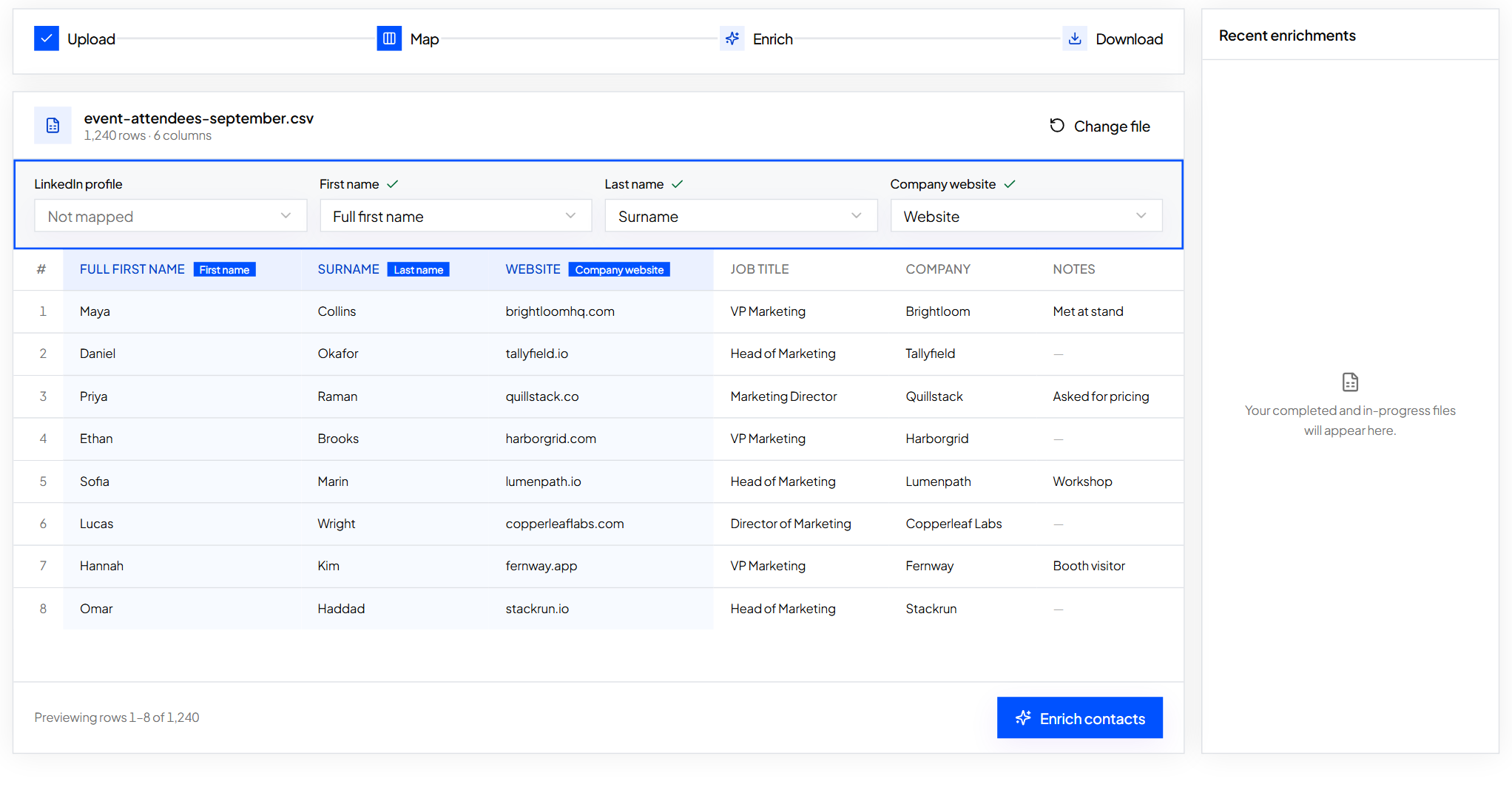
Step 2: Upload the file to Enrich Contacts and map the column
ContactYard suggests which column holds which detail. Confirm the LinkedIn URL column and check the preview rows.
Step 3: Download the file with emails and mobiles
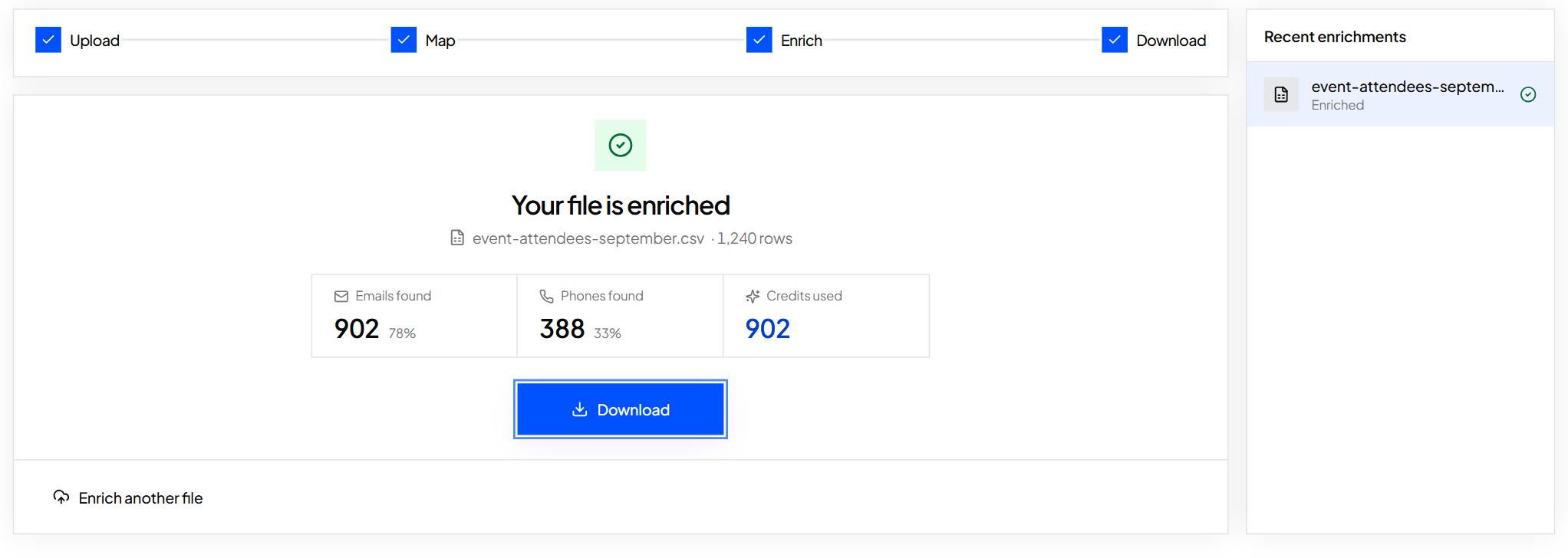
You see how many emails and phones were found and how many credits were used. One credit covers the verified work email, the mobile when available and the email verification. Other tools charge 4 to 12 credits for the same contact. Every work email is verified before you get it, so your first email doesn't bounce.
Step-by-step help for single profiles is in how to find someone's email on LinkedIn, and fill missing emails and phones in a spreadsheet explains every result column.
Worked example: Quillstack's three-channel week (fictional)
- List
- 250 operations leaders saved from LinkedIn profiles
- Enrich Contacts
- 250 LinkedIn URLs uploaded, verified work emails and mobiles returned, up to 250 credits
- Plan cost
- Fits easily inside the Growth plan: 10,000 contacts for $49/month
- Day 1
- Connection note mentioning one true detail from the profile
- Day 2
- Cold email to the verified work email
- Day 4
- Call the mobile in their working morning
- Day 5
- LinkedIn message if they accepted, otherwise email follow-up 1
- Day 10
- Email follow-up 2 with something useful, then the breakup email a week later
Starting from scratch rather than a list of profiles? Search ContactYard's 100M+ verified B2B prospects by job title, headcount, industry and location, and export a CSV that already includes LinkedIn URLs, work emails and mobiles. How to find decision makers in a company shows the filters.
Tip: Use AI to draft a first line for each person from their title and company, then check it yourself before it goes out. Personalize cold emails with AI shows the prompt, and it works for LinkedIn notes too.
What to do next
Write your connection note today, and get every prospect's email and mobile so LinkedIn isn't your only way in. Start free on ContactYard and upload your first list of LinkedIn URLs.
FAQ
- What is a cold LinkedIn message?
- A cold LinkedIn message is a first message to someone you've never spoken to, sent as a connection request note, a message after they accept, or an InMail. It should give one specific reason you're reaching out and end with an easy question.
- How do I write a cold message on LinkedIn?
- Use their first name, give one real reason you're writing, such as a post or company news, say who you are in a few words, and ask one easy question. Keep connection notes under 200 characters and leave the pitch for later.
- How long can a LinkedIn connection note be?
- LinkedIn caps notes at 300 characters, and free accounts can get a shorter allowance and only a few personalized notes. Aim for two short sentences, under 200 characters.
- What should a LinkedIn outreach message say?
- A thank you or a true personal line, one observation about their work or problem, and a question that takes seconds to answer. Offer something useful before you ask for a call.
- Should I send a connection request or an InMail?
- Start with a connection request for most people because it costs nothing. Use InMail credits for senior buyers who don't accept requests. For everyone, also get their verified work email and mobile from their LinkedIn URL with ContactYard, so you aren't limited by invitation caps or InMail credits.
- Is it OK to cold message people on LinkedIn?
- Yes, when the message is relevant to their job, honest about who you are, and you stop when they're not interested. Write each message yourself and don't use automation tools that break LinkedIn's User Agreement.
Keep reading
How to find someone's email on LinkedIn
LinkedIn only shows an email to the people a member chooses. Here is where to look, the manual methods that work, and the fastest way to get a verified work email from a profile URL.
How to get phone numbers for cold calling
Where cold callers get direct dials and mobile numbers, how to build a call list for B2B and real estate, the columns to track, and the calling rules to follow.
How to fill in missing emails and phone numbers in a spreadsheet
Upload a contact file, map your columns, check the preview and get emails and phones added next to your original rows.