
Total addressable market (TAM): what it is and how to calculate it
What TAM, SAM and SOM mean, the two ways to calculate total addressable market, and a step-by-step bottom-up calculation you can finish in an afternoon.
Total addressable market (TAM) is the total yearly revenue you would earn if every company that could buy your product bought it from you. The simplest way to calculate it is bottom-up: count the companies that match your customer profile and multiply by what one customer pays you a year.
This guide explains TAM, SAM and SOM, compares the top-down and bottom-up methods, and walks through a full bottom-up calculation with a fictional company. The fastest way to get the count is ContactYard: set your filters and the total number of matching prospects shows instantly, so your TAM is built on a real count, not a guess. Then the same search becomes your target list.
TAM vs SAM vs SOM
TAM is the outer circle. Two smaller numbers sit inside it, and you need all three to plan anything real.
| Term | What it means | Question it answers | How you get it |
|---|---|---|---|
| TAM: total addressable market | Revenue if every company that could use your product bought it | How big is the whole opportunity? | All matching companies × annual contract value |
| SAM: serviceable addressable market | The part of TAM your product, pricing and channels can serve today | Who can we actually sell to now? | TAM narrowed to the regions, sizes and use cases you support |
| SOM: serviceable obtainable market | The part of SAM you can realistically win in a set period | What can we win in the next 1 to 3 years? | SAM × the share your team can reach and close |
A quick way to remember it: TAM is everyone who could buy, SAM is everyone you can serve, SOM is everyone you can win. Each number should be smaller than the one before it. If your SOM is close to your TAM, one of them is wrong.
Tip: Your SAM is mostly your ideal customer profile turned into numbers. If you haven't written your ICP yet, do that first. It tells you which filters to use in every step below.
The two ways to calculate total addressable market
Top-down: start from an industry report
You take a published figure for the whole industry, then cut it down by the share that fits your product. For example, a report says companies spend a certain amount a year on legal software, and you estimate that contract review is one slice of that.
- Good for: a quick sense of scale, or a slide where you need a familiar outside source.
- Weak because: the report's category rarely matches your product, the method behind it is often hidden, and you can't turn a dollar figure into a list of companies to sell to.
Bottom-up: count the buyers yourself
You count the real companies that match your customer profile, then multiply by your own price. The formula is short.
TAM = number of matching companies × annual contract value (ACV) Per-seat pricing: TAM = number of matching buyers or users × annual price per seat
- Good for: fundraising, sales planning, hiring and pricing decisions. Every number in it can be checked.
- Strong because: the companies you counted are the same companies you will contact. The TAM and the target list come from one search.
| Top-down | Bottom-up | |
|---|---|---|
| Starting point | Industry report | Count of matching companies |
| Uses your price | No, uses industry spend | Yes, your real ACV |
| Can be checked | Rarely | Yes, every input is visible |
| Gives you a list to sell to | No | Yes |
| Best use | Sanity check | The number you plan and pitch with |
Use bottom-up as your main number. If you have a top-down figure, use it only to check that your bottom-up result is in a sensible range.
How to calculate TAM bottom-up, step by step
You need four inputs: who your buyer is, how many companies match, how many buyers each company has, and what one customer pays you a year. Here's how to get each one.
Step 1: Write down who buys from you
Look at your best current customers, or the ones you most want. Note what they have in common: industry, size, location, revenue and the job title of the person who signs. If you have customers already, find what your best customers have in common before you guess. These traits are firmographic data, and what is firmographic data explains each one.
Step 2: Turn the profile into search filters
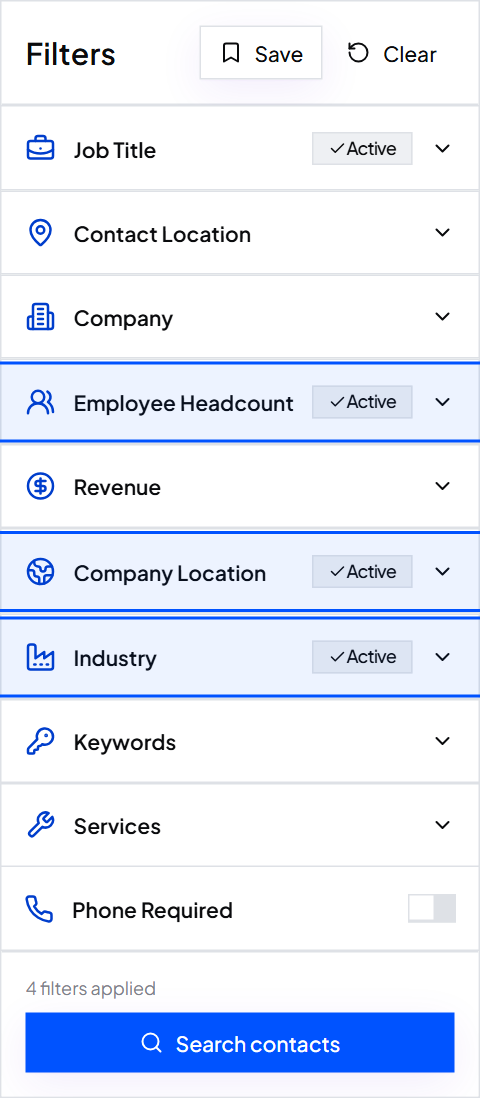
Open a ContactYard search and add the filters one at a time. Watch the total count change as you go. That count is your market, shown live.
- Industry. Pick the industry and sub-industry your buyers sit in. Add more than one if your product fits several.
- Employee Headcount. Pick the bands that match the companies you serve: 1 to 10, 11 to 20, 21 to 100, 101 to 250, 251 to 500, 501 to 1000, 1001 to 5000, 5001 to 10000 or 10000+. Pick each band separately so you can price them separately later.
- Location. Add the countries, states or cities you can sell into. Leave out places you can't serve, such as countries where you can't bill or support customers.
- Revenue. Add it when your price depends on budget more than headcount.
- Job Title. Add the title of the person who buys. Smart mode catches common variants, Exact mode matches only the title you type, and Exclude removes titles you don't want.
Tip: Use Keywords or Services to narrow an industry to the companies that do the specific work your product helps with. This is often the difference between TAM and SAM.
Step 3: Read the count and turn people into companies
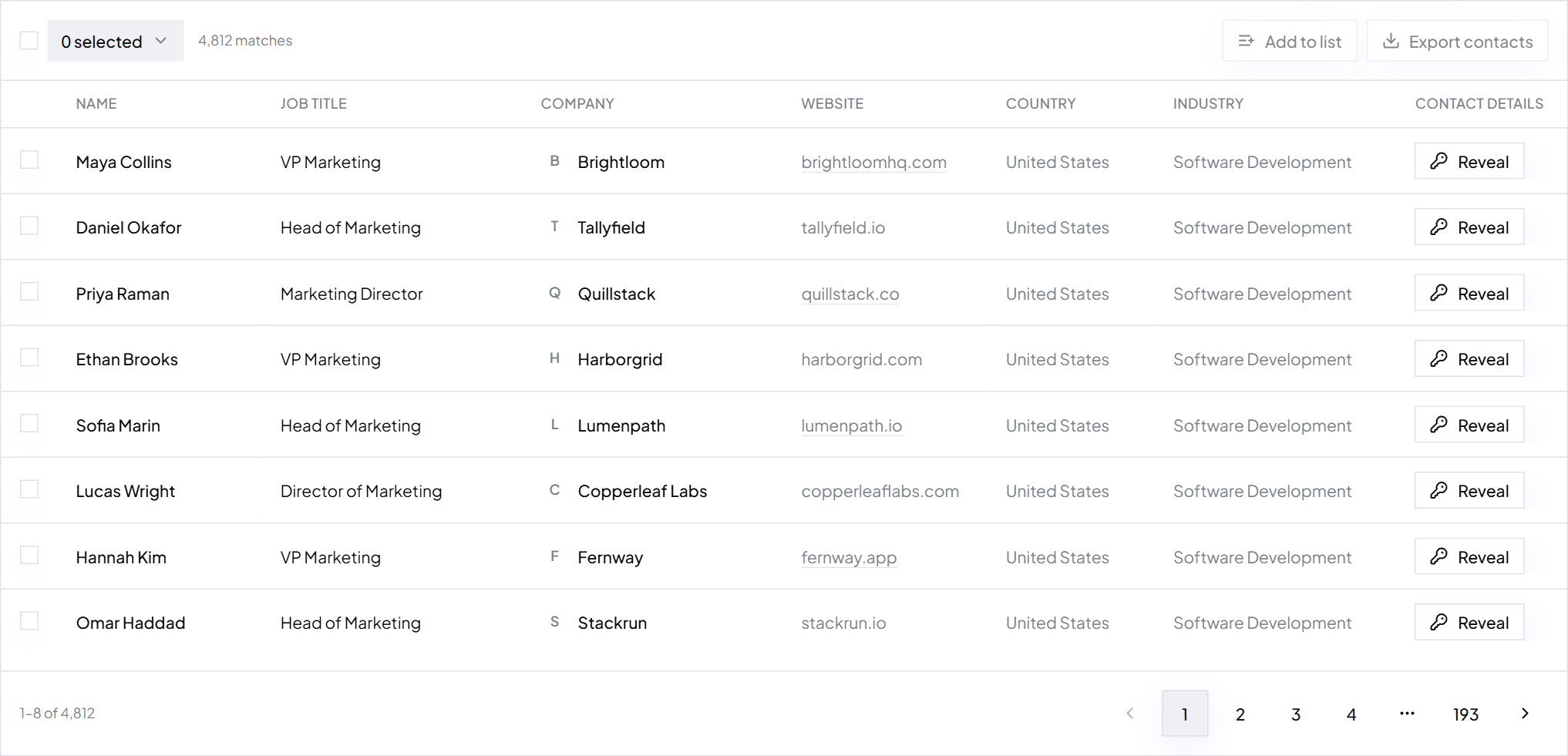
The total in ContactYard counts matching people. For per-seat pricing, that is already your buyer count. For per-company pricing, you need the number of companies. There are two easy ways to get it.
- Use a title that exists once per company. Search only CEO, Founder or Owner, and the count is close to the number of matching companies.
- Count unique companies in an export. Export the list, then remove duplicates on the Website column. The rows left are your exact company count.
Step 4: Work out contacts per company
Divide the people count for your buyer titles by the company count. If 3,000 companies have 5,400 matching buyers, that's 1.8 contacts per company. You need this number later to size your list, your data budget and how long the market lasts for outreach.
Step 5: Set the annual contract value for each band
Use what customers in each band actually pay you per year. Small companies usually buy a smaller plan than large ones, so one average across all sizes will skew the result. If you have no customers yet, use your planned price for each band and say so.
Step 6: Multiply, then add the bands
Multiply each band's company count by its ACV, then add the bands together. That's your TAM. Then narrow it with the filters for what you can serve today to get SAM, and apply a realistic win rate to get SOM.
TAM WORKSHEET Buyer profile Industry: Employee Headcount bands: Location: Revenue (optional): Buyer job titles: Per band Companies x ACV = Revenue Band 1: ________ x $______ = $________ Band 2: ________ x $______ = $________ Band 3: ________ x $______ = $________ TAM (sum of bands) $________ SAM: filters for what you serve today Companies left: ________ SAM: $________ SOM: what you can win in ___ years Companies x win rate: ______ x ____% = ______ customers SOM: $________ Contacts per company: buyers ______ / companies ______ = ____ Contacts to reach SAM: companies ______ x ____ = ______
Worked example: TAM for a contract review tool
Quillstack is a fictional company that sells contract review software to US law firms. All numbers below are illustrative, made up to show the method. Your own search will give you your real ones.
Quillstack TAM (illustrative numbers)
- Filters
- Industry Government and Legal > Law Practice, United States, Employee Headcount 21 to 100 and 101 to 250
- Companies, 21 to 100
- 5,000 firms × $4,800 a year = $24,000,000
- Companies, 101 to 250
- 1,200 firms × $9,600 a year = $11,520,000
- TAM
- $35,520,000 a year
Quillstack's product only handles commercial contracts, so a firm that does only family or criminal law won't buy it. Adding the Keywords filter for commercial contracts narrows the count. That smaller number is the SAM.
Quillstack SAM and SOM (illustrative numbers)
- SAM filter
- Keywords: commercial contracts
- Companies, 21 to 100
- 2,000 firms × $4,800 = $9,600,000
- Companies, 101 to 250
- 600 firms × $9,600 = $5,760,000
- SAM
- $15,360,000 a year
- SOM assumption
- Win 3% of SAM firms in two years: 60 small and 18 mid-size firms
- SOM
- 60 × $4,800 + 18 × $9,600 = $460,800 a year
Quillstack sells to the managing partner or the head of operations. The search shows about 1.8 of those people per firm, so the SAM is roughly 2,600 × 1.8 = 4,680 contacts. On the ContactYard Scale plan, at about $3.30 per 1,000 contacts, the verified list for the whole SAM costs around $15. Each contact comes with a verified work email and the mobile when available.
Tip: The SOM win rate is the number people argue about most. Base it on your own past results if you have them. If you don't, run a small test first, as in test a market with 500 emails, and use the real reply and close rate.
Common mistakes when calculating TAM
- Counting everyone who could possibly use it. "Every business in the US" is not a TAM. Count only companies that match your real buyer profile.
- Using one ACV for every size. A 15-person firm and a 900-person firm don't pay the same. Price each headcount band on its own.
- Mixing monthly and yearly numbers. TAM is a yearly figure. Multiply a monthly price by 12 before you use it.
- Presenting TAM as the plan. TAM is the ceiling. Investors and managers want to see SAM and SOM too, and how you got from one to the next.
- Copying a top-down figure without checking it. If a report's number is 20 times your bottom-up count, the report is measuring a different market.
- Ignoring whether you can reach the buyers. A market only counts if you can contact the people in it. Check whether your market is big enough for cold outreach.
- Never updating it. Companies open, close and grow. Re-run the count every quarter, or whenever you change your price or add a segment.
How TAM turns into a target list
This is where the bottom-up method pays off. The search that gave you the count is already your list. In ContactYard you go straight from the number to the people.
- Save the search. Save your SAM filters so you can re-run them later. New matches show up as companies grow into your bands and people change jobs.
- Split it into segments. Export each headcount band or region on its own, so each gets its own message. See how to split a big list into segments.
- Turn on Email required. This keeps only people with a verified work email, so every row you pay for is sendable. Add Phone required if you also call.
- Export the CSV. You get first name, last name, job title, email, personal phone, company, website, LinkedIn URL, country, industry and employee count, ready for Instantly, Smartlead, lemlist or your CRM.
One credit gets the full contact: verified work email, mobile when available, and the verification. Other tools charge 4 to 12 credits for the same person. ContactYard costs about $3.30 per 1,000 contacts on Scale, against $18 at Apollo, $75 at Lusha, $131 at ContactOut and $371 at UpLead. The data is refreshed every 30 days, so the market you counted is the market you reach. For the full list-building process, read how to build a prospect list.
Agencies can use the same method before signing a client. Check a client's market size shows how to turn the count into how many months of outreach a market supports. To get your own count now, start free.
FAQ
- What is total addressable market?
- Total addressable market (TAM) is the total yearly revenue you would earn if every company that could buy your product bought it from you. It is the upper limit of your opportunity. SAM is the part you can serve today, and SOM is the part you can realistically win.
- How do you calculate total addressable market?
- Use the bottom-up method: count the companies that match your customer profile and multiply by your annual contract value. Split the count by company size so each band gets its own price, then add the bands. ContactYard shows the matching count instantly as you set Industry, Employee Headcount, Location and Revenue filters.
- What is the TAM formula?
- TAM = number of matching companies × annual contract value. If you price per seat, use TAM = number of matching buyers or users × annual price per seat.
- How do I find the total addressable market for a startup with no customers?
- Write down who you expect to buy, turn that into filters, and count the matching companies in ContactYard. Use your planned price for each company size as the ACV, and say clearly that it is planned pricing. Then run a small outreach test to check the profile before you rely on the number.
- What is the difference between TAM, SAM and SOM?
- TAM is everyone who could buy your product. SAM is the part of TAM your product, pricing and channels can serve today. SOM is the part of SAM you can realistically win in a set period, usually 1 to 3 years.
- Is top-down or bottom-up TAM better?
- Bottom-up. It uses your own price and a real count of companies, every input can be checked, and the same search gives you the list to sell to. Use a top-down figure from an industry report only as a sanity check.
Keep reading
Ideal customer profile: definition, examples and template
What an ICP is, why it matters, seven examples, a fill-in template and an A, B, C scoring sheet, plus how to turn it into a list of real contacts.
What is firmographic data? Meaning, attributes and examples
Firmographic data describes a company the way demographic data describes a person. See the attributes, three full company profiles and how to turn them into a list.
Is your market big enough for cold outreach?
Do the napkin math: how many emails one customer takes, what that costs, and whether your market has enough people.