
Lead generation for IT services: how MSPs and IT firms win new clients
Who buys IT services, the channels that work for MSPs and IT consultancies, the exact filters to build a target list, two cold emails to copy and a worked first-quarter plan.
Lead generation for IT services means finding the businesses that need outside IT help, identifying the person who signs the contract, and getting in front of them before their current setup lets them down. For most MSPs, IT support companies and IT consultancies, that person is the owner or operations lead at a company with 10 to 100 staff and no in-house IT team, or the IT manager at a larger firm that needs extra hands.
The method that works best is a verified list of those buyers in your service area, worked by email and phone every month, backed by referral partners who meet the same buyers. This guide covers who buys, which industries to target first, every channel compared, the exact ContactYard filters to build your list, two cold emails written for IT buyers, and a worked plan with real costs.
Why IT services leads are different
Buying managed IT is a trust decision. The client hands you their passwords, their data and their ability to work. Contracts often run for a year or more, and switching providers is painful, so most companies only move when something pushes them.
- Something broke. A server died, email was down for a day, or a ransomware scare hit a business down the road.
- The current provider stopped answering. Slow tickets are one of the most common reasons a business starts looking.
- The company grew. New hires, a second office or a move outgrow the “friend who knows computers” setup.
- Someone asked a hard question. A cyber insurance renewal, a client security questionnaire or an audit asks about MFA, backups and device protection, and nobody inside can answer.
You can't predict which week that happens. So IT lead generation is a consistency game: stay in front of a defined list of the right companies, month after month, so you are the name they remember when the push comes. That favours channels you control, like outbound to a verified list, over channels you wait on.
Who buys IT services
The buyer changes with company size. Get this wrong and you pitch an IT manager who doesn't exist, or bore a CFO with patch schedules.
| Company size | Who signs | What they care about | Job titles to search |
|---|---|---|---|
| 1 to 20 staff | The owner | Things working, one number to call, one predictable bill | Owner, Founder, CEO, President, Managing Partner |
| 21 to 100 staff | Operations or finance lead, with the owner | Downtime, fast setup for new hires, insurance and client security questions | Operations Manager, Office Manager, COO, CFO, Controller, Practice Manager |
| 101 to 500 staff | The IT lead, with finance | Extra hands for projects, after-hours cover, security tools they can't run alone | IT Manager, IT Director, Head of IT, CIO, CTO |
In the middle band, the office manager is often the person who rings the current provider when the printer stops. They feel the pain every day, even when the CFO signs. Contact both. How to find decision makers in a company covers deals with more than one decision maker.
Industries that buy IT services most readily
Compliance-heavy industries with sensitive data and no technical staff are the best targets. They have to get IT right, and they know they can't do it themselves.
| Industry | ContactYard Industry filter | Why they buy | Your angle |
|---|---|---|---|
| Medical practices and clinics | Healthcare > Medical Practices | Patient records, HIPAA in the US, practice software that must not go down | Uptime for the practice system and protecting patient data |
| Dental practices | Healthcare > Dentists | Imaging, scheduling and patient data in small offices | A fast fix when appointments stop because the system did |
| Law firms | Government and Legal > Law Practice | Client confidentiality, document systems, remote access | Secure remote work and answers for client security questionnaires |
| Accounting firms | Business Services > Accounting | Client financial data and a hard tax-season deadline | No downtime from January to April |
| Wealth and investment firms | Financial Services > Investment Management | Regulators and clients expect strong security | Documented controls they can show an auditor |
| Construction and trades | Construction > Specialty Trade Contractors | Several sites, field staff on phones and tablets | Keeping crews connected without an office IT person |
Tip: Search for IT Manager at a target company and find no one? Good. It usually means there's no in-house IT team, so the owner or office manager is your buyer.
Signals that a company needs IT help now
- Headcount growth. A company moving from 11 to 20 staff into the 21 to 100 band is outgrowing ad hoc IT. Save a search and rerun it monthly to catch the movers.
- A new office or a move. Cabling, network, phones and security all need sorting at once.
- A new finance or operations leader. New people review vendors in their first months.
- Job posts for IT roles. A company hiring its first IT person may want co-managed support instead, or cover until the hire starts.
- Compliance and insurance pressure. Cyber insurance renewals and audit season for regulated firms.
Collect the websites of companies showing these signals as you spot them, paste up to 1,000 into ContactYard's Company Domain filter, add the job titles above, and you have the right person at each one. Find companies with the problem you solve has more ways to spot them.
IT services lead generation channels, compared
| Channel | Speed | Cost | Best for |
|---|---|---|---|
| Cold email to a verified list | First replies in days | Low: ContactYard Growth is $49 a month for 10,000 contacts | Filling the pipeline on your schedule |
| Cold calling the same list | Same day | Your time, with mobiles from the same export | Owners and office managers who still answer the phone |
| Referral partners | Weeks to months | Free, or a referral fee | Warm introductions to companies in your area |
| Client referrals | Unpredictable | Free | Your most trusted, best-fit leads |
| Vendor and distributor partner programs | Months | Certifications and time | Credibility, co-marketing and the occasional passed lead |
| Local SEO and Google Business Profile | Months | Writing time | Owners searching “IT support near me” the day something breaks |
| Webinars and lunch-and-learns | Weeks | Low | Security awareness talks for local business groups |
| Google Ads | Days | High | Urgent searches, if you can afford the clicks |
Paid search is the expensive end. Advertisers bid around $35 a click on the phrase “lead generation for IT services” alone, and local “IT support” terms are crowded with other MSPs. That one click costs about the same as 7,000 complete contacts on ContactYard's Growth plan. Outbound to your own list is where the maths works.
Referral partners that meet your buyers first
The best partners sell something else to the same small businesses, at the moment IT comes up.
- Accountants and CPAs. They see which clients are growing, hear the complaints, and get asked who to use for IT.
- Office fit-out, furniture and moving companies. A move is exactly when a company needs network, cabling and phones.
- Commercial real estate brokers. They know who is signing a new lease months before move-in.
- Copier, phone system and alarm dealers. Already in the office, and often asked about “the computers”.
- Cyber insurance brokers. Their clients must meet security requirements to get cover.
Find partners the same way you find clients. In ContactYard, set Industry to Business Services > Accounting, add Partner, Managing Partner and Owner as job titles, set Company Location to your city and Employee Headcount to 1 to 10 and 11 to 20. Offer a two-way deal: you send them clients who need an accountant, they send you clients who need IT.
How to build an IT services lead list, step by step
This is the core of outbound lead generation for an MSP: one saved search per segment, refreshed every month. The example follows Brightpath IT, a fictional MSP in Denver.
Step 1: Draw your service area
If you do onsite work, your market is a driving radius, not a country. Brightpath sets Company Location to Denver, Aurora, Lakewood, Littleton and Boulder. Remote-only IT consultancies, cybersecurity firms and cloud specialists can go statewide or national.
Step 2: Pick two or three industries
Choose from the table above, not all of it. Brightpath picks Healthcare > Medical Practices, Healthcare > Dentists and Government and Legal > Law Practice. One segment per industry keeps every email specific.
Step 3: Set the company size
Under Employee Headcount, Brightpath picks 11 to 20 and 21 to 100: big enough to need managed IT, small enough to have no IT department. A second search for co-managed IT uses 101 to 250. Add Revenue if you only want companies above a set budget.
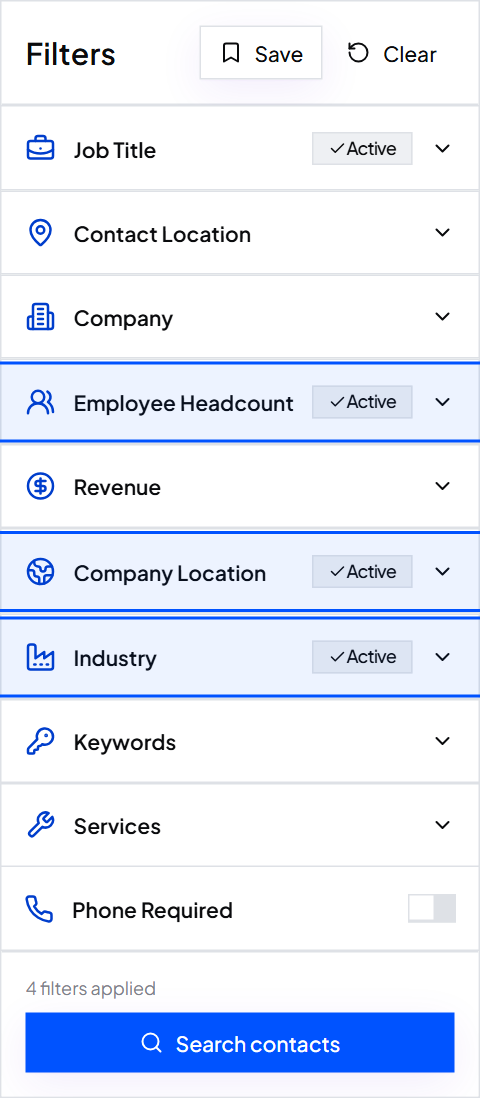
Step 4: Add the job titles for that size
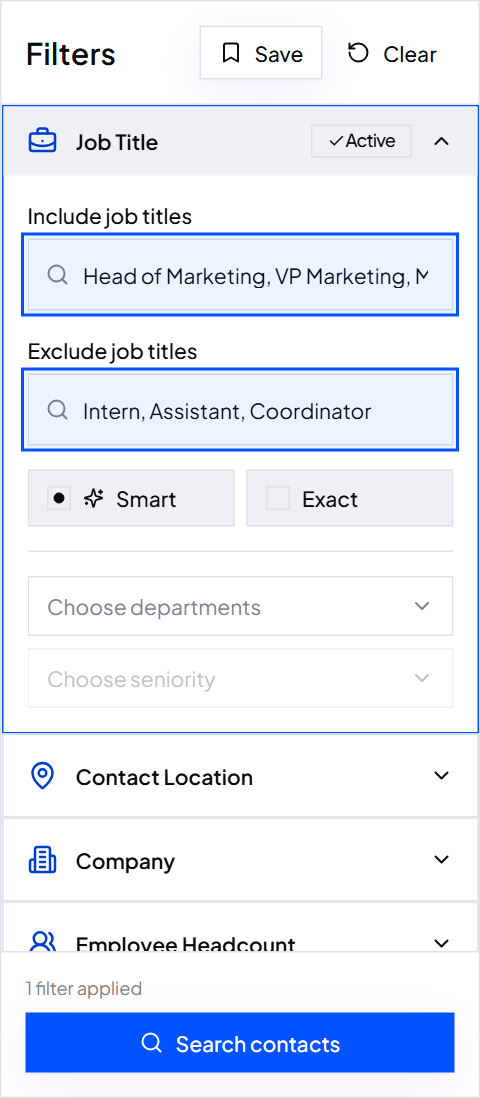
For the 11 to 100 search: Owner, Founder, President, Managing Partner, Practice Manager, Office Manager and Operations Manager. For the co-managed search: IT Manager, IT Director and Head of IT. Leave matching on Smart so common variants are found too.
Then use Exclude job titles. Owner on its own also matches titles like Product Owner, so exclude Product Owner, plus Assistant and Intern.
Step 5: Remove other IT companies
Competitors don't belong on your list. In Keywords, use the exclude box for “managed services”, “IT support” and “MSP”, and exclude IT Services under Services. Now every row is a possible client, not another provider.
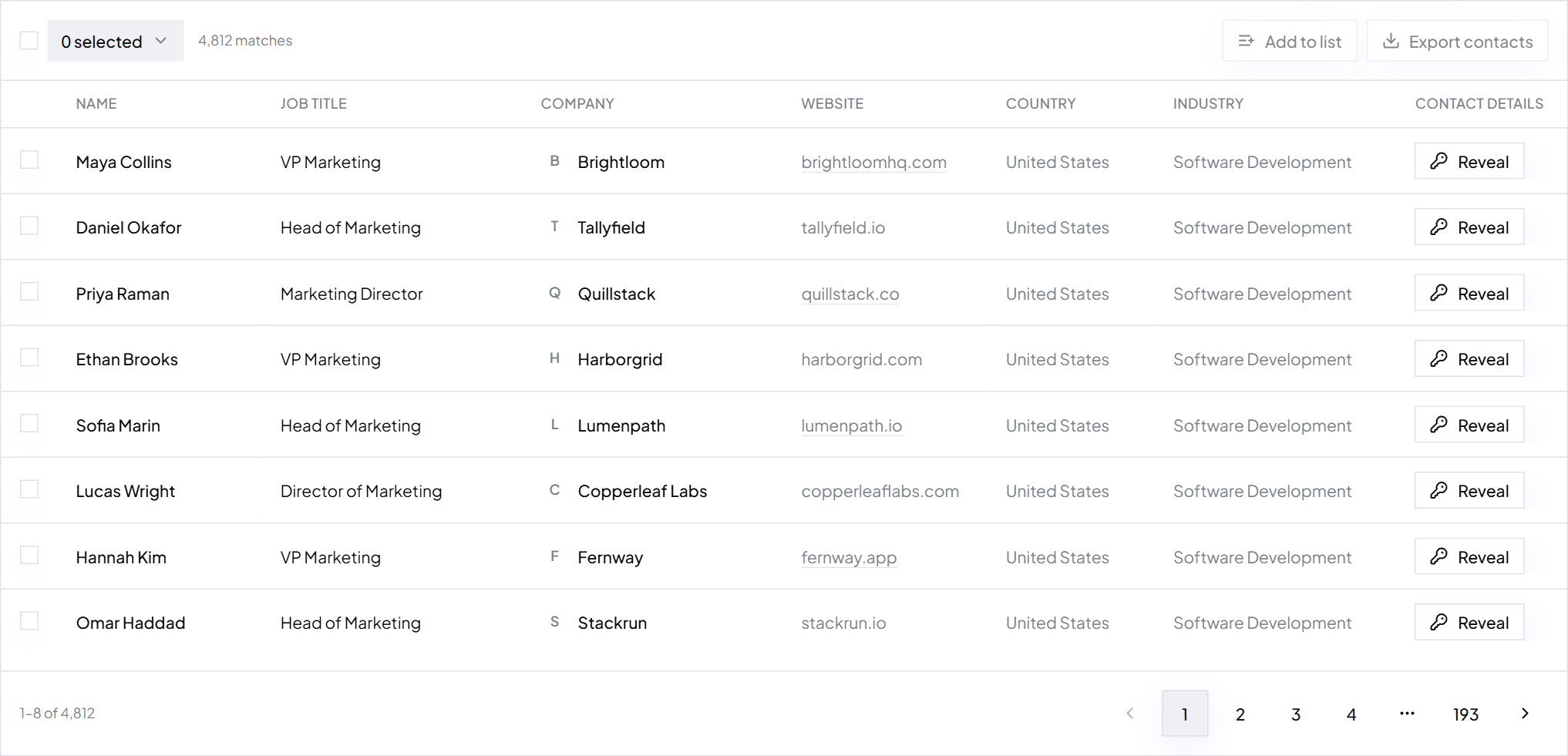
Step 6: Search, check and save
Results show at once with the total count. Open 10 to 20 rows: right kind of practice, right person, right town? Then click Save and name it by segment, like “Denver dental 11 to 100, owners”. ContactYard refreshes its data every 30 days, so rerunning the saved search next month picks up new matches.
Step 7: Export, with phones for calling
Turn on Email required, and Phone required for the call list. Export the CSV: name, title, company, website, verified work email, mobile when available, LinkedIn URL, location, industry and headcount. One credit covers the complete contact, so the call list costs nothing extra. How to build a prospect list covers each filter in more depth.
Cold email templates for IT services
Write about their workday, not your stack. Owners don't buy “RMM, EDR and a SOC”. They buy “the system stays up and someone answers in 15 minutes”. Keep it under 120 words with one question at the end.
Subject: who fixes IT at {company}? Hi {first_name}, Quick question: when the practice system or Wi-Fi goes down at {company}, who do you call, and how long until they pick up? We look after IT for {number} practices around {city}. Most came to us after a slow fix cost them a day of appointments. We answer in {response_time}, for one fixed monthly price. Would a free 20-minute check of your backups and security be useful? You'd get a one-page list of what's fine and what isn't, whether you work with us or not. {Your name} {Your company}, {city} {Postal address} Not relevant? Reply "no" and I won't email again.
Subject: cyber insurance questions at {company} Hi {first_name}, Cyber insurance renewals and client security questionnaires now ask about MFA, backups and device protection in detail. At firms the size of {company}, those questions often land on finance, with no IT team to answer them. We handle that for {number} {industry} firms in {city}: we put the controls in place, document them, and fill in the questionnaires with you. One fixed monthly fee, no surprise project bills. Worth a short call before your next renewal? {Your name} {Your company}, {city} {Postal address} Not relevant? Reply "no" and I won't email again.
Tip: Send a follow-up three or four days later in the same thread, then one more a week after. How to follow up on an email has the wording. The free security check works because it gives something useful before asking for a call.
Add a phone call to every email
Small-business owners and office managers still pick up. Call two days after the first email: “I sent you a note about who fixes IT at the practice. Did it reach you?” ContactYard includes the mobile number when available in the same credit as the verified email, so you work both channels from one export. How to get phone numbers for cold calling covers the calling side.
Worked example: Brightpath IT's first quarter
Brightpath IT, fictional MSP in Denver
- Team
- 8 people, onsite and remote support
- Service area
- Denver, Aurora, Lakewood, Littleton and Boulder
- Client segments
- Medical practices, dental practices and law firms with 11 to 100 staff; co-managed IT for 101 to 250
- Titles
- Owner, Managing Partner, Practice Manager, Office Manager; IT Manager and IT Director for co-managed
- Partner segment
- Partners and owners at accounting firms with 1 to 20 staff in the same cities
- Contacts per month
- 600 possible clients and 100 partners
- Outreach
- 2 sending inboxes, a 3-email sequence, and a call to everyone with a mobile two days after email 1
- Data cost
- ContactYard Growth: $49 a month for 10,000 contacts. 700 used a month, unused credits roll over for 2 months
- Rate
- $4.90 per 1,000 complete contacts at the Growth plan rate, mobile included
- Same 700 contacts elsewhere
- 2,800 to 8,400 credits a month at 4 to 12 credits per contact
A single small managed IT contract is worth more than a full year of that data cost. Brightpath needs a few new clients a quarter for the whole programme to pay back many times over.
Common mistakes
- Pitching technology instead of outcomes. Owners buy uptime, fast answers and one bill.
- Targeting IT managers at companies that don't have one. Under about 50 staff, sell to the owner or office manager.
- Going national when you sell onsite support. Keep the list inside your driving radius.
- Emailing other MSPs. Exclude IT services companies before you export.
- One email, then silence. Companies switch when something breaks. Stay in touch every month or two so you're the name they remember.
- Leading with price. To a buyer who just got burned, the cheapest MSP is a warning sign. Lead with response time and a plan.
- Buying a recycled lead list. Old lists bounce and hurt your sending domain. Why your bounce rate is high explains the damage.
FAQ
- What is lead generation for IT services?
- It is finding businesses that need outside IT help, the person who signs for it, and a way to reach them. For MSPs and IT firms that usually means owners and operations leads at companies with 10 to 100 staff, and IT managers at larger firms that want co-managed support.
- How do MSPs get new clients?
- Through a mix of referrals, referral partners such as accountants, local search, and outbound. Outbound is the part you control: build a list of owners, office managers and IT managers in your service area in ContactYard, then email and call them every month.
- Who should an MSP target?
- Companies with 11 to 100 staff and no in-house IT team, in industries with sensitive data such as medical and dental practices, law firms, accounting firms and financial advisers. At that size, contact the owner, office manager or operations manager.
- Does cold email work for IT services lead generation?
- Yes, when the list is local, verified and specific to one industry, and the offer is useful, like a free backup and security check. Follow up two or three times and add a phone call. Read is cold email legal for the rules in your market.
- Should I pay an IT lead generation company?
- Appointment-setting agencies charge a monthly retainer or a fee per meeting, and still build their lists from a contact database. Building your own list in ContactYard costs $49 a month for 10,000 contacts, and the list, the replies and the relationships stay with you.
- How much does IT services lead generation cost?
- The data is the cheap part: ContactYard Growth is $49 a month for 10,000 complete contacts with mobiles. Add a sending tool and a few inboxes. What cold outreach costs in month one has the full budget.
What to do next
Start free, build one saved search for your best segment, and export your first 200 contacts this week. For the wider playbook, read how to get B2B leads and what sales leads are.
Keep reading
How to get B2B leads: 9 ways, ranked by speed and cost
What B2B lead generation is, nine ways to get B2B leads with the fastest and cheapest marked, a step-by-step outbound process, the tools you need, and what month one costs.
How to find decision makers in a company
Who makes the buying decision at a company of each size and in each department, how to spot them, and how to find them at up to 1,000 companies in one ContactYard search.
How to get phone numbers for cold calling
Where cold callers get direct dials and mobile numbers, how to build a call list for B2B and real estate, the columns to track, and the calling rules to follow.